
This community tutorial documents a way to run AzuraCast on ZimaOS by importing a modified Docker Compose configuration as a customized app. The original December 2025 post was tested on a ZimaBoard with ZimaOS 1.5.3 Plus and focused on private or home use over the local network or Tailscale.
Important: the author later updated the thread on January 5, 2026 and said that further testing showed this installation method was sometimes unstable or did not work, and that AzuraCast's automatic web updating also had problems with the setup. That later correction is more important than the original claim that the configuration worked perfectly.
What the Original ZimaOS Setup Used
The source environment was a ZimaBoard with an Intel Celeron N3450, 8 GB of memory, Intel HD Graphics 500, and ZimaOS 1.5.3 Plus. The author imported a customized AzuraCast Compose definition through the ZimaOS custom-app interface.
The workflow was:
- Open the ZimaOS dashboard and choose Install a customized app.
- Use Import and submit the Docker Compose definition.
- Review the generated web and updater settings before installation.
- Adjust host-side ports and ZimaOS-side volume paths without changing the corresponding AzuraCast container paths.
- Install the app and open AzuraCast using the server address and configured Web UI port.
Current ZimaOS documentation continues to support importing Docker Compose YAML for customized apps. See the current ZimaOS feature documentation.
Map Host Ports Without Changing the Container Ports
In the source configuration, the author highlighted the host mappings corresponding to AzuraCast container ports 80, 443, and 8000. The recommendation was to change the host-side values to ports that fit the local ZimaOS installation while leaving the container-side values unchanged.
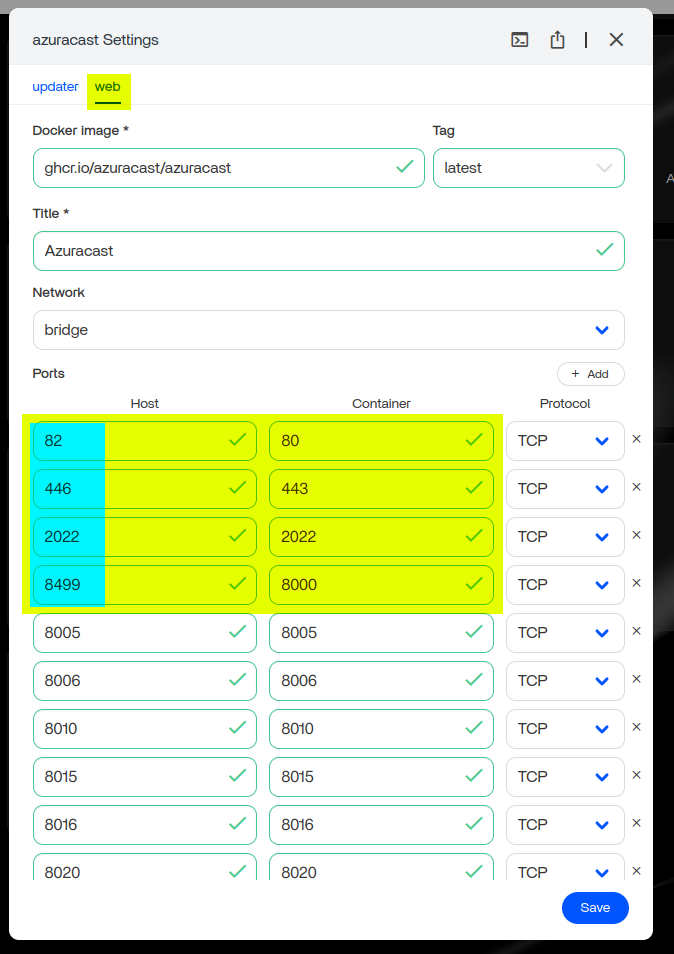
The updater tab also contained the Web UI address. The guide says that this Web UI port should match the host-side port mapped to container port 80.

Keep the AzuraCast Container Paths Stable
The author also remapped persistent storage on the ZimaOS side while leaving the AzuraCast-side paths unchanged. The posted stack included storage for stations, backups, MySQL data, uploads, optional components, and a separate music directory.

The guide advised against changing environment variables unless the administrator understood their purpose. That is especially important because application credentials and database settings can be included in Compose environment data.
Do Not Treat the Posted Compose File as a Reusable Secret Template
The original forum YAML contains database-related environment values. A community page should not turn those posted values into a reusable credential template. If you rebuild this stack, use credentials appropriate to your own installation and follow current AzuraCast configuration guidance.
For current upstream installation and configuration information, use the official AzuraCast Docker installation guide.
The Author Later Reported Stability and Update Problems
Nine days after publishing the guide, the same author posted an important correction: additional experiments showed that this method was sometimes not working and could be unstable. The author also reported problems with AzuraCast's automatic web update process under this installation method.
The author said they were experimenting with an SSH-based installation and planned a more detailed follow-up guide, but no replacement procedure was published in this thread. Because of that, this page should be read as a documented community experiment with known limitations, not as a current officially supported AzuraCast-on-ZimaOS installation method.
Compare the Community Method with Current AzuraCast Guidance
Current AzuraCast documentation recommends Docker for most self-hosted installations and maintains its own Docker installation and update workflow. It also warns users to back up before updates because station downtime or data loss is possible when an update fails.
See the official AzuraCast update documentation before relying on the updater behavior from this historical ZimaOS Compose stack.
The Source Guide Was Intended for Private Network Use
The author explicitly framed the tutorial around home or private access on the local network or through Tailscale. Public internet exposure can require additional networking, TLS, firewall, authentication, and broadcasting-security decisions that were outside the scope of the community post.
Do not assume that a working local Web UI is sufficient preparation for a public radio service.
AzuraCast on ZimaOS FAQ
Did the community author confirm that this method is stable?
No. The original post was optimistic, but the January 5, 2026 follow-up explicitly said the method could be unstable or fail in some tests.
Which ZimaOS version was used?
The original guide used ZimaOS 1.5.3 Plus on a ZimaBoard. Treat the screenshots and generated app settings as historical examples rather than exact instructions for every newer release.
Should I change the AzuraCast container-side volume paths?
The source guide says to change the ZimaOS host-side paths as needed while leaving the AzuraCast container-side paths unchanged.
Why must the updater Web UI port match the web service mapping?
In the source configuration, the updater's Web UI entry pointed to the host port mapped to container port 80. Using a different value would send the ZimaOS shortcut to the wrong port.
Does automatic AzuraCast updating work reliably with this community stack?
The author specifically reported problems with automatic web updating after further testing. Use current AzuraCast update documentation and maintain backups rather than assuming the historical updater container is reliable.


