
HAOS Booted but Could Not Expand into the 32GB Virtual Disk
The user created a ZVM with the Home Assistant OS generic x86-64 16.2 image and allocated 32GB from an SSD pool. Networking worked, DHCP assigned an address, and the Home Assistant web interface was reachable, but setup never completed because the guest reported insufficient disk space.
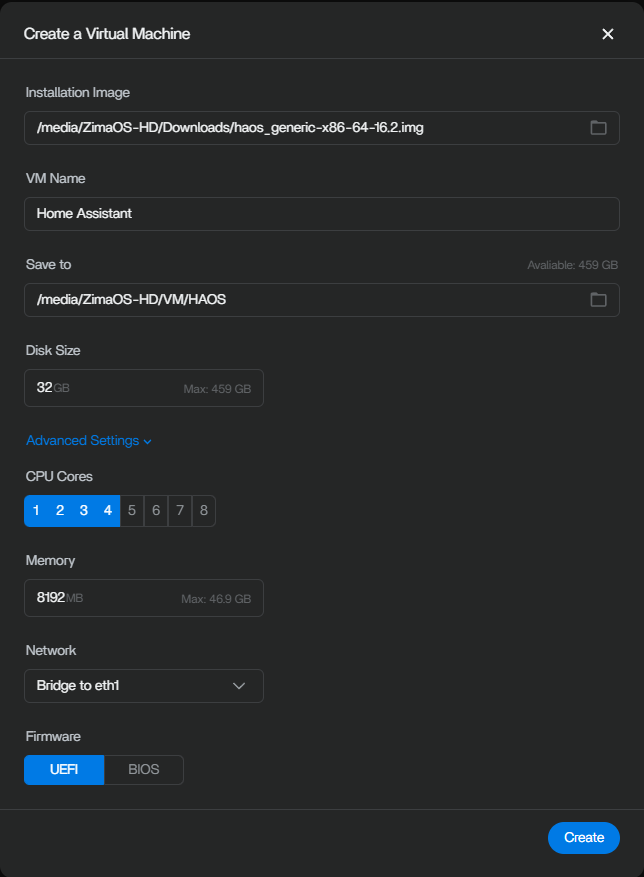
Recreate the VM with More Space and BIOS Firmware
A community reply attributed the behavior to how the virtual disk was presented during HAOS's early partition expansion. The suggested recovery was:
- Create a new VM with a disk of at least 64GB.
- Select BIOS firmware instead of UEFI.
- Recreate the virtual machine after applying both settings.
The original author later confirmed that the explanation and recovery were correct. The thread therefore supports this combination as a successful community result, although it does not isolate whether disk size, firmware mode, or both were required in every environment.
This Was Home Assistant OS, Not Home Assistant Core
The user deliberately chose the full HAOS image so add-ons, updates, and backups would remain inside the VM. Advice for a Home Assistant Core container would not address the same partition-expansion path.
Why the Allocated Capacity Could Still Look Too Small
Virtualization platforms can expose a disk image and its expanded capacity in stages. The thread's diagnosis was that HAOS initially saw the base image layout during its early setup and reported a shortage before it could use the full 32GB allocation.
Recreating the VM was important because changing the displayed capacity after a failed initial expansion may not reproduce the clean first-boot layout used in the successful setup.
Version Boundary
The source used HAOS generic x86-64 16.2 and a ZimaOS ZVM between September 2025 and January 2026. It does not prove that every HAOS or ZVM release requires the same minimum disk.
FAQ
Was the HAOS network configuration broken?
No. The guest obtained a DHCP address and exposed its web interface. The failure occurred during storage setup.
Did increasing the virtual disk solve the reported case?
Yes. The author confirmed the reply recommending a newly created VM with 64GB or more and BIOS firmware.


