
ZimaSpace Black Friday 2026 Buying Guide: Deals, Clusters, and Gifts


For ZimaSpace Black Friday 2026, start with the job you want your server to do. ZimaBoard 2 832 is the $289 entry point for a compact, expandable home server. ZimaBoard 2 1664 gives you more memory at $379. ZimaBoard SE offers a lower-cost start, three-board cluster offers suit multi-node projects, and ZimaCube 2 is the choice to consider when your main project is a personal cloud for files, photos and backups.
The campaign runs November 12–30, 2026, Eastern Time (ET). Product savings come with matching gifts, and the opening November 12–15 window adds a limited cart gift for eligible orders of $399 or more. Use this guide to compare the offers and understand how gifts combine, then visit the ZimaSpace Black Friday and Cyber Monday 2026 deals to choose the configuration and claim the available offer. All prices below are in USD and refer to the eligible campaign configuration.
Which ZimaSpace Black Friday Deal Fits Your Setup?
A good starting point is a project you can describe in one sentence. Perhaps you want one place for family photos, a small host for self-hosted apps, or three separate machines for learning how a cluster behaves. The number of devices, memory and storage connections that project needs should guide the purchase.
| Your next project | Offer to compare | Campaign saving or price | Matching hardware gift |
|---|---|---|---|
| A compact home server with room to expand | ZimaBoard 2 832 | $50 off, $289 | PCIe to 4 Channel USB Adapter |
| More memory for a growing homelab | ZimaBoard 2 1664 | $20 off, $379 | PCIe to 4 Channel USB Adapter |
| A ZimaBoard 2 project kit | Other eligible ZimaBoard 2 kits | $20 off | PCIe to 4 Channel USB Adapter |
| A first server or compact DIY setup | Eligible ZimaBoard SE configurations | $15 off | PCIe to NVMe & NGFF SSD Adapter |
| A multi-node ZimaBoard 2 lab | Three-unit ZimaBoard 2 832 cluster | $279 per unit | One dual-band Wi-Fi 6 USB Adapter per cluster |
| A multi-node SE lab | Three-unit ZimaBoard SE cluster | $20 off under the cluster offer | One ZBA037 5-in-1 USB Multiport Adapter per cluster |
| A personal cloud for files and media | ZimaCube 2 | $50 off | Lekuo USB4 40Gbps M.2 NVMe SSD Enclosure |
For a first build, leave room in your budget for the drives, cables and network connections your project needs. For an upgrade, list what is already working and what is limiting you. A new server makes the most sense when it solves that specific limit.

ZimaBoard 2 832: The $289 Starting Point
The ZimaBoard 2 832 campaign offer brings the price to $289, with $50 off, and includes the matching PCIe to 4 Channel USB Adapter gift. Its compact x86 format suits a home server that you can build around: a few self-hosted services, a media library, a small storage project or a machine for learning Linux and containers.
The 832 configuration has 8 GB of RAM and 32 GB of eMMC. Think of the built-in storage as the starting system drive when planning your setup. Size separate storage for the media, backups or application data you want to keep. A compact enclosure and expansion connections make a flexible base, while the complete workload still needs a realistic memory and storage budget.
The four-channel USB adapter is useful when your project needs more USB connections. Plan how you will use the PCIe expansion connection before installing it, especially if you are considering a different expansion card for the same build. Review the ZimaBoard 2 configurations alongside the Black Friday home-server offers to check the selected model and its gift.
ZimaBoard 2 1664 and Kits: When Is the Upgrade Worth It?
Choose the ZimaBoard 2 1664 at $379, with $20 off, when memory is the part of the system your project needs to grow. Its 16 GB of RAM and 64 GB of eMMC provide more room than the 832 configuration. That extra memory is worth considering for several services running together, a larger application stack or virtual-machine experiments, subject to the resources each workload requires.
The difference between the two stated single-device campaign prices is $90. Use that comparison to ask a concrete question: will the applications you intend to run benefit from the extra memory now, or would the budget help more with the drives and networking around the server?
Other eligible ZimaBoard 2 kits receive $20 off under this promotion and have the same PCIe four-channel USB adapter gift. Select a kit for the parts its project needs. Check the configuration, included accessories and drive requirements before adding a separate item that may already be in the box. The ZimaBoard 2 Mini NAS Kit and ZimaBoard 2 Firewall Kit illustrate how different projects lead to different bundles.
ZimaBoard SE: A Lower-Cost Way to Start
Eligible ZimaBoard SE configurations receive $15 off and a PCIe to NVMe & NGFF SSD Adapter gift. SE is a useful place to start when you want a compact home server with pre-installed RAM and ZimaOS, then build up the storage and services around it.
Choose the RAM configuration and kit contents together. A lighter collection of applications and a larger multi-service setup place different demands on the machine. List the services you want to keep running at the same time, then compare the memory and accessories included in the available SE configurations.

The SSD adapter gift gives you another storage-expansion option. Check the adapter's supported drive interfaces, sizes and installation requirements against the SSD you intend to use. An adapter and an SSD are separate items. The hardware gift should be evaluated as part of the complete build, including the slot it occupies and any mounting or cooling you need.
You can compare the ZimaBoard SE starter and NAS configurations and then return to the eligible SE Black Friday deals to claim the matching offer.
Three-Board Cluster Bundles: What Do You Get?
A cluster is worth considering when you have a reason to run several separate nodes. You might want to learn orchestration, separate experimental services from other applications, or practice maintaining one machine while work continues on another. Each node keeps its own hardware resources, so plan workloads and storage across the machines you buy.
For a three-unit ZimaBoard 2 832 cluster, the campaign price is $279 per unit, or $837 for three before any applicable tax or shipping. The $60 saving is per unit against the $339 comparison price. Compared with buying three units at the $289 single-device campaign price, the cluster total is $30 lower. The cluster gift is one Wi-Fi 6 USB Adapter with 5GHz/2.4GHz dual-band support.
The three-unit ZimaBoard SE cluster has its own $20-off cluster offer and one ZBA037 5-in-1 USB Multiport Adapter gift. That adapter provides Gigabit RJ45, three USB 3.0 ports and USB Type-C connectivity. Review the selected SE cluster configuration for its final total.

The key quantity rule is simple: one cluster receives one cluster gift. A three-board order does not mean three cluster gifts. Product gifts and cluster gifts are alternatives, so choose the applicable cluster offer and its matching gift on the product page. A qualifying cluster order can also claim the separate cart gift during the relevant campaign phase. Check the three-board cluster offers and eligible configurations before placing the order.
ZimaCube 2: Choose It for Your Storage Workflow
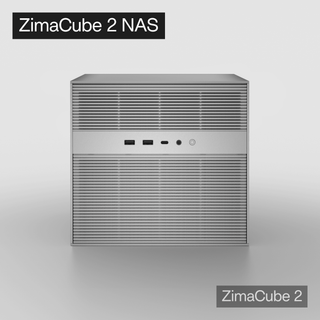
ZimaCube 2 receives $50 off, with a Lekuo USB4 40Gbps M.2 NVMe SSD Enclosure gift. Consider it when the project revolves around a dedicated home for family photos, shared files, media and backups, and you want a system designed around storage expansion.
Begin with the data you need to keep. Estimate the current library, how much it grows each year and how much space your backup history requires. Then decide how many people and applications will access it. That process helps you choose drives and configuration around your workflow.

The gifted enclosure can support an external NVMe storage workflow with a compatible SSD and connection. Check the actual package contents, supported SSDs, cable and host interface. Its advertised 40Gbps interface rating is one part of the path. The SSD, cable, computer connection and workload affect the transfer speed you experience.
Browse the ZimaCube 2 personal-cloud configurations and compare the ZimaCube 2 Black Friday saving and enclosure gift. Keep an independent backup for important files as you plan the storage system. The NAS backup and recovery guide explains how storage layout and recoverable copies work together.
How to Claim the Limited Cart Gift
The opening November 12–15, 2026, ET window adds a separate order-level gift. Eligible orders of $399 or more can claim a ZBA002 PCIe to 2.5G Ethernet Adapter with the Realtek RTL8125 chipset in the cart. This bonus is limited to 50 gifts and is subject to the remaining allocation and the campaign's eligibility rules.
- Open the eligible product and choose the configuration or cluster offer you want.
- Apply or claim the available campaign coupon and select the matching product or cluster gift as prompted.
- Add the chosen items to your cart and open View Cart.
- If the order meets the current threshold and the bonus remains available, redeem the cart gift.
- Confirm that the selected gift appears in the order before completing checkout.
The later cart-gift phase changes to a T-shirt with eligible orders of $299 or more. The threshold and gift therefore depend on the phase in which you order. Check the current cart-gift dates, threshold and availability before checkout. Use the cart's eligibility result to confirm whether your selected items qualify, including the effect of any applied discount.
How to Combine Gifts and Check Your Final Order
There are two levels to the gift offer. First, the eligible hardware purchase receives its matching product gift or cluster gift. Second, a qualifying order can add the cart gift available during that campaign phase. Keep the two levels in mind when checking the order summary.
| Combination | Campaign rule |
|---|---|
| Product gift + eligible cart gift | Can stack. |
| Cluster gift + eligible cart gift | Can stack. |
| Product gift + cluster gift for the same cluster purchase | Cannot stack. |
| Three gifts for one three-board cluster | One cluster gift is provided per cluster. |
For example, a $289 ZimaBoard 2 832 single-device order is below the $399 early cart-gift threshold on its own. A $379 ZimaBoard 2 1664 order is also below it. A three-unit 832 cluster totals $837 at the stated per-unit campaign price and can qualify for the opening cart bonus if the items are eligible and the limited gift is available. The selected cluster gift remains one per cluster.
Before paying, check the device configuration, quantity, coupon, hardware gift and any redeemed cart bonus. Review the payable total and delivery details together. Save the confirmation so you can match the order to the selected offer. When you are ready to choose, explore the full ZimaSpace Black Friday and Cyber Monday campaign and build the order around the project you want to finish.
FAQ
Can I combine a product gift with the cart gift?
Yes. An eligible product gift can stack with the cart gift when the order meets the current phase's threshold and the gift is available. Claim the cart gift in View Cart and confirm it appears before checkout.
Does a three-board cluster include three cluster gifts?
Each cluster includes one cluster gift. The three-unit ZimaBoard 2 offer has one dual-band Wi-Fi 6 USB adapter, and the SE cluster offer has one ZBA037 five-in-one adapter.
Can I receive both the normal product gift and the cluster gift?
Product gifts and cluster gifts are alternatives for the cluster purchase. Choose the matching cluster offer and gift. A qualifying cluster order can additionally redeem the separate cart gift.
Is the ZimaBoard 2 cluster price $279 for the complete bundle?
The stated price is $279 per ZimaBoard 2 832 unit. Three units total $837 before any applicable tax or shipping. The advertised $60-per-unit saving uses the $339 comparison price.
When is the limited 2.5G Ethernet Adapter cart gift available?
The opening window is November 12–15, 2026, Eastern Time, with a $399 eligible-order threshold and a limit of 50 gifts. Check availability and redeem it in the cart before completing payment.
What changes in the later cart-gift phase?
The later offer uses a $299 eligible-order threshold and a T-shirt gift. Check the campaign's current phase and the cart's eligibility message when placing the order.
Do the gifted SSD adapter and enclosure include an SSD?
Check the selected gift's package contents before ordering. Budget separately for the compatible SSD your build needs unless the offer explicitly includes one.
Where can I check the available coupons, configurations and gifts?
Use the official ZimaSpace Black Friday 2026 offers, then check the selected product page and cart for the offer and gifts attached to your order.

Recommended products
Zima Campaign Hub
More to Read

How The Social Dork Builds an OPNsense Home Firewall
Explore The Social Dork’s OPNsense firewall build on ZimaBoard 2, including virtual interfaces, Wi-Fi access points, DHCP, and Pi-hole DNS filtering.

How The Social Dork Builds a Pi-hole Ad Blocker with ZimaBoard 2
Follow The Social Dork’s Pi-hole and Tailscale build on ZimaBoard 2, with local DNS testing, blocklist checks, and private filtering away from home.
I Bought AI to Save Time. Then I Started Working Around Its Limits.
I started planning my evenings around AI credits and Codex resets. Moving a few everyday jobs to local AI gave me a different way...


