


From Rack Servers to a Living-Room ZimaCube 2 Homelab


Thank you to u/Good_Consideration93 for sharing a ZimaCube 2 homelab built around a practical change of setting: moving useful services out of the rack-server compromise and into a machine that can sit beside the television. The owner reports consolidating roughly twenty Docker containers and GitHub Actions runners while retaining room for several hard drives and NVMe devices.
The original Reddit post and follow-up replies explain both the motivation and the installed storage. The creator also identifies participation in the ZimaCube 2 Pioneer Program, which is relevant context for this personal account.
The Old Machines Solved Different Parts of the Problem
The owner had already tried two approaches. Rack servers offered capability but brought heat and noise. An ASUS PN50 paired with direct-attached storage was quieter, yet felt restrictive as a longer-term arrangement. Neither description is presented as a controlled comparison; both explain what this particular owner wanted to change.
The new target was consequently broader than replacing a disk enclosure. The machine needed to carry storage and the services around it in a form the owner was comfortable placing in an ordinary room. That makes physical placement part of the project’s requirements rather than an afterthought.

The creator describes the result as quiet during their usual mix of containers, monitoring, reverse proxies and storage work. No sound-level measurements or standardized workload accompany that observation. Its value is the reported fit with the room and daily routine, rather than a universal acoustic claim.
The Base Model Carries a Mixed Drive Inventory
In a reply, the owner explicitly distinguishes their Base model from the Pro model discussed by another commenter. They also list the drives installed in their own machine. Those details are more useful for understanding this story than treating every available bay as an occupied drive.
| Area | Detail reported by the owner |
|---|---|
| Machine | ZimaCube 2 Base model; Intel Core i3-1215U and 8 GB DDR5 listed in the post |
| Hard drives | Three 6 TB drives and one 2 TB drive |
| NVMe storage | Two 512 GB Samsung NVMe drives |
| Application work | Approximately twenty Docker containers |
| Deployment work | GitHub Actions runners |
| Power support | CyberPower UPS also serving modem, switch and router |
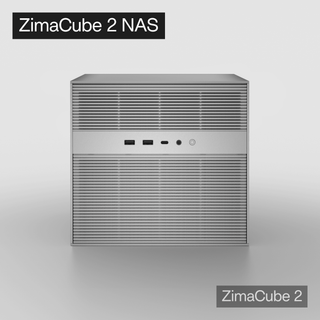
The product reference for this build is the ZimaCube 2 personal cloud NAS. The table preserves the owner’s stated configuration. It does not convert the mixed disk capacities into a claim about protected usable space.
Another commenter suggests mirroring operating-system drives using TrueNAS. That is a suggestion from a different participant, not confirmation that this creator uses TrueNAS or has adopted an OS mirror. The source does not establish the installed storage operating system or exact pool layout.
Consolidation Brings Maintenance onto One Host
The owner describes running around twenty containers after bringing services together. The original post names categories—reverse proxies, monitoring, storage pools and other self-hosted services—without publishing a complete application list. The container total therefore describes the deployment at that point, rather than the maximum capacity of the hardware.

One consequence of consolidation is easier physical organization. Another is shared maintenance: a host reboot can affect services that previously ran elsewhere. Knowing which services share a machine becomes useful when choosing an update window or planning a storage change.
The Docker volume documentation explains the persistence layer that needs attention during such changes. Containers can be replaced while the owner still needs the right application data, configuration and attached storage to return. The thread reports a working collection, but does not provide a complete recovery procedure.
Our ZimaCube 2 custom-dashboard story offers a different approach to organizing files and applications on the same hardware family. That creator documents a custom software interface; this owner focuses on consolidation and placement.
Deployment Runners Add a Developer Role
The GitHub Actions runners are an especially useful detail because they extend the machine beyond storing and serving household content. A runner executes workflow jobs, connecting a development repository to an environment the owner maintains.
The GitHub documentation on self-hosted runners explains the responsibility that comes with that control: the operator maintains the host environment and installed tools. It also distinguishes the runner application’s updates from the rest of the machine’s software.
The source does not name the repositories, job types, build times or concurrency settings. It would therefore be misleading to turn this detail into a compilation benchmark. The confirmed change is functional: the same compact server now supports deployment work alongside the containers and storage services.
The UPS Test Includes the Network Equipment
In a follow-up, the creator reports about twenty-five minutes on UPS battery after interrupting mains power. The UPS was also powering the modem, switch and router. Keeping that context is essential: the number describes an observed system with several connected devices, not the Cube alone.

The report does not include the UPS model, battery condition, measured wattage or a documented automatic-shutdown sequence. It cannot establish runtime for a different household or serve as a power-consumption specification.
For a similar installation, the practical question is which services remain useful during an outage. Keeping the local network running alongside storage may matter as much as keeping the server powered. A shutdown policy and a recovery test would answer different questions from the battery-duration observation.
A Living-Room Location Makes the Tradeoffs Visible
The strongest part of this account is its clear reason for changing hardware. Storage expansion, service consolidation and room placement all belong to the same decision. The owner’s experience gives that decision a concrete setting without requiring every reader to use the same application stack.
Our small homelab story from u/jc-21 provides a useful comparison in allocating responsibilities among compact machines. Whether services are combined or separated, an inventory becomes more valuable when it records what a restart interrupts and where the persistent data lives.
FAQ
Is this the ZimaCube 2 Pro?
No. The creator identifies the Base model in a reply. A separate commenter links a Pro review.
Which disks are installed?
The owner reports three 6 TB drives, one 2 TB drive and two 512 GB Samsung NVMe drives. The pool arrangement is not specified.
Does twenty containers establish a capacity limit?
No. It is the owner’s deployment count, without a workload or concurrency benchmark.
Does the UPS figure apply to the Cube alone?
No. The reported battery test also included the modem, switch and router.
Conclusion
This ZimaCube 2 migration is about matching a useful server to the place it actually lives. The owner brings storage, containers and deployment runners together beside the television after experiencing the compromises of both rack servers and a mini PC with external storage. The lesson is a clearly defined operating role, with noise impressions, disk inventory and UPS observations kept in their original context.
Welcome to the ZimaSpace community! Share your setup, ask questions, and explore practical build guides, real user stories, and product updates with fellow self-hosters.

Recommended products
Zima Campaign Hub
More to Read
A ZimaBlade TrueNAS Storage Host in a Shelf-Sized Apartment Homelab
An apartment homelab puts ZimaBlade TrueNAS storage beside a Raspberry Pi, Mac mini and automated fans, with two 14 TB disks and a separate...

A ZimaBoard SE NAS with an RTX 3060 and USB Database Storage
A ZimaBoard SE owner combines an RTX 3060, hard drives and USB database storage for Immich and Plex after a replacement-unit experience.
A ZimaBoard NAS Beside Separate Media and Local AI Hosts
Gusmanbro’s MiniRack V2 separates ZimaBoard storage from media services and a Tesla P4 AI computer, with owner-reported idle power context.


