
Running Docker, CI/CD, and 10+ Self-Hosted Services on the ZimaCube 2


When I first unboxed the ZimaCube 2, I had one question that mattered more than any spec sheet comparison: Can this thing actually run a real infrastructure stack?
After weeks of continuous operation, the answer is a decisive yes. Here is exactly what I am running, how it performs, and why the stock 8GB configuration went further than I ever expected.
The Stack: Everything Running on One Box
The ZimaCube 2 is now the center of my self-hosted infrastructure. Here is the full picture:

Core Services (Docker Compose)
- Nginx Proxy Manager — reverse proxy and SSL termination
- Cloudflare Tunnel — encrypted access without opening ports
- Ghost CMS — self-hosted blog (the one you are reading now)
- Vaultwarden — password management
- Uptime Kuma — infrastructure monitoring
- 5+ additional containers for automation and tooling
CI/CD Pipeline
- GitHub Actions self-hosted runners — build and deploy Docker containers directly into my local environment
- Automated deployment workflows triggered on every push
Storage & Data
- ZFS pools spanning 3× HDDs and 3× NVMe drives
- Local backup workflows with dedicated backup drives
- Media and dataset storage with snapshot support
Networking
- Dual 2.5Gb Ethernet paired with WiFi 7 router
- Reverse proxy routing to all services
- Encrypted tunnels for remote access
8GB RAM: The Surprise Performer
Here is the honest part: when I saw the stock configuration came with 8GB DDR5, my first instinct was to order a RAM upgrade immediately. Instead, I decided to test how far the stock configuration could realistically go before spending more money.
The results surprised me.
Even with 10+ Docker containers — including a reverse proxy, encrypted tunnels, monitoring, CI/CD runners, CMS hosting, and storage services — the system never felt constrained. Memory usage stayed manageable. Container startup times were fast. Service responsiveness remained excellent.
This says a lot about both the efficiency of modern Linux container workloads and the platform architecture. The NVMe storage pools mean swap is genuinely usable when needed, and the DDR5 memory bandwidth keeps container I/O snappy.
I still plan to expand memory later — especially as I add more AI workloads — but the stock experience was far more capable than I expected.

Docker CI/CD: BUILD → DEPLOY → AUTOMATE → REPEAT
One of the most important use cases for me is Docker-based CI/CD. Here is how the workflow works on the ZimaCube 2:
- I push code to GitHub
- A self-hosted GitHub Actions runner on the ZimaCube 2 picks up the job
- The runner builds the Docker image locally
- The new container is deployed into my self-hosted environment
- Nginx Proxy Manager routes traffic to the updated service
- Cloudflare Tunnel ensures it is accessible from anywhere
This is exactly the type of workflow I wanted this machine for. No more juggling between a NAS for storage, a separate box for compute, and yet another system for CI/CD.
Storage Architecture That Makes Sense
The dual-pool design is what makes this level of consolidation possible:
| Pool | Drives | RAID | Purpose |
|---|---|---|---|
| Bulk (HDD) | 3 × 6TB | RAID 1 + hot spare | Media, datasets, backups |
| Fast (NVMe) | 2 × 512GB | RAID 1 | Docker, VMs, app storage |
| Fast Backup | 1 × 2TB NVMe | — | Local backup target |
The fast pool is where Docker lives. Container images, volumes, and runtime data all sit on NVMe RAID 1, which means container startup and I/O operations are genuinely fast. The bulk pool handles the long-tail storage — media files, archives, and datasets that do not need NVMe speed.
This separation means I never have to choose between capacity and performance.
Thermal Performance Under Continuous Load
One of the most impressive parts of the ZimaCube 2 has been thermal performance. Even while running Docker containers, storage pools, reverse proxies, monitoring services, CI/CD infrastructure, and self-hosted applications, the system has remained both quiet and cool.
The metal chassis, airflow design, included NVMe heatsinks, and internal component layout all contribute to this. For a compact always-on infrastructure device, the thermal envelope is genuinely excellent.
Compared to the older rack servers I previously used, the difference in heat output, power usage, noise, and physical footprint is night and day.
Networking: Dual 2.5GbE in Practice
The dual 2.5Gb Ethernet ports pair perfectly with modern network infrastructure. Paired with a WiFi 7 router and a 2.5GbE switch:
- Fast file transfers to and from storage pools
- Responsive container networking between services
- Smooth remote access through Cloudflare Tunnel
- No bottlenecks for concurrent workloads
For a compact infrastructure device, dual 2.5GbE matters significantly — it means your storage access is not gated by a single gigabit link.
Build your own self-hosted platform with ZimaCube 2 →
Frequently Asked Questions
Q1. How many Docker containers can the ZimaCube 2 run?
With the stock 8GB DDR5 configuration, Michael runs 10+ containers including reverse proxy, CMS, password manager, monitoring, CI/CD runners, and storage services — with headroom to spare. The NVMe storage pool ensures fast container I/O even under concurrent load.
Q2. Can the ZimaCube 2 run GitHub Actions runners?
Yes. Self-hosted GitHub Actions runners work well on the ZimaCube 2. Michael uses them to build and deploy Docker containers directly into his local self-hosted environment — a fully local CI/CD pipeline.
Q3. Is 8GB RAM enough for a Docker homelab?
For container workloads — Docker, reverse proxies, tunnels, monitoring, and storage services — 8GB goes surprisingly far. Modern Linux containers are memory-efficient, and the NVMe storage provides fast swap when needed. You can always upgrade later via the SODIMM slot.
Q4. What is the benefit of dual storage pools (HDD + NVMe)?
The NVMe pool handles high-I/O workloads like Docker, VMs, and application storage with low latency. The HDD pool provides cost-effective bulk storage for media, backups, and datasets. This separation means you never trade capacity for performance.
Q5. Does the ZimaCube 2 support Cloudflare Tunnel?
Yes, and it works well. Combined with Nginx Proxy Manager and dual 2.5GbE networking, you can expose your self-hosted services securely without opening ports on your router.

Recommended products
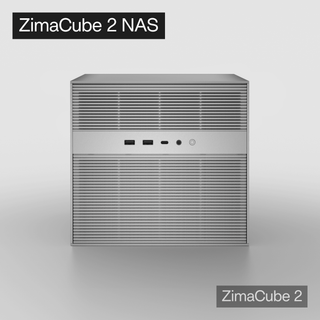
Zima Campaign Hub
More to Read
Meet ZimaOS 1.7: A Better Way to Discover and Manage Self-Hosted Apps
See how ZimaOS 1.7 makes a growing self-hosted app library easier to discover, manage, configure, update, and troubleshoot.

Meet ZimaOS Photos: A Private Photo Library Built for Your Home Server & NAS
Turn the photos already on your home server into a private, searchable library built for rediscovery, local control, and everyday browsing.
Software Freedom Day: The Best Open-Source Apps to Self-Host at Home
Build a practical open-source home stack with apps for photos, files, media, automation, documents, RSS, and network control.


