
NAS vs Cloud vs HDD: The Ultimate Storage Showdown


In today’s rapidly evolving data storage landscape, high-performance, reliable storage solutions have become a critical need for professionals and power users.
When choosing between Network-Attached Storage (NAS), cloud services, and external hard drives, balancing performance, cost, and security is key. This guide breaks down the strengths of each solution.

Part1. External Hard Drives: The Legacy Workhorse

How It Works: Physical drives (HDD/SSD) connected via USB or Thunderbolt, storing data locally.
Pros:
- Portability: Ideal for quick file transfers or backup on-the-go.
- Low Initial Cost: Entry-level models start at $50–$100.
- No Network Dependency: Works offline, perfect for isolated environments.
Cons:
- Single-Point Failure: No built-in redundancy; drive failure = data loss.
- Limited Scalability: Adding storage requires purchasing more drives.
- Performance Bottlenecks: USB 3.2 maxes out at ~1,000 MB/s, lagging behind NAS in multi-user setups.
Use Case: Casual users or short-term backups where data redundancy isn’t critical.
Part2. Cloud Storage: The Convenient Remote Solution

How It Works: Data is hosted on remote servers, accessed via Internet (e.g., AWS S3, Google Drive, Dropbox).
Pros:
- Accessibility: Unlimited remote access from any device with an Internet connection.
- Automatic Scalability: Pay for storage as you need it.
- Managed Maintenance: Providers handle hardware updates and security patches.
Cons:
- Ongoing Costs: Subscriptions (e.g. $10–$50/month for 1–10 TB) add up long-term.
- Bandwidth Dependence: Upload/download speeds are limited by Internet connection (e.g., 100 Mbps = ~12.5 MB/s max).
- Security Risks: Data resides on third-party servers, raising concerns about privacy and compliance (e.g. GDPR, HIPAA).
- Offline Inaccessibility: No internet = no data access.
Use Case: Teams needing remote collaboration or users prioritizing convenience over full control.
Part3. NAS (Network-Attached Storage): The Versatile Powerhouse

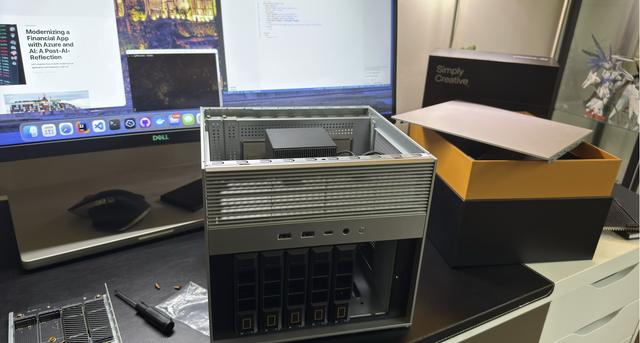
How It Works: A dedicated device connected to your network, enabling shared storage and advanced features (e.g., ZimaCube with ZimaOS).
Pros:
1.Performance & Scalability
Blazing Speeds: Modern NAS devices (e.g. ZimaCube with 10GbE) achieve 1,000+ MB/s, ideal for 4K video editing or virtual machine hosting (ZimaCube Pro with Thunderbolt 4 at 40Gb/s).
Modular Storage: Expand capacity by adding drives or bays (e.g. ZimaCube’s 6+4bay design supports up to 164 TB).
2.Cost-Efficiency
One-Time Investment: $69–$1,099 for a NAS device (e.g. ZimaOS-powered systems), with no recurring fees after hardware purchase.
Long-Term Savings: Avoid cloud subscription creep—own your storage infrastructure indefinitely.
3.Security & Control
Local Data Ownership: Keep sensitive data on-premises, compliant with strict regulations.
Advanced Protection: Features like RAID, VPN, and scheduled backups.
3-2-1 backup strategy: Sync NAS data with cloud services/other NAS for off-site redundancy without full reliance on third parties.
4.Versatility
Multimedia Hub: Stream 4Kcontent to TVs, phones, or computers simultaneously.
Home Office Server: Host websites, VPNs, or Docker containers directly from your NAS.
Remote Access: Securely access files from anywhere via VPN or dedicated apps (e.g. ZimaOS’s mobile interface).
The Showdown: Key Metrics Compared

Why NAS Outperforms in 2025?
As data volumes grow (global data is projected to hit 175 ZB by 2025), NAS solutions like ZimaCube offer:
- Future-Proofing: Expand storage without rebuilding infrastructure.
- Performance for Demanding Workloads: Ideal for video editors, developers, or small businesses running virtualized environments.
- Peace of Mind: Eliminate single points of failure and third-party dependency.

Conclusion: Choose NAS for Control, Performance, and Value
While external drives and cloud storage have their niches, NAS emerges as the ultimate solution for users who prioritize data sovereignty, high performance, and long-term cost savings.
For studios and tech enthusiasts seeking a robust storage setup, explore ZimaOS-powered solutions like ZimaCube and ZimaBoard—designed to scale with your needs while putting you in full control of your digital ecosystem.

Zima Campaign Hub
More to Read

OpenSearchCon 2026: Why AI Agents Need More Than a Vector Database
OpenSearchCon 2026 shows why serious AI agents need two data layers: reliable knowledge retrieval and searchable execution history.
Programmers’ Day 2026: Why 256 Matters—and What to Build
Celebrate Day 256 with a 256-minute build challenge: solve one real problem, move beyond localhost, and keep one useful side project running.

National Video Games Day 2026: Build Your Own Gaming Home Server
Turn a home server into gaming infrastructure for retro libraries, PC streaming, private multiplayer servers and save backups.


