
CasaOS vs TrueNAS: Pick the Right Home Server Setup


Quick Answer
CasaOS is usually better if you want a simple, beginner-friendly home server for Docker apps, media tools, home automation, and light self-hosting. TrueNAS is usually better if your priority is storage, ZFS, snapshots, drive redundancy, file sharing, and long-term data protection.
The simplest way to choose is this:
-
Choose CasaOS if your main goal is running apps with less setup friction.
-
Choose TrueNAS if your main goal is protecting and managing storage.
-
Consider a hybrid setup if you want serious storage and flexible app hosting.
-
Do not choose only by interface design or feature lists.
-
Decide based on workload, hardware, storage risk, app complexity, permissions, and growth path.
For most beginners, CasaOS feels easier to start with. For storage-heavy home NAS users, TrueNAS asks for more planning but gives you a more storage-first foundation.
What Are CasaOS and TrueNAS Really Built For?
CasaOS and TrueNAS are often compared because both can be used in a home server, but they are built around different priorities.
CasaOS is best understood as a lightweight personal cloud and app dashboard that runs on top of an existing Linux system. Its own getting-started page says it supports devices such as ZimaBoard, Intel NUC, and Raspberry Pi, and lists compatibility with systems such as Debian, Ubuntu Server, Raspberry Pi OS, and CentOS through a one-line installation path.
TrueNAS is a storage-first NAS operating system. It is designed around storage pools, ZFS, sharing services, system configuration, snapshots, and long-term data management.
That difference matters because “home server” can mean different things. For one user, it means “I want to run Jellyfin, Home Assistant, and a few Docker apps.” For another, it means “I want a multi-drive NAS that protects family photos and important files.”
Those are not the same problem.
CasaOS vs TrueNAS: The Core Difference
The core difference is not simply “easy vs advanced.” A better comparison is app-first vs storage-first.
CasaOS is app-first. It helps beginners manage apps, files, and simple services through a friendlier interface. TrueNAS is storage-first. It asks users to think carefully about disks, pools, file systems, shares, permissions, backups, and recovery before relying on the system.
| Category | CasaOS | TrueNAS |
| Primary role | Simple app dashboard and beginner self-hosting | Storage-first NAS operating system |
| Best starting point | Light apps, media, smart home, personal projects | Multi-drive storage, ZFS, snapshots, SMB/NFS, long-term file protection |
| Hardware expectation | Often works on lower-power or repurposed hardware if supported | Better suited to dedicated x86_64 hardware with planned storage |
| Learning curve | Lower for beginners | Higher, especially around storage pools and permissions |
| Main risk | Outgrowing simple storage and app limits | Overbuilding when you only need simple apps |
| Better question | “Do I mostly want apps?” | “Do I mostly need reliable storage?” |
CasaOS Is Better for Simple App Hosting and Beginner Self-Hosting
CasaOS is a good fit when your main goal is to get useful services running quickly. That may include media streaming, lightweight file access, smart home tools, dashboards, or small personal web services.
It is especially attractive when you are using an old mini PC, a small board, or a low-power home server and do not want to spend much time learning storage-first NAS concepts before running your first app.
CasaOS is not the same as a professional NAS storage stack. If your data protection needs become more serious, you should think beyond the app dashboard and ask where your files live, how storage is protected, and how recovery works.
TrueNAS Is Better for Storage, ZFS, and Long-Term Data Protection
TrueNAS is better when your main priority is storage design. This includes drive layout, storage pools, snapshots, file sharing, permissions, replication, and planning for disk failure.
The TrueNAS hardware guide lists minimum requirements such as an x86_64-compatible processor, 8 GB of memory, a 20 GB SSD boot device, and two identically sized devices for a single storage pool. It also explains why ZFS, storage device choices, memory, controllers, cooling, and network planning matter in a storage system.
This does not mean every home user needs TrueNAS. It means TrueNAS is designed for users who are ready to treat storage as the core job of the server, not just as a place where apps happen to put files.
What Should You Compare Before Choosing?
The best way to choose is not to ask which system is “better” in general. Ask which system better matches your first real job.
Use The App-or-Storage Decision Matrix before choosing.
| Framework Module | Key Question | If Your Answer Points App-First | If Your Answer Points Storage-First or Hybrid |
| Workload Priority | Is your main goal running apps or protecting data? | CasaOS-style setup may fit better | TrueNAS or a storage-first setup may fit better |
| Storage Risk Level | What happens if a drive fails or files are deleted? | Keep the setup small and back up separately | Plan pools, snapshots, restore paths, and backups carefully |
| Hardware Readiness | Is your hardware old, low-power, or dedicated? | Lightweight app hosting may be more realistic | Dedicated multi-drive hardware may be more appropriate |
| App and Service Complexity | Do you need a few apps or a broader platform? | Simple Docker-style apps may be enough | Hybrid or virtualization may become relevant |
| Access and Permission Boundary | Who needs access, from where, and with what permissions? | Simple local access may be enough | Structured users, SMB/NFS, remote access, and permissions matter more |
| Growth Path | Will this stay small or become a serious home NAS? | Start simple and avoid overbuilding | Choose storage-first or plan a hybrid path earlier |
This matrix is useful because it avoids a common mistake: treating CasaOS and TrueNAS as two versions of the same thing. They can both live in a home server workflow, but they solve different parts of the problem.
Hardware Requirements and Learning Curve
Hardware should influence your choice early. CasaOS can be more forgiving for lightweight setups, but it still depends on a compatible base system and working hardware. TrueNAS expects more from the machine because storage reliability, memory, drive layout, and controllers can directly affect the NAS experience.
Learning curve matters too. If you are new to self-hosting and only want a few apps, TrueNAS may feel like too much structure at first. If you are storing important files across multiple drives, CasaOS may feel easy at first but leave you with too many storage questions later.
The practical question is not “Can I install it?” The better question is “Can I maintain it safely after installation?”
Storage Layout, RAID, and Data Safety
Storage is where the difference becomes serious. CasaOS may be enough for simple file access or casual storage, but it is not primarily built around ZFS storage design. TrueNAS is built around the idea that storage layout, redundancy, snapshots, devices, memory, and recovery all matter.
Do not reduce this decision to RAID alone. RAID or ZFS redundancy can help with some drive-failure scenarios, but it is not the same as a full backup plan. Deleted files, accidental overwrites, malware, failed updates, and user mistakes can still create data loss.
If your home server will hold irreplaceable family photos, client files, long-term archives, or shared household data, you should think about recovery before choosing the system.
Docker Apps, Media Servers, and Home Automation
If your main interest is running apps, CasaOS will usually feel more direct. It is closer to the beginner self-hosting experience: install apps, manage a dashboard, and run lightweight services.
TrueNAS can also run apps and services, but its bigger value is the storage foundation behind them. That can be helpful if your apps depend on reliable storage, but it may feel heavier if you only want a few simple tools.
Docker itself adds network and port concepts that users should understand regardless of the platform. Docker’s networking overview explains that containers can communicate through networks, use bridge networking by default, attach to user-defined networks, and require published ports when services need to be reachable outside the host.
That matters because app hosting is not only about installing an app. You also need to know how the app communicates, where its data lives, which ports are exposed, and whether it should be reachable from outside your home network.
File Sharing, Permissions, and Remote Access
File sharing is often where a casual home server becomes a real NAS. Once multiple users, devices, folders, and permissions are involved, the system has to do more than run apps.
For simple personal use, local access and a few shared folders may be enough. For family storage, multi-device backup, SMB/NFS shares, user permissions, and remote access, the system choice becomes more important.
Before choosing, ask:
-
Will only one person use the server?
-
Do you need separate user accounts?
-
Do some folders need restricted access?
-
Will files be accessed only at home or remotely?
-
Do you need SMB, NFS, or app-based file access?
-
What happens if a user deletes or overwrites a file?
If these questions are central to your setup, you are closer to a storage-first NAS decision than a simple app server decision.
When CasaOS Is the Better Home Server Choice
CasaOS is usually the better choice when you want a simple, fast path into self-hosting and your storage needs are not complex.
It is a good fit if:
-
You mainly want to run Docker-style apps.
-
You are reusing a low-power mini PC, small board, or old machine.
-
You want a friendlier dashboard before learning deeper Linux or NAS concepts.
-
You are running media, smart home, DNS, small file tools, or personal services.
-
You are comfortable keeping backups separate from the app dashboard.
-
You do not need a complex multi-drive storage pool from day one.
CasaOS can be a good first system because it lowers the barrier to entry. It lets users learn what they actually need before committing to a heavier storage-first setup.
The risk is outgrowing it. If the server becomes the place where your most important files live, the decision should shift toward storage planning, backups, and recovery.
When TrueNAS Is the Better Home Server Choice
TrueNAS is usually the better choice when storage is the reason you are building the home server.
It is a good fit if:
-
You are using multiple drives.
-
You want ZFS-based storage management.
-
You care about snapshots, redundancy, and long-term data integrity.
-
You need structured file sharing for multiple users or devices.
-
You are building a dedicated NAS rather than repurposing a random device.
-
You are willing to learn storage pools, datasets, permissions, and recovery planning.
TrueNAS is not better because it has more features. It is better when those features match your actual risk.
If you only want a few apps, TrueNAS may feel heavy. If you need a serious storage foundation, that extra structure can be the point.
Common Mistakes When Choosing Between CasaOS and TrueNAS
The biggest mistake is choosing the system before defining the job. A home server can be an app box, a file server, a backup target, a media server, a private cloud, or a homelab. The right system depends on which of those roles matters most.
Choosing CasaOS When You Really Need a Storage-First NAS
CasaOS can make a home server feel easy, but easy does not always mean storage-safe. If your main concern is long-term family data, drive failure, large file libraries, snapshots, or structured permissions, you may need more than a lightweight app dashboard.
This does not mean CasaOS is wrong. It means you should not ask it to solve a storage-first problem without a separate plan for storage layout, backup, and recovery.
A better approach is to use CasaOS for what it does well and avoid treating it as a replacement for a storage-first NAS design.
Choosing TrueNAS When You Only Want Simple Docker Apps
TrueNAS can be too much if your only goal is running a few simple home apps. It asks you to think about storage, boot devices, pools, datasets, networking, permissions, and system design before you get to the simple app experience.
For users who only want to host a small media app, dashboard, or smart home service, that may create unnecessary friction.
In that case, a simpler app-focused platform may help you learn faster. You can always move toward a storage-first or hybrid setup when your needs become clearer.
Ignoring Drive Layout, Backups, and Recovery Before Setup
Many users focus on installation first and recovery later. That is risky.
Before trusting any home server with important files, decide:
-
Where active files will live.
-
Where app data will live.
-
How drives will be arranged.
-
What gets backed up.
-
How restore will be tested.
-
What you will do if the system fails.
This is especially important when moving from a casual app server to a real NAS. The more important the data becomes, the more recovery planning matters.
Assuming One System Can Stay Perfect as Your Needs Grow
A system that is perfect for the first month may not be right after a year. You may start with one media app and later add photo backup, remote access, multi-user file sharing, and larger drives.
That does not mean your first choice was wrong. It means your home server changed roles.
A healthy way to think about growth is:
-
Start simple if you are learning.
-
Move storage to a stronger foundation when data becomes important.
-
Use a hybrid setup only when you understand why you need it.
-
Avoid stacking complexity just because other homelab users do it.
How to Decide: App Server, NAS, or Hybrid Setup?
The final decision should follow your primary workload.
| Your Main Need | Better Starting Direction | Why |
| Run a few simple apps | CasaOS-style app-first setup | Lower friction and easier onboarding |
| Host media and light services | CasaOS-style setup or lightweight server | Apps matter more than advanced storage at first |
| Store important family files | TrueNAS or storage-first NAS | Storage layout and recovery matter more |
| Build a multi-drive NAS | TrueNAS | Designed around storage pools and NAS workflows |
| Learn apps now, improve storage later | App-first now, migration plan later | Keeps learning simple without pretending it is final |
| Run serious storage and separate apps | Hybrid setup | Lets storage and app hosting have different responsibilities |
| Learn virtualization and isolation | Hybrid or hypervisor-based setup | Useful when you know why you need separate environments |
For most beginners, the decision can be reduced to one question:
Would you be more upset if an app was harder to install, or if your storage was harder to recover?
If the app experience matters most, start app-first. If data protection matters most, start storage-first.
How to Move From Comparison to a Real Home Server Setup
Once you understand the difference between app-first, storage-first, and hybrid setups, the next step is to choose a real installation path and follow the requirements for that system.
A device-specific operating system may require its own image, USB flashing process, boot mode, first-login method, storage setup, and app workflow. For example, the ZimaOS installation guide shows one x86-64 NAS-oriented setup path that includes downloading an installation image, creating a bootable USB drive, checking UEFI and Secure Boot settings, installing the system, and accessing the web interface after reboot.
This kind of setup guide is most useful after you have already decided what role the server should play. If your goal is a storage-heavy private cloud, media library, backup target, or home NAS workflow, a system and device designed around storage become more relevant.
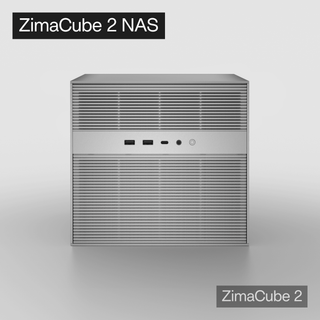
For users comparing lightweight app hosting with a more storage-focused home NAS direction, ZimaCube 2 personal cloud NAS fits the kind of scenario where file sharing, photo backup, media libraries, storage pools, and remote file access become central. It is not the only possible path, but it is a clearer category when the project moves beyond “I just want a few apps.”
Before installing anything, make the decision in this order:
-
Define the server’s main role.
-
Decide whether apps or storage matter more.
-
Check hardware requirements.
-
Plan storage and backup before importing important files.
-
Set up local access first.
-
Add remote access only after permissions and security are clear.
-
Re-evaluate when your workload grows.
FAQ
Can I use CasaOS as a real NAS?
You can use CasaOS for simple file access and personal cloud-style workflows, but it is not the same as a storage-first NAS system. If your needs are light, it may be enough. If your priority is multi-drive storage, snapshots, ZFS, structured permissions, and recovery planning, you should consider a more NAS-focused system.
Do I really need TrueNAS if I only want Docker apps?
Probably not. If your main goal is running a few Docker apps, media tools, or home automation services, a lighter app-focused setup may be easier to start with. TrueNAS becomes more relevant when storage integrity, drive layout, file sharing, and recovery are central to the project.
Is TrueNAS too difficult for a beginner home server?
TrueNAS can be difficult for beginners because it requires more storage and system planning. That does not make it a bad choice. It means you should choose it when you are ready to learn pools, datasets, permissions, snapshots, hardware requirements, and recovery workflows.
What happens if I choose CasaOS first and outgrow it later?
That can be a normal path. Many users start with a simple app-focused setup to learn what they actually need. If your storage, backup, or multi-user needs grow, you can later move toward a storage-first NAS or hybrid setup.
Should I use CasaOS, TrueNAS, or Proxmox for a home server?
Use CasaOS when you want simple app hosting and beginner-friendly self-hosting. Use TrueNAS when storage, ZFS, file sharing, and data protection are the main goal. Consider Proxmox or another hybrid approach only if you understand why you need virtualization, separation, and more complex management.

Recommended products
Support & Tips
More to Read
Live TV Recording Storage Guide for Capacity, Retention, and Cleanup
Measure real recordings, reserve headroom, combine age and capacity limits, and prove the oldest eligible program is removed before storage fills.
Home Media Metadata Recovery Workflow After a Database Restore
Protect the restored state, verify media identity and paths, then repair missing artwork or matches in a pilot library before broad metadata changes.
Jellyfin Client Compatibility Checklist for Audio, Video, and Subtitles
Test representative files one variable at a time and record Direct Play, remux, audio conversion, video transcode, or failure for every client.


