
Local AI Workstation vs AI NAS for Families and Small Teams


A local AI workstation is better when one power user needs maximum GPU speed for coding, image generation, model testing, or heavy local LLM inference. An AI NAS is better when the real problem is shared access: family photos, team documents, private search, backups, permissions, and always-on services.
For families and small teams, the decision is not just “which machine is faster?” A workstation can be fast but awkward to share. A NAS can be easier to share but should not be treated as a GPU workstation. When both speed and shared data matter, the cleaner answer is often a hybrid setup: NAS for the data layer, workstation or GPU node for heavy compute.
The Short Answer: Workstations Win Speed, AI NAS Wins Shared Access
Choose a local AI workstation if the main user is one developer, creator, researcher, or power user who needs fast interactive AI. This is the better path for large local models, coding assistants, image generation, multimodal experiments, or fine-tuning.
Choose an AI NAS if the main need is shared private data. Families and small teams usually care about file access, photo and video libraries, document search, backups, permissions, and services that stay available even when one person’s computer is off.
The practical rule is simple: if the bottleneck is GPU compute, choose the workstation. If the bottleneck is shared data, choose the NAS. If both bottlenecks matter, split the roles.
What a Local AI Workstation Actually Solves
A local AI workstation solves the performance problem. It gives one heavy user direct access to stronger GPU, VRAM, memory, cooling, and software flexibility.
That matters when you are running larger models, coding assistants, image generation tools, VLM workflows, or other workloads where latency and GPU memory determine the experience. vLLM’s optimization guidance around KV cache, batching, and GPU memory shows why a local AI workstation for heavy GPU inference can still be the right tool for demanding real-time workloads.
The weakness is sharing. A workstation can be made available over the network, but it is not naturally a family file server, backup target, permission system, or shared knowledge base.
What an AI NAS Actually Solves for Families and Teams
An AI NAS solves the shared data problem. It gives everyone a common place for documents, photos, videos, project files, backups, private indexes, and self-hosted services.
For families, that may mean shared media organization, photo search, and private file access. For small teams, it may mean document libraries, project folders, private RAG, backups, and a local AI interface connected to shared files.
Photo and media AI is a good example. Immich’s machine learning documentation shows how background AI indexing for photos and documents can support smart search and facial recognition. That is a different need from one person running the fastest possible model on a desktop GPU.
The Real Difference Is Peak Compute vs Shared Data
A workstation is a peak-compute machine. It is optimized for the person sitting closest to the GPU and asking the hardest questions.
An AI NAS is a shared-data machine. It is optimized around storage, access, services, file organization, local privacy, and long-term availability.
Open WebUI can connect to Ollama running on a different server, which supports a NAS storage layer vs workstation compute layer architecture. In that pattern, the NAS stores the files, indexes, and backups, while the workstation handles the heavy model runtime.
Where Multi-User AI Gets Difficult
Sharing local AI is harder than opening a browser tab. A family or small team needs accounts, permissions, private chat history, model access rules, knowledge base boundaries, and resource planning.
Open WebUI’s feature documentation describes multi-user support, roles, groups, and per-model access, which is why multi-user access for self-hosted AI tools should be planned as part of the system. Without that layer, a fast workstation can still feel messy when several people need private access.
There is also a compute bottleneck. If one user loads a large model or runs a heavy image job, another user may wait, slow down, or hit memory limits. Shared AI needs both access control and workload control.
When a Hybrid NAS + Workstation Setup Makes More Sense
A hybrid setup makes sense when the family or team needs both shared files and strong AI performance. The NAS becomes the stable source of truth. The workstation becomes the heavy compute node.
That means documents, photos, videos, backups, vector indexes, and project files live on the NAS. The workstation reads from that shared data layer when it needs to run local models, coding tools, image workflows, or heavier inference.
This hybrid NAS and GPU workstation architecture avoids forcing one box to do every job. It also keeps experiments, model upgrades, and GPU-heavy workloads from disrupting the shared storage layer.
Local AI Workstation vs AI NAS Fit Table
Use this table as a buying matrix. The goal is not to crown one winner. The goal is to match the hardware to the first bottleneck your family or team will actually feel.
| Decision factor | Local AI workstation | AI NAS / home AI server | Buying meaning |
|---|---|---|---|
| Best strength | Peak GPU compute | Shared data and services | Choose based on first bottleneck |
| Main user | One power user | Family or small team | Sharing changes the hardware choice |
| Local LLM speed | Faster with GPU | Often slower without GPU | Workstation wins heavy inference |
| File sharing | Needs manual setup | Native strength | NAS wins shared access |
| Private RAG | Good for one user | Better for shared libraries | NAS wins persistent team data |
| Photo / video library | Depends on local storage | Centralized and always available | NAS wins family media |
| Backups | Needs separate plan | Core workflow | NAS protects original files |
| Permissions | Manual app-level setup | Folder and user-based workflow | NAS is easier for shared privacy |
| Simultaneous users | Can hit GPU or VRAM limits | Better as data and service layer | Compute may still need queue or GPU node |
| Noise and heat | Desk-side issue | Can live away from work areas | NAS is easier to share physically |
| Upgrade path | GPU and RAM upgrades | Storage, network, and app expansion | Different scaling paths |
| Best fit | Heavy solo AI work | Shared local AI data layer | Hybrid if both matter |
The table shows why “faster” and “better for sharing” are not the same thing. A workstation can be the best AI machine for one person. A NAS can be the better AI foundation for everyone.
Who Should Choose a Local AI Workstation?
Choose a local AI workstation if one person does most of the AI work and the workload is compute-heavy. This fits developers, creators, researchers, and power users who care about fast model response, image generation, coding workflows, or GPU-heavy experiments.
A workstation also makes sense if the shared file layer already exists somewhere else. If the team already has reliable storage and only needs a powerful inference box, the workstation can focus on compute instead of pretending to be the data hub.
The boundary is that a workstation is not automatically good shared infrastructure. You still need remote access, user separation, backup planning, and a stable way for other people to reach the files and AI interface.
Who Should Choose an AI NAS?
Choose an AI NAS if the main problem is shared private data. That includes family photos, videos, personal records, project folders, PDFs, notes, shared knowledge, backups, and always-on services.
For small teams, private RAG is often more valuable when it runs over a persistent shared document library instead of one user’s local folder. Ollama embeddings and vector database workflows support private RAG over shared document libraries, but the storage layer still needs to be organized, backed up, and accessible.
The boundary is performance. An AI NAS may be excellent for storage, indexing, and shared services, but that does not mean it replaces a GPU workstation for every model, image, or multimodal workload.
Where ZimaCube 2 Pro Fits This Decision
The useful product pattern is shared infrastructure first. Families and small teams need a stable place for files, backups, media libraries, document indexes, Docker apps, and private AI-ready data before they worry about every possible model benchmark.
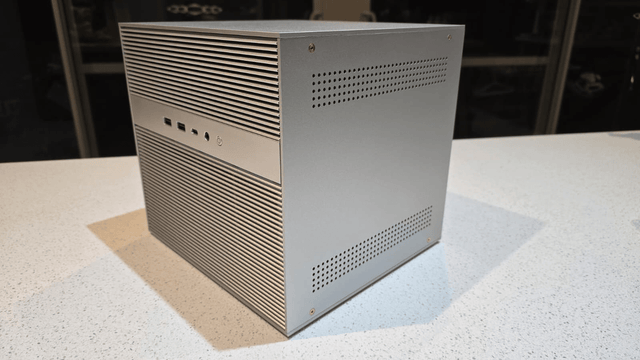
A ZimaCube 2 Pro NAS fits the AI NAS side of this decision. It is better aligned with shared storage, 6-bay expansion, 10GbE, SSD expansion, self-hosted apps, media workflows, and small-team data access than with replacing a dedicated GPU workstation.
That boundary is important. ZimaCube 2 Pro should not be described as a dedicated GPU inference machine or an RTX workstation. If your family or team needs heavy local LLM serving, image generation, fine-tuning, or VLM workloads, keep the NAS as the shared data layer and add a workstation or GPU node for compute.
FAQ
Is an AI NAS better than a workstation for families?
An AI NAS is usually better if the family needs shared photos, videos, documents, backups, private search, and multi-device access. A workstation is better if one person mainly needs heavy GPU performance for local models, coding, image generation, or experiments.
Can a NAS replace a local AI workstation?
Not completely. A NAS can replace scattered storage and make shared local AI data easier to manage, but it does not automatically replace a GPU workstation for heavy inference, fine-tuning, image generation, or large multimodal workloads.
What is the best setup for a small team that needs both shared files and fast AI?
The best setup is usually hybrid. Use the NAS for shared files, backups, media, indexes, and private knowledge. Use a workstation or GPU node for heavy inference, coding models, image generation, and other compute-heavy tasks.
The best local AI setup for a family or small team depends on whether the real bottleneck is speed or sharing. Choose a workstation when one user needs maximum compute. Choose an AI NAS when everyone needs reliable access to private files, media, backups, and search. Choose a hybrid setup when shared data and heavy AI performance both matter.

Recommended products

Product Comparisons
More to Read
Four-Core vs Eight-Core CPU for Plex: Which Fits Mixed-Client Concurrency?
Four cores fit mostly direct play; eight cores earn their cost when software transcodes or concurrent host jobs cross a measured threshold.
Dedicated Jellyfin Server vs a Shared App Host: Which Boundary Fits?
Choose dedicated hosting for predictable media and recovery; choose a shared host when workloads are light and isolation is measurable.
Jellyfin vs Plex for Multi-User Home Streaming: Client Coverage or Control?
Plex wins when client reach is the gate; Jellyfin wins when control is the gate; both can be valid when users split cleanly.


