
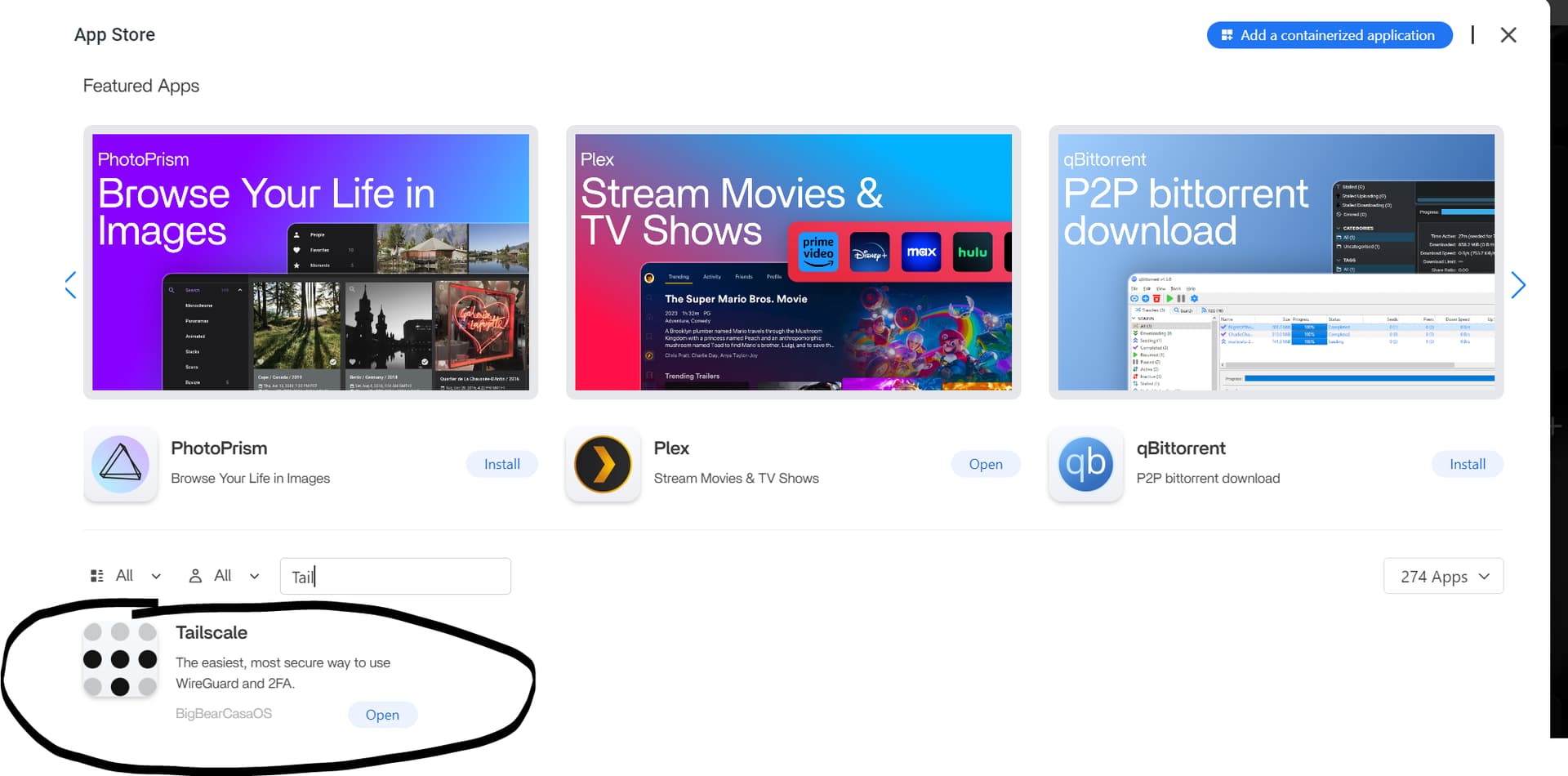
Wenn die Tailscale-App unter ZimaOS installiert wird, ein Klick auf ihre WebUI Sie jedoch einfach zum ZimaOS-Dashboard zurückführt, bedeutet das nicht unbedingt, dass der Tailscale-Container fehlerhaft ist. Der Community-Thread vom November 2024 begann genau mit diesem Symptom unter ZimaOS 1.2.5. Die wichtige Korrektur war, dass Tailscale hauptsächlich über Authentifizierung, Umgebungsvariablen und die Tailscale-CLI konfiguriert wird – nicht über eine herkömmliche Anwendungs-WebUI.
Die ursprüngliche Antwort empfahl, das App-Store-Paket zu verwenden und einen Tailscale-Authentifizierungsschlüssel über TS_AUTHKEY. Ein späterer ZimaOS-Thread aus dem Jahr 2025 bestätigte einen weiteren funktionierenden Weg: Tailscale installieren, ausführen tailscale status Öffnen Sie in der CLI die von ihr zurückgegebene Anmelde-URL und authentifizieren Sie den Knoten. Die aktuelle Tailscale-Docker-Dokumentation unterstützt sowohl auf Authentifizierungsschlüsseln basierende als auch anmeldungsbasierte Abläufe und empfiehlt außerdem einen persistenten Zustand, damit der Container nach Neustarts dieselbe Knotenidentität beibehält.
Warum der „WebUI“-Link von Tailscale irreführend sein kann
Der ursprüngliche Benutzer erwartete, dass die App nach der Installation eine Verwaltungsseite öffnet. Stattdessen kehrte der Browser zur ZimaOS-Startseite zurück.
Die ursprüngliche Lösung der Community: TS_AUTHKEY verwenden
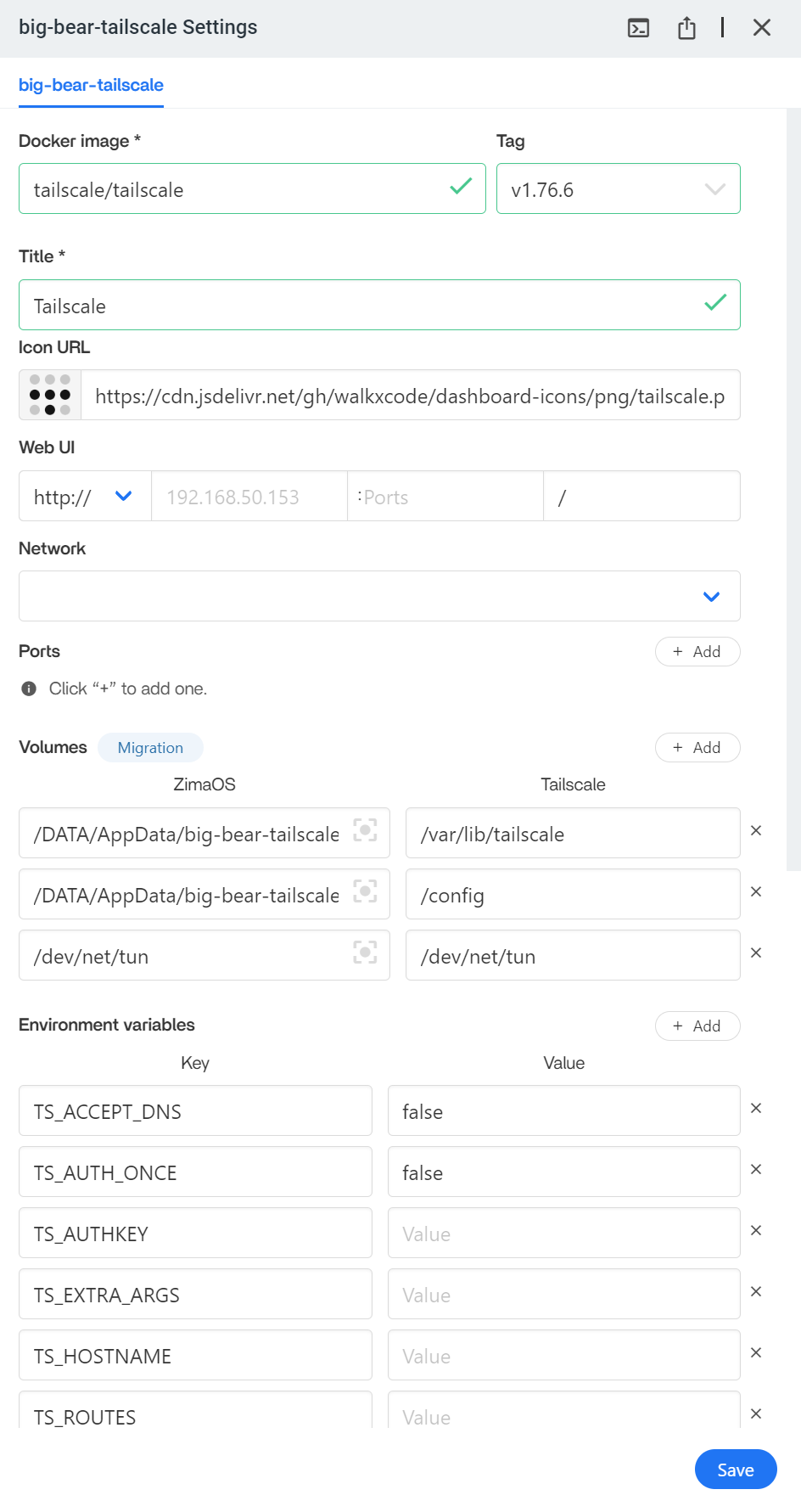
Die erste Antwort besagte, dass das App-Store-Paket funktionieren könne, indem man einen Tailscale-Authentifizierungsschlüssel erstellt und ihn in Folgendes einfügt:
TS_AUTHKEYDie aktuelle Tailscale-Dokumentation definiert weiterhin TS_AUTHKEY als die Umgebungsvariable, die zur Authentifizierung eines Docker-Containers in einem Tailnet verwendet wird.
Aktuelle Referenz: Tailscale-Docker-Konfigurationsparameter.
Generieren Sie den Schlüssel in der Tailscale-Administrationskonsole und behandeln Sie ihn anschließend als Geheimnis. Veröffentlichen Sie ihn nicht in Screenshots, Forenbeiträgen, Git-Repositories oder freigegebenen Compose-Dateien.
Alternative: Über die Tailscale-CLI authentifizieren
Eine spätere Lösung der ZimaOS-Community verwendete:
tailscale statusWenn der Knoten noch nicht authentifiziert war, gab Tailscale eine Anmelde-URL zurück. Der Benutzer öffnete diese URL in einem Browser und genehmigte das Gerät.
Je nach installiertem Container und Shell-Kontext musst du den Befehl möglicherweise im Tailscale-Container statt direkt auf dem ZimaOS-Host ausführen.
Identifiziere zuerst den Container:
docker ps --format '{{.Names}}' | grep -i tailscaleDann, falls erforderlich:
docker exec -it TAILSCALE_CONTAINER tailscale statusVerwende den tatsächlichen Containernamen, der von deinem System angezeigt wird.
Tailscale-Status über Neustarts hinweg beibehalten
Die aktuelle Tailscale-Docker-Dokumentation empfiehlt, Folgendes festzulegen:
TS_STATE_DIR=/var/lib/tailscaleund dieses Verzeichnis in den persistenten Host-Speicher einzubinden. Ohne persistenten Status kann ein neu gestarteter oder neu erstellter Container als neuer Knoten registriert werden, anstatt seine bisherige Identität beizubehalten.
Tailscale bietet außerdem:
TS_AUTH_ONCE=truefür Bereitstellungen, die sich nur authentifizieren sollen, wenn der Container keinen vorhandenen Status besitzt.
Was eine aktuelle Container-Konfiguration benötigt
Eine minimale konzeptionelle Docker-Konfiguration umfasst:
environment:
  - TS_AUTHKEY=YOUR_SECRET_KEY
  - TS_STATE_DIR=/var/lib/tailscale
  - TS_AUTH_ONCE=true

volumes:
  - /YOUR/ZIMAOS/PERSISTENT/PATH:/var/lib/tailscale
Der genaue Host-Pfad sowie zusätzliche Netzwerk- und Geräteeinstellungen hängen von der App-Store-Definition von ZimaOS ab. Ersetze eine aktuell funktionierende App-Definition nicht allein deshalb durch eine alte CasaOS-YAML-Datei, weil der Thread aus dem Jahr 2024 auf ein CasaOS-Tutorial verwiesen hat.
Auf ZimaOS zuzugreifen ist etwas anderes, als das gesamte LAN zu bewerben
Es gibt zwei häufige Ziele:
- Den Tailscale-Knoten selbst erreichen: Verbinde dich über seine Tailscale-Adresse oder seinen MagicDNS-Namen mit dem ZimaOS-/Tailscale-Knoten.
- Andere Geräte im ZimaOS-LAN erreichen: Konfiguriere den Knoten als Tailscale-Subnet-Router.
Das zweite Ziel ist komplexer. Die aktuelle Tailscale-Dokumentation erfordert, dass der Router Routen bewirbt und diese in der Administrationskonsole genehmigt werden.
Siehe Dokumentation zum Tailscale-Subnet-Router.
Subnet-Routing in einer Docker-basierten Tailscale-App unter ZimaOS erfordert zusätzliche Einstellungen
Ein Community-Bericht zu ZimaOS aus dem Jahr 2026 zeigte einen Tailscale-Docker-Container, der erfolgreich verbunden wurde, aber LAN-Routen nicht bewerben konnte. Diese Konfiguration verwendete Host-Netzwerk, den privilegierten Modus und /dev/net/tun, doch die Subnet-Routen wurden weiterhin nicht angezeigt.
Dies ist eine wichtige Abgrenzung: Ein Container, der sich erfolgreich mit deinem Tailnet verbindet, ist nicht automatisch ein funktionsfähiger Subnet-Router. Für das Routing sind Kernel-/Netzwerkberechtigungen, Weiterleitung, Routenwerbung und die Genehmigung durch einen Administrator erforderlich.
Wenn dein einziges Ziel darin besteht, remote auf ZimaOS zuzugreifen, aktiviere Subnetz-Routing nicht unnötigerweise.
Tailscale erfordert keinen SMB-Gastzugriff
Die Antwort der Community aus dem Jahr 2024 behauptete, dass für die Freigabe von SMB-Ordnern Gastberechtigungen erforderlich seien, damit sie über den Tailscale-Tunnel funktioniert. Das sollte nicht als aktuelle Tailscale-Anforderung verallgemeinert werden.
Tailscale stellt die Netzwerkverbindung bereit. Die SMB-Authentifizierung bleibt eine unabhängige Samba-/Windows-/macOS-Berechtigungsebene. Ein korrekt konfiguriertes benanntes SMB-Konto kann über eine Tailscale-Verbindung genauso funktionieren wie über ein LAN.
Der Gastzugriff könnte in der älteren Diskussion eine Lösung für die spezifische CasaOS-/ZimaOS-Samba-Konfiguration gewesen sein, ist jedoch keine inhärente Voraussetzung von Tailscale.
Sicherheitshinweise
- Verwende je nach deinen Bereitstellungsanforderungen einen eingeschränkten/wiederverwendbaren oder kurzlebigen Authentifizierungsschlüssel.
- Halte Authentifizierungsschlüssel aus Screenshots und Repositories heraus.
- Speichere den Zustand persistent, damit der Knoten nicht wiederholt registriert wird.
- Verwende Tailscale-ACLs oder Grants, um zu steuern, welche Tailnet-Geräte den ZimaOS-Knoten erreichen können.
- Veröffentliche das ZimaOS-Dashboard nicht direkt im öffentlichen Internet, nur weil du Remotezugriff benötigst.
Checkliste für die Tailscale-Einrichtung unter ZimaOS
- Installiere das aktuelle Tailscale-Paket aus dem App Store.
- Verlasse dich nicht auf den WebUI-Link der App als primäre Konfigurationsmethode.
- Authentifizieren mit
TS_AUTHKEYoder über die Tailscale-CLI-Anmelde-URL. - Persistent speichern
/var/lib/tailscalemitTS_STATE_DIR. - Überprüfe, ob der Knoten in der Tailscale-Administrationskonsole angezeigt wird.
- Ausführen
tailscale statusund bestätige, dass der Knoten verbunden ist. - Teste den Zugriff auf den ZimaOS-Knoten, bevor du Subnetz-Routing einrichtest,
- Wenn du das gesamte LAN benötigst, konfiguriere und genehmige Subnetz-Routen separat.
FAQ zu ZimaOS und Tailscale
Warum führt der Tailscale-WebUI-Link zurück zu ZimaOS?
Der Tailscale-Container wird normalerweise über Umgebungsvariablen, Authentifizierung und CLI-Befehle konfiguriert und nicht über eine herkömmliche WebUI der App. Genau diese Verwechslung wurde im ursprünglichen Thread gezeigt.
Was ist TS_AUTHKEY?
Dabei handelt es sich um die Tailscale-Docker-Umgebungsvariable, die zur Authentifizierung des Containers in deinem Tailnet verwendet wird.
Warum sollte ich TS_STATE_DIR persistent speichern?
Durch das Speichern des persistenten Zustands kann der Container seine Knotenidentität und Authentifizierung über Neustarts oder Neuerstellungen hinweg beibehalten.
Benötige ich Subnetz-Routing, um remote auf ZimaOS zuzugreifen?
Nein. Subnetz-Routing ist nur erforderlich, wenn der Tailscale-Knoten Datenverkehr zu anderen Nicht-Tailscale-Geräten im lokalen Netzwerk weiterleiten soll.
Benötigt SMB den Gastmodus über Tailscale?
Nein, nicht als allgemeine Tailscale-Regel. Die SMB-Kontoauthentifizierung ist von der Tailscale-Netzwerkverbindung getrennt.


