
Wenn ZimaOS Folgendes zurückgibt mkdir: cannot create directory '/mnt/...': Read-only file systemGehen Sie nicht davon aus, dass die externe Festplatte selbst defekt ist. Im IceWhale-Community-Thread vom Oktober 2025 verwendete der Benutzer einen herkömmlichen Linux- /mnt Arbeitsablauf mit ZimaOS, bei dem das Systemdateisystem und die Speicherstruktur anders verwaltet werden.
Die wichtigste Erkenntnis aus dem Thread besteht darin, zwei Aufgaben zu trennen: Zuerst muss sichergestellt werden, dass ZimaOS einen stabilen Hostpfad für die externe HDD bereitstellt; anschließend wird dieser Hostpfad in den Immich-Container eingebunden. Immich kann einen externen Bibliothekspfad nur validieren, wenn dieser innerhalb seines Containers existiert. Die aktuelle Immich-Dokumentation folgt weiterhin demselben Docker-Prinzip, erfordert jedoch nicht mehr ausdrücklich den historischen Containerpfad /external_library.
Warum /mnt im Community-Fall schreibgeschützt war
Der ursprüngliche Autor versuchte, Folgendes zu erstellen:
/mnt/terrabay1
/mnt/terrabay2
/mnt/terrabay3
/mnt/terrabay4
zurück, worauf ZimaOS Folgendes meldete:
mkdir: cannot create directory '/mnt/terrabay4': Read-only file systemZima-Giorgio riet davon ab, ZimaOS-Systemdateien direkt zu ändern, außer unter fachkundiger Anleitung oder in einer Testumgebung. Dieselbe Antwort wies darauf hin, dass von ZimaOS verwaltete Laufwerke und Freigaben normalerweise unter Pfaden zu finden sind, die unterhalb von /media und kann im Terminal aufgelistet werden.
Prüfen Sie, wie ZimaOS das Laufwerk bereits eingehängt hat
Vor dem Aushängen oder Bearbeiten /etc/fstabÜberprüfen Sie den aktuellen Speicherstatus:
lsblk -f
ls /media
df -h
Im ursprünglichen Thread hatte ZimaOS die vier Laufwerke bereits über Pfade ähnlich den folgenden bereitgestellt:
/media/sdb-ata-ST2000VN003-3CW1
/media/sdc-ata-ST2000VN003-3CW1
Wenn das Laufwerk bereits über ZimaOS eingehängt ist und stabil funktioniert, müssen Sie es möglicherweise überhaupt nicht manuell erneut einhängen. Die einfachste Immich-Einrichtung besteht häufig darin, den vorhandenen ZimaOS-Hostpfad als linke Seite einer Docker-Volume-Zuordnung zu verwenden.
Die vom Autor beschriebene historische Methode zum manuellen Einhängen
Der ursprüngliche Autor dokumentierte schließlich eine manuelle Methode mithilfe von UUID-basierten /etc/fstab die folgenden Einträge und Einhängepunkte /DATA. Zum Beispiel:
sudo mkdir -p /DATA/Enclosure/Bay1
sudo mount /dev/sdb /DATA/Enclosure/Bay1
und anschließend ein /etc/fstab eine Zeile mit einer echten Festplatten-UUID:
UUID=YOUR-REAL-UUID /DATA/Enclosure/Bay1 ext4 defaults,nofail,x-systemd.automount 0 0gefolgt von:
sudo systemctl daemon-reload
sudo mount -a
Dies war 2025 eine Community-Übergangslösung für ZimaOS und keine allgemeingültige aktuelle Empfehlung. Übernehmen Sie nicht die UUIDs oder Gerätenamen des Threads, wie etwa /dev/sdb; sie gehören zur Hardware dieses Benutzers und können sich ändern.
Ein kleiner Tippfehler war Teil des ursprünglichen Problems
Der Autor stellte später fest, dass Apple Notes den ersten Buchstaben einiger kopierter Befehlszeilen automatisch großgeschrieben hatte. Linux-Befehle und -Pfade unterscheiden zwischen Groß- und Kleinschreibung, daher schlägt ein als Mkdir statt mkdir, oder ein Pfad mit geänderter Großschreibung, schlägt fehl.
Verwenden Sie beim Vorbereiten von Terminalbefehlen einen Nur-Text-Editor und überprüfen Sie vor dem Einfügen die Groß- und Kleinschreibung.
Externe Bibliotheken in Immich erfordern zwei separate Schritte
Die späteren Antworten verdeutlichten die Architektur:
-
ZimaOS/Docker: Binden Sie den Hostpfad der externen Festplatte in den Container
immich-serverein. - Immich: Erstellen Sie eine externe Bibliothek mit dem containerseitigen Pfad aus Schritt 1.
Wenn nur Schritt 2 ausgeführt wird, schlägt die Immich-Validierung fehl, weil der Pfad innerhalb des Containers nicht existiert.
Das ZimaOS-Beispiel von 2025 verwendete /external_library
Das Community-Mitglied sny verwendete konzeptionell eine Zuordnung wie:
ZimaOS-Hostpfad: /media/USB_1/sny
Immich-Pfad:      /external_library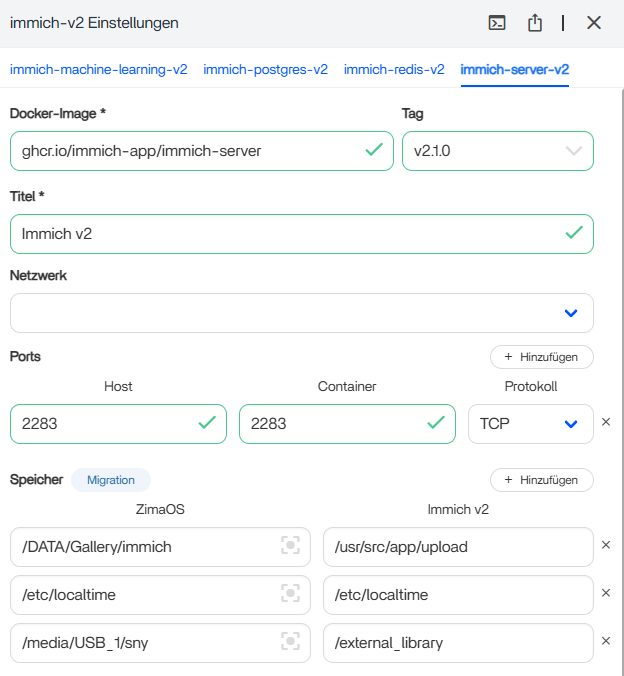
Anschließend fügte der Benutzer in Immich Folgendes hinzu:
/external_libraryals Importpfad der externen Bibliothek.

Die aktuelle Version von Immich erfordert nicht den Namen /external_library
Die aktuelle Immich-Dokumentation ist flexibler. Der offizielle Leitfaden zu externen Bibliotheken zeigt beliebige Host- und Containerpfade, zum Beispiel:
immich-server:
  volumes:
    - /home/user/photos1:/home/user/photos1:ro
    - /mnt/photos2:/mnt/photos2:ro
Die wichtigste Regel lautet, dass der in Immich eingegebene Pfad exakt mit dem Pfad innerhalb des Containers übereinstimmen muss. Der Name /external_library war im Community-Beispiel von ZimaOS eine praktische Konvention, ist aber keine Anforderung von Immich.
Schreibgeschützte Mounts für Archivbibliotheken bevorzugen
Die aktuelle Immich-Dokumentation empfiehlt, Folgendes hinzuzufügen: :ro wenn die externe Bibliothek von Immich nur gelesen werden soll:
/host/photos:/external_library:roEntfernen Sie den Nur-Lese-Modus nur, wenn Immich externe Dateien absichtlich löschen oder XMP-Sidecar-Metadaten schreiben soll. Ein schreibgeschützt eingebundenes Archiv verringert das Risiko, dass eine Anwendung die Originaldateien verändert.
Mehrere externe Bibliotheken
Die Community schlug separate Containerpfade vor, zum Beispiel:
/external_library/usb1
/external_library/usb2
/external_library/photos
Das aktuelle Immich unterstützt außerdem mehrere Einbindungspunkte. Jeder Bibliothekspfad muss in immich-server und anschließend auf der Verwaltungsseite für externe Bibliotheken in Immich hinzugefügt.
Kopiert Immich Fotos aus einer externen Bibliothek in seine Hauptbibliothek?
Nein. Die aktuelle Immich-Dokumentation beschreibt externe Bibliotheken als Assets, die an ihrem ursprünglichen Speicherort im Dateisystem verbleiben. Immich scannt sie, indiziert Metadaten, erstellt Datenbankeinträge und abgeleitete Dateien wie Miniaturansichten und zeigt sie in der Zeitleiste an.
Wenn eine externe Datei von der Festplatte verschwindet, kann Immich das Asset nach einem erneuten Scan als fehlend markieren oder in den Papierkorb verschieben. Sichern Sie das externe Laufwerk unabhängig davon.
Vorsicht beim Bearbeiten von /etc/fstab unter ZimaOS
Die manuelle Methode aus dem Quellthread funktionierte weit genug, um stabile Laufwerkspfade zu erstellen, aber der Autor berichtete später von weiteren USB-/Migrationsproblemen. Ein ungültiger /etc/fstab Eintrag kann außerdem den Systemstart beeinträchtigen oder dazu führen, dass der Speicher nicht verfügbar ist.
Wenn ZimaOS den Datenträger bereits verwaltet und einen stabilen /media/... Pfad vorhanden ist, und verwenden Sie für die Immich-Bind-Mounts bevorzugt diesen vorhandenen Pfad, anstatt das Speicherlayout des Hosts unnötig neu aufzubauen.
Checkliste für externe Immich-Laufwerke unter ZimaOS
- Prüfen Sie
lsblk -f,ls /mediaund zuerst den ZimaOS-Speicher benötigen. - Gehen Sie nicht davon aus, dass Sie eine herkömmliche
/mntEinbindungspunkt. - Bevorzugen Sie einen von ZimaOS verwalteten Hostpfad, wenn bereits einer vorhanden ist.
- Binden Sie den Hostpfad in den
immich-serverContainer. - Verwenden Sie einen eindeutigen Containerpfad wie
/external_library/photos. - Verwenden Sie
:rowenn Immich ein Archiv nur lesen muss. - Fügen Sie den exakten Containerpfad unter Immich-Administration → Externe Bibliotheken hinzu.
- Scannen Sie die neue Bibliothek und überprüfen Sie, ob die Aufträge ausgeführt werden.
- Sichern Sie Dateien der externen Bibliothek unabhängig von Immich.
FAQ zu externen Immich-Laufwerken unter ZimaOS
Warum kann ich /mnt/terrabay1 unter ZimaOS nicht erstellen?
Im Fall der Quelle lehnte das ZimaOS-Systemdateisystem Schreibvorgänge dort ab. ZimaOS verwaltete den externen Speicher bereits über eigene Speicherpfade, einschließlich Pfaden unter /media.
Muss ich /etc/fstab bearbeiten?
Nicht immer. Der Autor der Quelle verwendete fstab für ein benutzerdefiniertes, UUID-basiertes Einbindungslayout. Wenn ZimaOS das Laufwerk jedoch bereits zuverlässig einbindet, ist die Verwendung des vorhandenen Hostpfads einfacher und weniger invasiv.
Muss der Immich-Pfad /external_library sein?
Nein. Das war eine Konvention der ZimaOS-Community. Das aktuelle Immich erlaubt beliebige eingebundene Pfade, solange in den Einstellungen der externen Bibliothek derselbe Containerpfad eingetragen wird.
Kopiert eine externe Immich-Bibliothek meine Originale?
Nein. Die Dateien verbleiben an ihrem ursprünglichen externen Speicherort; Immich indiziert sie und erstellt zugehörige Metadaten sowie abgeleitete Dateien.


