
Tokyo Game Show 2026: From Game Console to Gaming Stack


Tokyo Game Show turns 30 in 2026. That makes this year's event useful for more than tracking new releases: it gives us a clear point to compare what “a game” meant in 1996 with what it means now.
Thirty years ago, the game, compute, storage and most of the player experience usually lived on one console or PC. In 2026, those pieces can be distributed across handhelds, gaming PCs, cloud services, multiplayer infrastructure and personal storage. The modern game is increasingly a stack, not a box.
Tokyo Game Show 2026 Shows How Much Gaming Has Expanded
Tokyo Game Show 2026 runs September 17–21 at Makuhari Messe. It is the event's longest-ever five-day edition and marks 30 years since the first TGS in 1996.
The anniversary program makes that historical perspective explicit. Opening day includes “30 Years of TOKYO GAME SHOW: Looking Back and Looking Ahead to 2056.”
The show itself has expanded far beyond conventional game publishing. Current categories include hardware, AR/VR, eSports, indie development, business solutions and AI technology.
That reflects a broader change: a modern game is shaped not only by the software the player launches, but also by the compute, data and services around it.
The Five Layers of Gaming in 2026
A useful way to understand modern gaming is to separate it into five layers.
| Layer | Main Question | Examples |
|---|---|---|
| Experience | What does the player actually play? | Game logic, world, UI, engine |
| Device | Where does the player interact? | PC, console, handheld, TV, phone |
| Compute | Where is the work processed? | Local GPU, remote gaming PC, cloud GPU |
| Data | What has to persist? | Saves, mods, assets, captures |
| Services | What must remain available? | Multiplayer, authentication, AI, streaming |
These layers once tended to live on the same machine. They no longer have to.
A handheld can provide the screen and controls while another computer performs the rendering. A game can run locally while authentication and multiplayer state remain publisher-hosted. Saves may synchronize through one service while mods and recordings stay on storage the player controls.
Saying that a game “runs locally” no longer tells you where the rest of the gaming experience lives.
Gaming Is Becoming Hybrid, Not Simply Local or Cloud
Cloud gaming was often presented as a replacement for local gaming hardware. In practice, the more durable model is hybrid.
A modern setup can combine:
- local GPU rendering,
- cloud identity and licensing,
- publisher-hosted multiplayer,
- remote streaming to another screen,
- cloud save synchronization,
- and personal storage for saves, mods and captures.
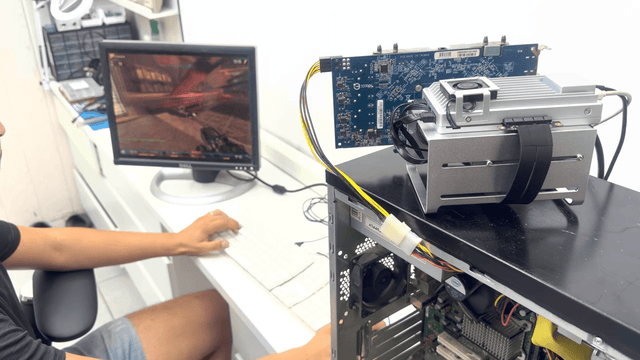
Portable gaming makes this separation easy to see. A handheld does not always need to be the computer rendering the game; it can act as a client while a more powerful host handles the expensive work.
A real portable PC game streaming setup demonstrates this clearly: Sunshine handles the host-side stream, Moonlight runs on the handheld, and Tailscale supplies the private network path.
The important lesson is architectural rather than product-specific:
client performance, render-host performance and network performance are separate bottlenecks.
Indie Games Are Infrastructure Projects Too
TGS 2026's indie program gives another view of the same shift. Its SELECTED INDIE 80 chose 80 titles from more than 1,500 submissions.
Those projects are judged as games, but shipping a modern game can require much more than a game engine.
An indie development stack may include source control, asset storage, automated builds, testing, crash logs, release artifacts, backups and multiplayer infrastructure.
An offline single-player title may require little live infrastructure after release. Add persistent multiplayer, online state or server-side AI and the problem changes.
Building the game and operating the game begin to overlap.
AI Is Entering Gaming in Two Different Places
TGS 2026 now includes AI-focused exhibition activity, while its SENSE OF WONDER NIGHT criteria explicitly mention technologies such as natural-language processing, image recognition and AI interactions.
But “AI in games” describes at least two different workloads.
| AI Role | Examples |
|---|---|
| AI used to create games | Coding, localization, art workflows, QA, testing |
| AI running during gameplay | NPC interaction, voice, dynamic behavior, generated content |
The second category creates an infrastructure decision: where does inference happen?
| Location | Potential Advantage | Main Constraint |
|---|---|---|
| Player device | Low network dependency | Local compute and memory |
| Gaming PC | Strong local hardware | Competes with game rendering |
| Publisher cloud | Centralized models and scaling | Latency, cost and service dependency |
| Local or edge server | Private compute close to users | Hardware and deployment complexity |
AI therefore adds another layer to the gaming stack rather than replacing the layers already there.
What Part of a Game Actually Needs a Server?
Not every gaming workload needs server infrastructure, and not every server-side function can be self-hosted.
| Gaming Function | Server Needed? | Commonly Self-Hostable? |
|---|---|---|
| Single-player rendering | No | Not applicable |
| Save backup | Optional | Yes |
| Mods and asset archive | Optional | Yes |
| Remote game streaming | Host required | Yes |
| Dedicated multiplayer | Usually | Sometimes |
| Matchmaking | Usually | Usually publisher-controlled |
| Authentication / licensing | Yes | Usually no |
| Developer builds and assets | Optional | Yes |
| AI inference | Depends | Sometimes |
This boundary matters.
A home server cannot replace publisher authentication simply because a player wants more control. A multiplayer game cannot become self-hosted if the developer never provides compatible server software.
But save backups, archives, supported dedicated servers, streaming hosts and developer infrastructure are realistic layers to own.
Where Does Your Game Actually Live? Ask Five Questions
A game can occupy hundreds of gigabytes on a local SSD while still depending heavily on remote infrastructure. Five questions expose that dependency much more clearly.
-
Where are the frames rendered?
On the device in front of you, another PC on your network or remote cloud hardware?
-
Where does the save live?
Only on one device, in a platform cloud, on a game server or in a backup you control?
-
Where does multiplayer state live?
On publisher infrastructure, peer-to-peer sessions or a supported dedicated server?
-
What proves your right to access the game?
A physical copy, DRM-free files, a digital entitlement or an active subscription?
-
What stops working if the publisher's service disappears?
Only multiplayer, or also authentication, saves, downloads and the ability to launch?
The last question often reveals more than the size of the local installation.
Installation location is not the same thing as infrastructure ownership.
What Parts of the Gaming Stack Can You Actually Control?
Control becomes easier to reason about when it is separated into layers.
A player may not control store licensing or publisher matchmaking, but can often control:
- save backups,
- mods and custom maps,
- screenshots and recordings,
- legally maintained retro libraries,
- supported dedicated worlds,
- development source and build artifacts,
- and selected local AI workloads.
Retro gaming is a good example because storage and compute can be separated. With browser-oriented emulation, the server may mainly deliver game files while the client performs the actual emulation. The EmulatorJS hardware requirements make that distinction explicit.
This is also the most realistic role for a home server: not replacing the console or gaming PC, but keeping the persistent layers around them available.
| Home-Server Role | What It Can Keep Available |
|---|---|
| Gaming data server | Saves, archives, mods and recordings |
| Dedicated game server | Supported multiplayer worlds |
| Remote gaming infrastructure | Streaming and private-network services |
| Developer infrastructure | Git, builds, assets and test services |
| AI experimentation | Local inference and development workflows |
Hardware should therefore follow the layer being hosted. Lightweight services need relatively little compute. A large game or media archive benefits more from a storage-focused personal cloud. Real-time rendering or heavier local AI may require substantially stronger GPU resources.
The useful question is not “what server is best for gaming?” It is “which part of the gaming stack am I trying to host?”
From 1996 to 2056, Gaming Is Becoming a Layered System
TGS's 30th anniversary makes the transition unusually visible.
In 1996, it was reasonable to think of the game, device, compute and storage as one tightly coupled product.
In 2026, a useful description needs to account for the device the player touches, the hardware performing the compute, persistent data, the network connecting those systems and the services required for the experience to continue.
TGS itself now brings games together with hardware, AI, indie development and business infrastructure while asking what the next 30 years might look like.
Predicting the console of 2056 is impossible. One direction is already clear:
the gaming device is becoming one component in a larger system. As that system becomes more distributed, the important question is where its compute, data and services actually live—and which of those layers you control.
FAQ
When is Tokyo Game Show 2026?
Tokyo Game Show 2026 runs September 17–21 at Makuhari Messe in Chiba, Japan. September 17–18 are Business Days, while September 19–21 are public days.
Why is Tokyo Game Show 2026 special?
TGS 2026 marks the show's 30th anniversary and is its longest-ever five-day edition. Its anniversary programming also looks ahead to the future of gaming through 2056.
What does “gaming stack” mean?
A gaming stack is the set of layers supporting a modern game: player experience, client device, compute, persistent data and online services. Those layers no longer need to run on the same machine.
Is cloud gaming replacing local gaming?
Not entirely. Modern gaming increasingly combines local rendering with cloud identity, multiplayer, remote streaming and synchronized data. A hybrid model is more accurate than a simple local-versus-cloud split.
Can I self-host a game server?
Only when the game provides compatible dedicated-server software or another supported server implementation. Publisher-controlled authentication and matchmaking usually cannot be replaced by a private server.
Can a home server replace a gaming PC?
Usually not for demanding real-time rendering. A home server is better suited to persistent gaming workloads such as backups, game data, supported multiplayer servers, developer services and selected remote-gaming or AI workflows.
What gaming data should I back up?
Prioritize saves and other irreplaceable user-generated data, then consider mods, custom maps, configurations, screenshots and recordings. Game binaries are often easier to reacquire than years of progress or custom content.

Recommended products

Zima Campaign Hub
More to Read

Xen Summit 2026: VM vs Docker vs Bare Metal for Self-Hosting
Choose VM, Docker or bare metal by isolation, hardware ownership and failure domains—not just CPU and RAM.
IT Professionals Day 2026: Show Us Your Rack, Stack & Scar
For IT Professionals Day 2026, go beyond rack photos. Share your hardware, self-hosted stack, biggest failure and the permanent fix that changed your homelab.

OpenSearchCon 2026: Why AI Agents Need More Than a Vector Database
OpenSearchCon 2026 shows why serious AI agents need two data layers: reliable knowledge retrieval and searchable execution history.


