
10 Best Self-Hosted GitHub Copilot Alternatives in 2026


GitHub Copilot is easy to use. Self-hosting is appealing for the opposite reason: you get to decide where the model runs, where your code goes, and how much authority the AI gets over your development environment.
The catch is that “self-hosted Copilot alternative” now describes several very different products. Some replace inline autocomplete almost directly. Others are full coding agents that can edit files, run tests, use Git, call MCP tools, and work against models served by Ollama, LM Studio, or your own inference server.
What Counts as a Self-Hosted GitHub Copilot Alternative?
Running an open-source extension inside VS Code does not automatically make a coding assistant self-hosted.
There are at least three layers to consider:
- The client: the VS Code extension, JetBrains plugin, CLI, or desktop interface.
- The agent or coding server: the software that indexes repositories, builds context, executes tools, or coordinates coding tasks.
- The model runtime: the LLM that actually receives code and generates completions, plans, edits, or tool calls.
A tool can be open source while still sending prompts to a commercial model API. It can also run locally while calling a model hosted somewhere else.
For this guide, a strong self-hosted alternative needs a credible path to keeping the important parts of the workflow under your control through local models, self-hosted inference, an on-prem server, or direct connections to infrastructure you operate.
We also separate Copilot-style autocomplete from agentic coding. GitHub Copilot still provides inline suggestions as you type, while modern Copilot workflows also include chat, agents, MCP, and broader development automation. The alternatives below cover different parts of that spectrum.
Best Self-Hosted GitHub Copilot Alternatives at a Glance
| Rank | Tool | Best For | Interface | Local / Self-Hosted Models | Closest Copilot Feature |
|---|---|---|---|---|---|
| 1 | Tabby | Direct on-prem Copilot replacement | VS Code, JetBrains, Vim and server | Yes | Inline completion + code chat |
| 2 | OpenCode | Self-hosted agentic coding | Terminal / TUI | Yes | Repository-aware coding agent |
| 3 | Kilo Code | Flexible local models across coding workflows | IDE + CLI | Yes | Agentic editing and automation |
| 4 | Cline | Local-model coding inside the IDE | VS Code, JetBrains, CLI | Yes | Agent mode |
| 5 | Aider | Git-first local AI pair programming | CLI | Yes | Repository-aware edits |
| 6 | Qwen Code | Open-source terminal agent with custom endpoints | CLI | Yes | Agentic coding |
| 7 | goose | MCP-heavy private developer automation | CLI + desktop | Yes | Tool-using developer agent |
| 8 | Plandex | Large multi-file coding tasks | CLI | Self-hostable | Planning + repository changes |
| 9 | Refact | IDE completion plus self-hosted coding server | IDE + server | Yes | Completion, chat and agent tools |
| 10 | CodeBot AI | Auditable autonomous coding | CLI + automation | Yes | Issue-to-PR agent workflows |
1. Tabby — Best Direct Self-Hosted Alternative to GitHub Copilot

Tabby remains the easiest project to recommend when someone literally asks for a self-hosted GitHub Copilot alternative.
The project describes itself in exactly those terms: an open-source, on-premises AI coding assistant that can run without depending on a cloud service or external database.
That distinction matters because Tabby was designed around a server architecture from the beginning. You run the Tabby service on your own hardware, connect editor clients to it, and keep control over inference, repository context, user access, and deployment.
Its workflow is also closer to traditional Copilot than many of the agent-heavy tools further down this list. Tabby supports real-time code completion and editor integrations while also adding chat, repository context, code browsing, and other higher-level capabilities.
A basic self-hosted deployment can be launched through Docker, including GPU-backed inference:
docker run -it \
  --gpus all \
  -p 8080:8080 \
  -v $HOME/.tabby:/data \
  tabbyml/tabby \
  serve --model YOUR_COMPLETION_MODEL
The real advantage is centralization. Instead of every developer running a separate local model, a team can host one Tabby server and connect multiple IDEs to it over the local network.
Best for: teams that want the closest practical on-prem replacement for Copilot-style autocomplete and code assistance.
Trade-off: Tabby's strongest identity is still centralized coding assistance rather than the latest generation of highly autonomous terminal agents. If you want the AI to plan, execute commands, use MCP tools, and drive long coding tasks, OpenCode or Cline may fit better.
2. OpenCode — Best for a Self-Hosted Agentic Coding Workflow

OpenCode solves a different problem from Tabby. It is less interested in being a drop-in autocomplete server and more interested in becoming the AI agent you work with from the terminal.
That makes it a stronger fit for developers who now use Copilot primarily through agent workflows rather than inline Tab completion.
OpenCode can inspect a repository, work through plans, edit files, execute tools, and operate with different permission profiles. More importantly for self-hosting, model choice is treated as a first-class part of the architecture.
The official OpenCode model documentation automatically discovers models served by Ollama on the standard local endpoint and can also connect to Ollama running at a different network address.
That creates a clean private architecture:
Developer workstation
        |
     OpenCode
        |
     Local LAN
        |
  Ollama / model server
        |
      GPU box
The coding agent and inference server do not have to live on the same machine.
Best for: terminal-heavy developers who want a modern coding agent with local-model support and minimal dependence on one AI vendor.
Trade-off: OpenCode is not the closest replacement for Copilot's inline completion experience. It replaces the agentic workflow more directly than the autocomplete UX.
3. Kilo Code — Best for Local Models With More Provider Flexibility

Kilo Code is a strong option when the main reason for leaving Copilot is model control rather than avoiding AI agents altogether.
Kilo currently supports a broad mix of hosted providers, direct API connections, local runtimes, and OpenAI-compatible servers. Its official provider documentation explicitly lists Ollama, LM Studio, Atomic Chat, and generic OpenAI-compatible endpoints as local or self-hosted options.
The local-model documentation makes the privacy goal explicit: local execution can keep code and data on your own hardware and can continue working without cloud inference.
Kilo also supports local embeddings for codebase indexing. That is an important detail because a supposedly private coding stack can still leak repository content if the chat model is local but embeddings are generated through an external API.
Best for: developers who want a broader coding platform while keeping the ability to use Ollama, LM Studio, private endpoints, and locally generated embeddings.
Trade-off: Kilo has more moving parts than a purpose-built local completion server. If your only goal is “replace Copilot autocomplete for 20 developers,” Tabby is the cleaner architecture.
4. Cline — Best Self-Hosted Copilot Alternative Inside VS Code

Cline is one of the stronger choices for developers who want to remain inside a familiar IDE while moving model inference onto hardware they control.
Cline is an autonomous coding agent rather than a pure completion engine. It can create and edit files, execute terminal commands, inspect large projects, use browser capabilities, and connect MCP tools, with human approval around important actions.
Its local-model support is well documented. The official Cline local-model guide supports Ollama, LM Studio, and Atomic Chat.
A typical Ollama configuration keeps the model endpoint at:
http://localhost:11434or points Cline to a more powerful model server elsewhere on the LAN.
Cline's current documentation also gives useful hardware expectations: roughly 16–32 GB of memory for smaller quantized models, 32–64 GB for mid-sized coding models, and more for larger models and context windows.
Best for: VS Code or JetBrains users who want an agentic coding assistant but want inference to run through local infrastructure.
Trade-off: local agent performance depends heavily on the model. A model that works well for chat may still struggle with reliable tool calls, long repository context, and multi-step code changes.
5. Aider — Best for Git-First Local AI Pair Programming

Aider is a good alternative for developers who do not actually want an AI agent embedded deeply into their IDE.
Its philosophy is closer to pair programming:
Load repository context
       |
Discuss change
       |
Edit files
       |
Run checks
       |
Review Git diff
       |
Commit or revert
Aider's repository map gives the model structural context about files, symbols, and relationships without blindly putting an entire codebase into every prompt.
Its Git integration is equally important. AI edits can be tracked through normal commits and diffs, which makes rollback part of the default workflow rather than an emergency recovery step.
Aider supports both hosted and local models, making it useful when you want Ollama or another privately served LLM to sit behind a mature Git-oriented coding interface.
Best for: developers who want local AI assistance while keeping Git and human review at the center of every change.
Trade-off: Aider does not try to reproduce Copilot's seamless inline-completion UX, and it is less of an all-purpose agent platform than Cline or OpenCode.
6. Qwen Code — Best Open-Source Terminal Alternative for Private Model Servers

Qwen Code is increasingly useful for self-hosters because its model layer is no longer limited to one hosted service.
The official Qwen Code model-provider documentation includes explicit examples for local self-hosted models through OpenAI-compatible APIs.
That means a Qwen Code client can point directly at inference servers such as:
- Ollama;
- vLLM;
- LM Studio;
- other private OpenAI-compatible endpoints.
This is a practical architecture for teams that want the agent experience on developer workstations but centralize larger coding models on one GPU server.
Qwen Code also has headless and automation-oriented behavior, so it can move beyond interactive coding and into scripts or CI workflows.
Best for: developers using Qwen-family coding models or teams that already expose self-hosted inference through an OpenAI-compatible API.
Trade-off: the tool naturally remains Qwen-oriented. If model neutrality is the top priority, OpenCode or Kilo Code offers a broader provider story.
7. goose — Best for Private MCP and Developer Automation
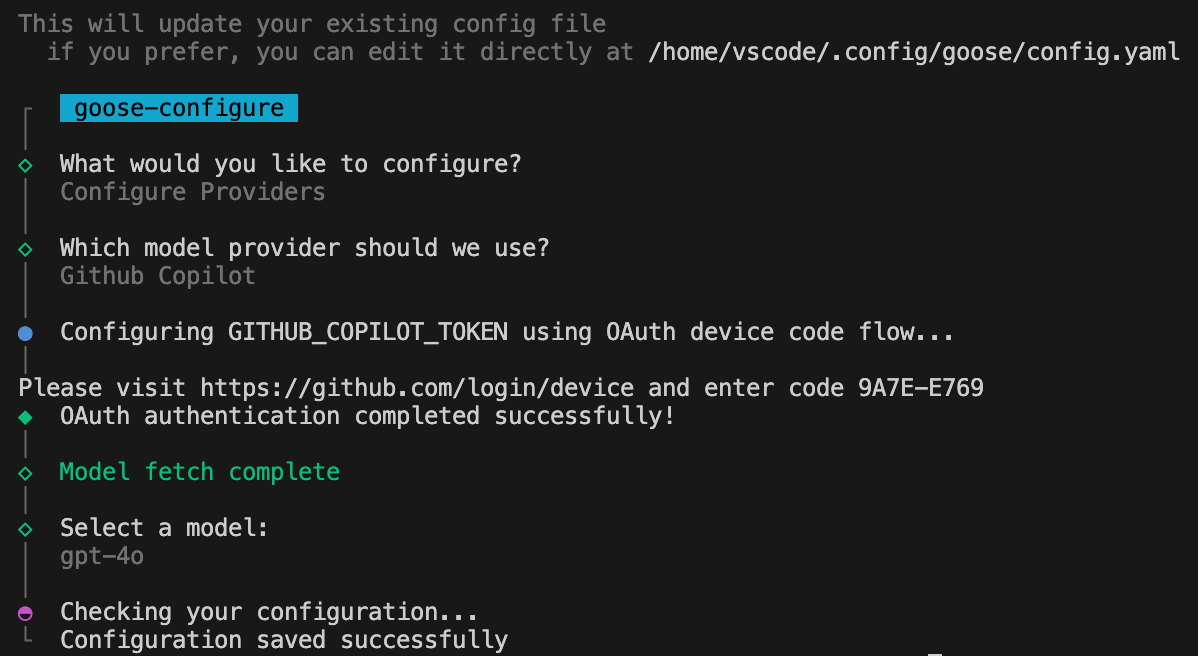
goose is broader than a direct Copilot replacement. It is a local developer agent that can combine coding with terminal work, research, automation, and MCP extensions.
The official provider documentation supports local inference through Ollama, LM Studio, Ramalama, and self-hosted OpenAI-compatible endpoints.
With a local model, goose can keep inference under your control and can operate offline when the selected tools do not require network services.
The catch is tool calling. goose relies heavily on models being able to invoke tools correctly, and its own documentation warns that models without reliable tool support fall back toward much simpler chat behavior.
Best for: developers whose Copilot replacement needs to interact with more than source code—terminals, MCP services, databases, tools, and automation.
Trade-off: goose is less suitable if what you really want is fast gray-text autocomplete while typing. It is an agent, not a Tab-completion engine.
8. Plandex — Best Self-Hosted Agent for Large Multi-File Tasks

Plandex is designed for jobs that are larger than the typical autocomplete or single-file editing workflow.
It focuses on planning and executing multi-step coding tasks across large projects while keeping proposed changes inside a reviewable diff sandbox before they are applied.
That makes it a useful alternative for developers who are less interested in “suggest the next line” and more interested in “work through this feature across 20 files.”
Plandex provides a self-hosted / local mode that can run through Docker or on infrastructure you operate. Its hosted cloud service was wound down, which makes the local deployment path particularly relevant now.
Plandex can also work with Ollama, although its documentation gives an important warning: smaller local models often struggle with demanding planner, architect, coder, and builder roles.
Best for: large repository changes, long planning cycles, and developers who want AI-generated work isolated in a reviewable sandbox before touching project files.
Trade-off: capable local operation may require substantially more compute than lightweight autocomplete. Plandex's own documentation sets realistic expectations about weaker local models.
9. Refact — Best for a Self-Hosted IDE Server With Completion and Agent Tools

Refact has historically been one of the more complete self-hosted Copilot-style stacks because it combines IDE integrations, code completion, repository indexing, chat, and agent-oriented tooling.
Its architecture includes a local service that keeps source indexes, AST information, and vector data available to IDE clients. A self-hosted deployment can serve multiple developers rather than requiring every workstation to manage a separate inference stack.
The project also supports third-party model APIs alongside self-hosted models.
There is, however, an important 2026 caveat: the original SmallCloudAI repository is now a legacy archive, and its README says active development has moved to a new maintainer repository.
That does not erase the value of the architecture, but it does make Refact a project to evaluate carefully before standardizing a team deployment.
Best for: developers who want a server-centered IDE assistant with completion, repository context, and agent capabilities.
Trade-off: project ownership and development have been transitioning. Verify the current active repository, release process, and migration path before committing production infrastructure.
10. CodeBot AI — Best for Auditable Self-Hosted Autonomous Coding
CodeBot AI is not a direct inline Copilot replacement, and the project explicitly says so.
Its target is a different problem: autonomous coding that still leaves a verifiable record of what the agent actually did.
CodeBot can work against local Ollama, LM Studio, and vLLM endpoints, as well as cloud models when desired. It can read repositories, edit code, run tests, solve GitHub issues, and produce pull requests.
The distinctive feature is its audit layer. Tool activity is recorded into a hash-chained log so teams can inspect which files were read, which commands were executed, and what actions were taken during an autonomous run.
That makes it interesting for teams where “keep the model local” is only half the requirement. The other half is proving what the agent did after it received access to the repository.
Best for: security-conscious or regulated environments experimenting with autonomous local coding agents.
Trade-off: this is an emerging autonomous-agent architecture rather than a mature Copilot-style editor experience. If autocomplete is the requirement, use Tabby instead.
Which Self-Hosted GitHub Copilot Alternative Should You Choose?
| If You Want... | Start With | Why |
|---|---|---|
| Copilot-style inline completion on-prem | Tabby | Purpose-built self-hosted completion server with IDE clients |
| A local terminal coding agent | OpenCode | Agentic workflow plus strong Ollama support |
| Maximum provider and local-model flexibility | Kilo Code | Ollama, LM Studio and OpenAI-compatible endpoints |
| A local AI agent inside VS Code | Cline | IDE-first agent with documented local inference |
| A Git-first pair programmer | Aider | Strong repository mapping and easy rollback |
| Qwen or private OpenAI-compatible models | Qwen Code | Explicit support for self-hosted model APIs |
| MCP-heavy private automation | goose | Broad local provider and tool ecosystem |
| Large multi-file changes | Plandex | Planning plus diff sandbox for long tasks |
| Central self-hosted IDE service | Refact | Completion, context indexing and agent tools |
| Auditable autonomous coding | CodeBot AI | Local inference plus tamper-evident action logs |
Tabby vs OpenCode vs Cline: Three Very Different Ways to Replace Copilot
These three tools illustrate why the phrase “Copilot alternative” has become too broad.
| Area | Tabby | OpenCode | Cline |
|---|---|---|---|
| Main interface | IDE completion + chat | Terminal / TUI | IDE agent + CLI |
| Closest Copilot replacement | Autocomplete | Agent workflows | Agent mode |
| Central server model | Core architecture | Optional remote model server | Optional remote model server |
| Ollama | Self-hosted inference architecture | Native discovery/support | Officially supported |
| Best for teams | Shared completion service | Developer-controlled agent | IDE-based local agents |
| Autonomous actions | More limited | Strong | Strong |
Choose Tabby when your developers like the traditional Copilot experience and your main objective is moving inference and repository context into infrastructure you control.
Choose OpenCode when the terminal has become your primary AI development interface and inline completion matters less than agent autonomy.
Choose Cline when you want that agentic workflow but still prefer working inside VS Code or JetBrains.
Local Models vs a Shared Self-Hosted Model Server
“Run it locally” often gets interpreted as “every developer needs a giant GPU workstation.” That is not the only architecture.
There are two common self-hosted approaches.
Option 1: Run the Model on Every Developer Machine
Developer laptop
      |
Coding assistant
      |
Ollama / LM Studio
      |
Local CPU / GPU
This provides the strongest device-level isolation and can work completely offline.
The downside is hardware duplication. Every developer needs enough memory or GPU capacity to run the selected coding model.
Option 2: Run One Private Model Server on the LAN
Developer A ──┐
Developer B ──┼── Private LAN ── Ollama / vLLM ── GPU Server
Developer C ──┘
This architecture lets lightweight developer machines connect to a central inference server while code and prompts remain inside the private network.
Tools such as OpenCode, Cline, Qwen Code, Kilo Code, and goose can work well with this separation because they support local or custom model endpoints.
If you are building a broader private AI environment rather than one developer workstation, our ZimaCube 2 local AI homelab guide covers the relationship between local inference, storage, Docker services, and expandable hardware.
For workloads that need a dedicated accelerator, the ZimaCube 2 GPU local AI build shows one way to add more inference capacity.
What Hardware Do You Need for a Self-Hosted Copilot Alternative?
The answer depends on whether you want autocomplete or a full coding agent.
Autocomplete can work well with relatively small code-specialized models because the task is constrained: predict a short continuation from nearby context.
Agentic coding is much harder. The model may need to:
- read repository structure;
- follow a long instruction chain;
- choose tools;
- write multiple files;
- execute commands;
- interpret compiler and test output;
- remember earlier decisions;
- recover when a step fails.
This is why Cline's current local-model guidance scales from smaller 16–32 GB systems toward 64 GB and beyond for larger models and context windows.
Plandex makes the same point from another direction: local models are supported, but smaller models can struggle with the heavy planning and coding roles required for large autonomous tasks.
The practical lesson is simple:
Do not choose a self-hosted coding assistant and a self-hosted model separately. Choose them as one system.
Self-Hosted Does Not Automatically Mean Private
This is the most important misconception in the category.
You can self-host the coding tool while still sending code outside your network.
For example:
- the IDE extension may run locally but call Anthropic or OpenAI;
- the main model may be local while embeddings use a cloud API;
- an MCP tool may send repository information to SaaS;
- web search may expose query context externally;
- telemetry or error reporting may leave the device;
- a browser agent may interact with authenticated cloud services.
A genuinely private coding stack requires checking every outbound dependency.
| Layer | Privacy Question |
|---|---|
| LLM | Where are prompts and code processed? |
| Embeddings | Where is repository indexing generated? |
| Vector database | Where is code-derived context stored? |
| MCP tools | Which external services can receive data? |
| Telemetry | What usage or error data leaves the system? |
| Agent tools | Which files, commands and network services can the agent access? |
Security Changes When Copilot Becomes an Agent
Inline autocomplete is relatively constrained. A coding agent may be able to run:
git
npm
pip
docker
kubectl
terraform
ssh
rm
Moving the model onto your own server does not remove that risk.
A practical private coding environment should also include:
- Git branches: isolate agent-generated changes.
- Restricted credentials: avoid exposing production secrets unnecessarily.
- Filesystem boundaries: give the agent access only to relevant repositories.
- Approval rules: distinguish read-only exploration from destructive commands.
- Containers or sandboxes: isolate higher-risk autonomous tasks.
- MCP review: treat tools and plugins as executable dependencies.
- Logs: record important tool calls and changes.
- Backups: assume that a sufficiently autonomous agent will eventually make a bad change.
For broader local-agent security and reusable workflow design, see our AI agent skills for local AI workflows.
Why Continue, Twinny, and Void Are Not in the Main List
All three are important to the history of local AI coding, but a 2026 buyer's guide should reflect current maintenance status rather than old recommendation lists.
Continue
Continue was one of the most influential open-source alternatives to Copilot and supported local models through Ollama and other providers.
However, its repository now explicitly states that it is no longer actively maintained, is read-only, and received a final 2.0.0 release.
That makes it valuable reference software, but not one of our first recommendations for a new long-term deployment.
Twinny
Twinny was another strongly local-oriented VS Code coding assistant with Ollama, llama.cpp, LM Studio, and customizable endpoints.
Its repository was archived in November 2025, so it no longer belongs in a forward-looking primary shortlist.
Void
Void offered an open-source AI editor that could connect directly to local or hosted models.
The project was officially deprecated and its repository was archived in June 2026. The maintainers now point users toward newer community forks rather than presenting the original project as an active editor.
This is why checking maintenance status matters as much as checking GitHub stars when selecting infrastructure for a team.
Final Verdict
If your goal is the closest possible replacement for the classic GitHub Copilot experience, start with Tabby. It is designed around self-hosted coding assistance and shared on-prem infrastructure.
If you are replacing modern Copilot agent workflows rather than only autocomplete, OpenCode is a stronger terminal-first option and Cline is a better fit for developers who want the agent inside their IDE.
Kilo Code makes sense when provider flexibility and local models are central requirements. Aider remains excellent for developers who want Git-centered AI assistance without handing a broad autonomous agent control of the environment.
Qwen Code and goose are strong choices when your private infrastructure already exposes Ollama, vLLM, LM Studio, or OpenAI-compatible endpoints. Plandex deserves consideration for larger planned changes, while CodeBot AI represents the emerging security-oriented end of autonomous self-hosted coding.
The important decision is not simply whether the software is open source.
It is whether you control the model, repository context, embeddings, tools, permissions, logs, and infrastructure that turn a coding assistant into a development agent.
FAQ
What is the best self-hosted alternative to GitHub Copilot?
Tabby is one of the closest direct alternatives because it is specifically designed as a self-hosted, on-prem AI coding assistant with IDE integrations and code completion. Developers looking for agentic coding rather than autocomplete should also consider OpenCode or Cline.
Can GitHub Copilot run fully self-hosted?
GitHub Copilot itself is a GitHub-managed service. If the goal is to keep model inference and repository context on infrastructure you operate, use a self-hosted alternative built around local models or private inference endpoints.
Can I replace GitHub Copilot with Ollama?
Ollama is a model runtime, not a complete coding assistant. Pair it with a client such as OpenCode, Cline, Kilo Code, Aider, Qwen Code, or goose to add repository context, editing, tools, and coding workflows.
What is the best self-hosted Copilot alternative for VS Code?
Tabby is a strong choice for Copilot-style completion, while Cline is better for developers who want a local-model coding agent capable of editing files and running commands. Kilo Code is another option when multi-provider and local-model flexibility are priorities.
What is the best self-hosted Copilot alternative for teams?
Tabby's central-server architecture is particularly attractive for teams because multiple developer clients can connect to shared on-prem infrastructure. Larger teams should also evaluate authentication, user management, repository indexing, monitoring, model capacity, and concurrent inference.
Can self-hosted coding assistants work completely offline?
Yes, if the coding client, model, embeddings, repository data, and required tools all run locally. Features that depend on GitHub, web search, package registries, remote MCP services, or external APIs will still require network access.
Do I need a GPU for a self-hosted GitHub Copilot alternative?
Not always. Lightweight completion models can run on CPU or integrated memory, although a GPU usually improves latency substantially. Larger agentic coding models require much more RAM or VRAM, particularly when using long context windows and repeated tool calls.
Is Tabby better than Cline for self-hosting?
They solve different problems. Tabby is closer to a traditional Copilot replacement with centralized completion and IDE assistance. Cline is a coding agent that can edit files, execute commands, and use tools. Choose Tabby for autocomplete and Cline for agentic development.
Is Continue still a good GitHub Copilot alternative in 2026?
Continue remains usable and historically important, but its official repository now states that it is no longer actively maintained and is read-only. For a new long-term deployment, an actively maintained alternative is a safer starting point.
Does self-hosting guarantee that my source code stays private?
No. Check the model endpoint, embeddings, telemetry, MCP tools, web access, external APIs, and repository indexing. A locally installed client can still transmit source code to external services if any part of the workflow is cloud-backed.

Recommended products

Tech & AI HUB
More to Read

Can Home Cameras Synchronize Events Without Cloud Time Services?
A mechanism-first explanation of camera time without cloud, its shared-resource tradeoffs, three query-fanout FAQs, and a practical verification protocol.

Can a Local AI Service Detect Corrupted Model Layers Before Inference?
A mechanism-first explanation of corrupted model-layer detection, its shared-resource tradeoffs, three query-fanout FAQs, and a practical verification protocol.

Can a RAG System Be Restored Without Regenerating Every Embedding?
A mechanism-first explanation of rag restore without reembedding, its shared-resource tradeoffs, three query-fanout FAQs, and a practical verification protocol.


