
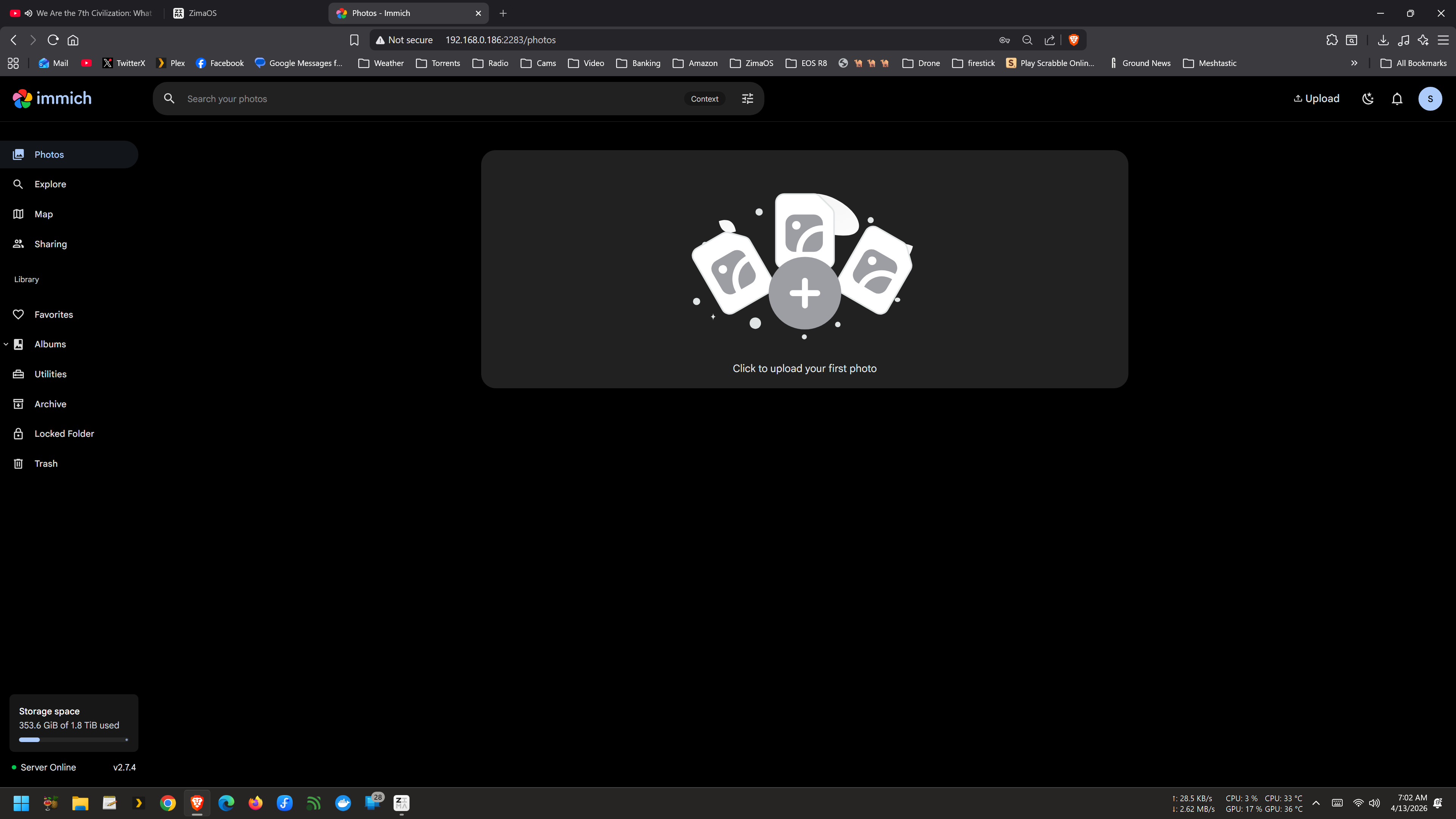
إذا استمر Immich في الإبلاغ عن المساحة الخالية من قرص ZimaOS SSD الخاص بالنظام حتى بعد إضافة قرص صلب أكبر، فالسؤال المهم هو: ما دليل المضيف المرتبط فعليًا بوحدة تخزين الرفع/التخزين في Immich؟ في نقاش المجتمع في أبريل 2026، كان المستخدم الأصلي يشغّل Immich 2.7.4 على قرص SSD للنظام بسعة 250 غيغابايت، وكان يريد حفظ الصور على قرص صلب بسعة 1 تيرابايت. وقد تسبب تغيير المسار مرارًا بعد التثبيت في ظهور حاويات غير سليمة أو فشل بدء التشغيل.
أثمر النقاش الأصلي عن عدة نتائج مختلفة. نجح أحد المستخدمين بعد إعادة تثبيت نظيفة مع ملف YAML مخصص. وأفاد المؤلف الأصلي في النهاية بأن النجاح تحقق فقط بعد اختيار مسار تخزين القرص الصلب قبل تثبيت Immich. وربط رد لاحق بعض حالات فشل بدء التشغيل بفحوصات تكامل التخزين في Immich. كما تغيرت وثائق Immich الحالية من المصدر الرئيسي منذ الإصدار 2.7.4، لذا لا ينبغي نسخ مسار الحاوية الدقيق في حزمة ZimaOS التاريخية هذه إلى كل عملية نشر حالية لـ Immich.
ما الذي استخدمه إعداد Immich 2.7.4 الأصلي
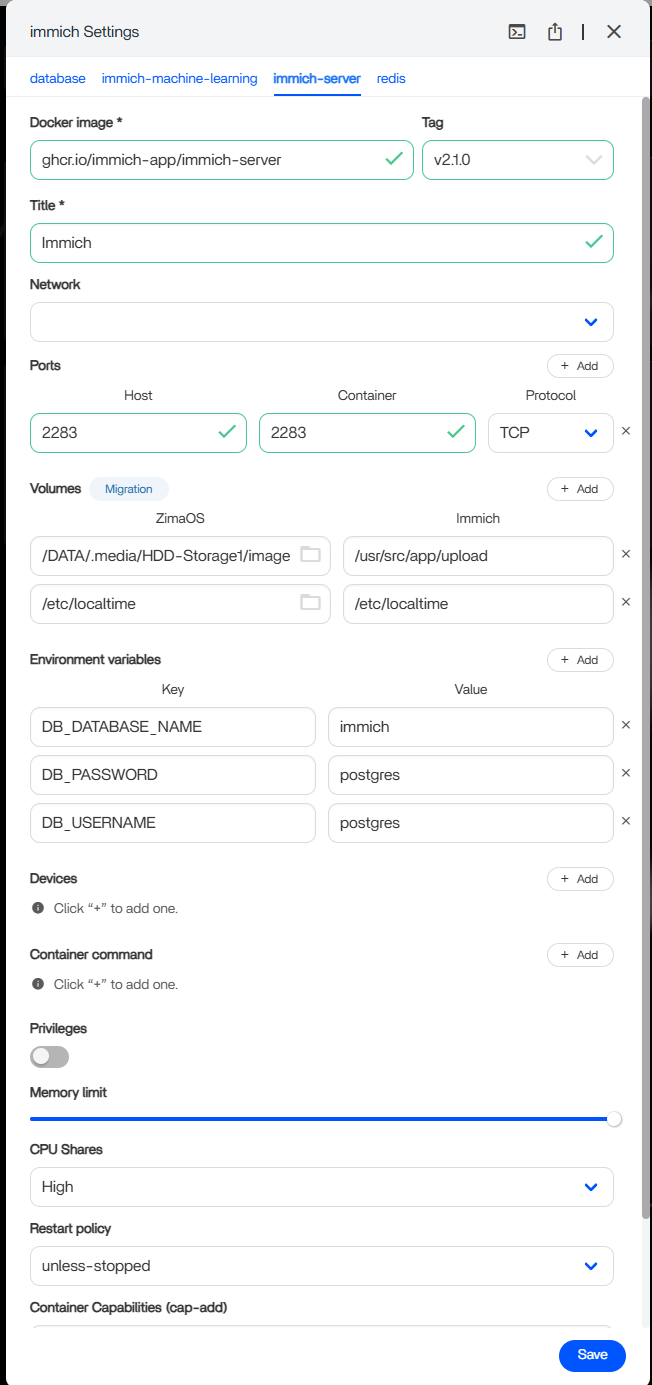
عرضت تعليمات المجتمع هذا الربط التاريخي:
المضيف:      /DATA/Gallery/immich
الحاوية: /usr/src/app/upload
كانت التوصية الأولى هي تغيير جانب المضيف فقط مع الإبقاء على مسار الحاوية. فعلى سبيل المثال، قد يتم إتاحة محرك ثانوي عبر مسار مضيف في ZimaOS، بينما يظل Immich يرى دليل الرفع الداخلي المتوقع.
لماذا لم ينجح تغيير مسار المضيف ببساطة مع الجميع
حاول عدة مستخدمين استبدال المسار الافتراضي على المضيف بعد أن تمت تهيئة Immich بالفعل. حصل بعضهم على حالة حاوية غير سليمة، وواجه بعضهم خطأ في نظام ملفات للقراءة فقط، بينما وجد آخرون أن التطبيق لا يزال يعرض محرك النظام.
هذا يعني أن هذا النقاش لا يدعم ادعاءً عامًا بأن «تعديل وحدة تخزين واحدة وإعادة التشغيل» ينجح دائمًا. يحتفظ Immich بحالة قاعدة البيانات وعلامات تكامل التخزين، وقد يؤدي تغيير الربط بعد التهيئة إلى جعل الدليل الجديد غير متسق مع الحالة التي يتوقعها Immich.
النهج الناجح المؤكد من المؤلف الأصلي
بعد عدة محاولات فاشلة، عاد Solid في 19 أبريل وقال إن النهج الناجح كان إجراء تثبيت نظيف وتغيير مسار التثبيت/التخزين إلى القرص الصلب بسعة 1 تيرابايت قبل تهيئة تثبيت Immich.
أكد مستخدم ثانٍ مسار إعادة تثبيت نظيفة وYAML مخصّصًا
أزال مشارك آخر، وهو scott492010، التثبيت الفاشل، واحتفظ بالصور الموجودة، وحذف حالة AppData/قاعدة بيانات Immich القديمة، ثم أعاد التثبيت، وبعد ذلك استخدم YAML المخصّص الذي تمت مشاركته في النقاش. وأكد صراحةً أن الإعداد الجديد نجح.
لا تحذف AppData أو قاعدة بيانات Immich باستخفاف. استُخدم ذلك الإجراء المجتمعي في تثبيت معطّل/اختباري. إذا كانت المكتبة تحتوي على بيانات وصفية أو مستخدمين أو ألبومات أو أصول مرفوعة مهمة، فاحتفظ بنسخة احتياطية من قاعدة البيانات وتخزين الصور قبل إعادة البناء.
مسار ZimaOS التاريخي: /DATA/.media/...
جرّب النقاش مسارات لمحركات أقراص خارجية مثل:
/DATA/.media/Elements/Photos
/DATA/.media/Elements/Photos/upload
كانت هذه الأمثلة خاصة بمحركات الأقراص وتخطيط المسارات في ZimaOS ضمن تلك المناقشة. لا تنسخ الاسم العناصر أو تفترض أن كل محرك أقراص يظهر في المسار نفسه على المضيف. استخدم المسار الفعلي الظاهر في إعدادات الملفات/التطبيقات في ZimaOS.
يستخدم Immich حاليًا تخطيط تخزين مختلفًا في المصدر
تستخدم وثائق Immich الحالية الخاصة بـ Docker Compose في المصدر UPLOAD_LOCATION على المضيف، ويقوم بتحميله إلى /data في قالب Compose الحالي. ويختلف ذلك عن تعيين ZimaOS التاريخي لـ Immich 2.7.4 إلى /usr/src/app/upload.
راجع وثائق Immich الحالية حول Docker Compose.
هذا حدّ للإصدار، وليس تناقضًا. إذا كنت تستخدم حزمة Immich من متجر تطبيقات ZimaOS، فأبقِ وجهة الحاوية التي تحددها الحزمة الحالية. وإذا كنت تدير Compose الأصلي بنفسك، فاتبع القالب الأصلي الحالي.
الإرشادات الحالية لـ Immich بشأن مواقع الملفات المخصّصة
لدى Immich الآن دليل المواقع المخصّصة للملفات. ويوصي بتغيير المواقع على المضيف بشكل مدروس ونقل الملفات الحالية المقابلة حتى تواصل Immich العثور عليها.
كما تحذّر Immich من تقسيم التحميل/ و المكتبة/ ضمن عمليات تحميل ربط منفصلة على الجهاز نفسه. بالنسبة إلى تخطيط جديد، اتبع نموذج التخزين الحالي بدلًا من إعادة بناء سطر YAML المجتمعي لعام 2026 سطرًا بسطر.
لماذا يمكن أن تمنع ملفات .immich المفقودة بدء التشغيل
حدّد رد في النقاش بتاريخ يوليو 2026 أخطاءً مثل:
ENOENT: لا يوجد ملف أو دليل
.../encoded-video/.immich
تؤكد وثائق تكامل النظام الحالية في Immich أن ملفات .immich المخفية هي علامات تحميل تُستخدم لاكتشاف الأذونات غير الصحيحة أو عمليات تحميل التخزين المفقودة/المستبدلة.
اقترح رد المنتدى إنشاء المجلدات وملفات العلامات المتوقعة يدويًا. لكن توثيق المنبع الحالي أكثر حذرًا: لا ينبغي عمومًا إنشاء ملفات العلامات أو حذفها يدويًا، إلا في حالات استرداد محددة. إذا تغيّر التحميل بشكل غير متوقع، صحّح التحميل أولًا. ولا تجب إعادة إنشاء العلامة يدويًا إلا بعد التحقق من سبب فقدانها.
لا تستخدم chmod 777 كإصلاح افتراضي للأذونات
كما استخدم الرد النهائي من المجتمع:
sudo chmod -R 777 /DATA/Main-Storage/immichيمنح هذا كل مستخدم/عملية محلية صلاحية كتابة واسعة. وقد يزيل عائقًا متعلقًا بالأذونات، لكنه ليس نموذج الأذونات الدائم المفضّل. حدّد UID/GID وأذونات التخزين المتوقعة من حزمة Immich المثبّتة بدلًا من ذلك.
أبقِ قاعدة بيانات PostgreSQL على نظام ملفات مناسب
نقل أصول الصور إلى محرك أقراص ثابت كبير لا يعني أن كل مكوّنات Immich يجب أن تكون عليه. تنص متطلبات Immich الحالية على أنه يُفضّل أن تكون قاعدة بيانات PostgreSQL على وحدة تخزين SSD محلية، كما تتطلب نظام ملفات يدعم دلالات الملكية والأذونات المعتادة في Unix؛ ولا يُدعم NTFS وexFAT لدليل بيانات قاعدة البيانات.
راجع متطلبات تثبيت Immich.
يعني هذا أن البنية المعقولة يمكنها الاحتفاظ بقاعدة بيانات Immich وحالة التطبيق على وحدة تخزين SSD موثوقة، مع وضع موقع تحميل الصور/مقاطع الفيديو الأكبر بكثير على قرص ثانوي مناسب.
النسخ الاحتياطي قبل إعادة إنشاء بيانات Immich الحالية أو نقلها
توصي وثائق Immich الحالية بحماية قاعدة البيانات وأصول نظام الملفات معًا. فالنسخة الاحتياطية لقاعدة البيانات وحدها لا تتضمن الصور ومقاطع الفيديو الأصلية.
دليل النسخ الاحتياطي والاستعادة في Immich
ترتيب استكشاف الأخطاء وإصلاحها الأكثر أمانًا
- حدّد حزمة/إصدار Immich المثبّت بدقة في ZimaOS.
- سجّل تعيين المضيف إلى الحاوية الحالي لمجلد upload.
- انسخ الصور المهمة وقاعدة بيانات Immich احتياطيًا قبل تغيير تثبيت حالي.
- بالنسبة إلى تثبيت جديد، اختر مسار المضيف المقصود للتخزين الكبير قبل التهيئة الأولى، عندما تسمح حزمة ZimaOS بذلك.
- حافظ على مسار جانب الحاوية الذي تحدده تلك الحزمة.
- إذا أصبح التطبيق غير سليم، فاقرأ سجلات Immich وابحث عن أخطاء الأذونات أو سلامة التخزين.
- تحقّق من أن مجلد المضيف الجديد قابل للكتابة بواسطة هوية حاوية Immich.
- إذا ذكرت السجلات فقدان
.immichالعلامات، وتحقّق من الربط وبنية الدليل قبل إنشاء الملفات يدويًا. - تجنّب
chmod 777كحل دائم.
الأسئلة الشائعة حول تخزين نظام Immich
لماذا لا يزال Immich يعرض سعة قرص SSD الخاص بالنظام؟
قد لا يزال ربط مجلد upload النشط يشير إلى تخزين النظام، أو ربما لم تتم تهيئة الربط المُغيَّر بنجاح. تحقّق من تعيين المضيف إلى الحاوية الفعلي الذي يستخدمه الخادم قيد التشغيل.
هل حلّ المؤلف الأصلي المشكلة؟
نعم. أفاد Solid بأن التثبيت النظيف، مع تحديد مسار محرك الأقراص الثابتة قبل التثبيت، نجح بعد فشل التغييرات التي أُجريت بعد التثبيت.
هل ينبغي أن أنسخ /usr/src/app/upload إلى تثبيت Immich جديد؟
ليس بشكل أعمى. كان ذلك مسار الحاوية في حزمة Immich 2.7.4 التاريخية على ZimaOS. أما Compose الخاص بـ Immich من المصدر الرئيسي حاليًا فيستخدم /dataاتبع الحزمة/الإصدار الذي تشغّله فعليًا.
هل ينبغي أن أنشئ ملفات .immich يدويًا؟
فقط بعد التحقق من سبب فقدانها. توضح وثائق Immich الحالية أن هذه العلامات لا ينبغي عادةً إنشاؤها أو حذفها يدويًا، باستثناء حالات استرداد محددة.
هل يمكنني وضع قاعدة البيانات على محرك USB مهيأ بنظام exFAT؟
متطلبات Immich الحالية لا تدعم exFAT/NTFS لدليل بيانات PostgreSQL. احتفظ بقاعدة البيانات على نظام ملفات محلي مناسب، وانقل أصول الصور بشكل منفصل عند الحاجة.


