
A network-status warning is not always the same thing as a network outage. In this June 2025 thread, the original user could connect to ZimaOS over Wi-Fi at a static IP and verify the wireless interface through SSH, while the physical server display still showed “Searching for network address” and the Web UI did not mark Wi-Fi as active.
Zima-Giorgio gave the central official answer: at that time, ZimaOS did not officially support Wi-Fi. That makes the incorrect dashboard state much easier to understand: a working NetworkManager wireless connection was outside the product's supported network-management path.
The Wireless Interface Could Work Even When ZimaOS Did Not Represent It Correctly
The original poster confirmed that wlan0 was connected and had the expected static address. They could open the ZimaOS dashboard using that address, yet the dashboard and attached display continued to show incomplete or incorrect network status.
wlan0 but did not show it as an active connection even though the user could reach the server over Wi-Fi.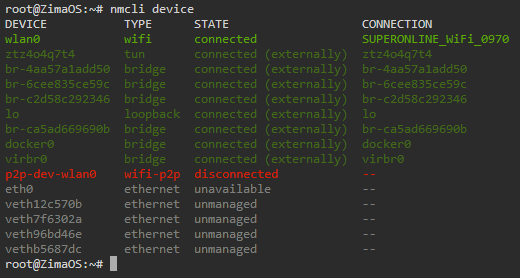
wlan0 in a connected state, confirming the mismatch between NetworkManager and the ZimaOS status display.This is strong evidence of a management/UI mismatch in that 2025 setup, not proof that the wireless link itself was down.
Official 2025 Position: Wi-Fi Was Not Supported
Zima-Giorgio's reply was short but decisive: ZimaOS did not officially support Wi-Fi at that time.
That means users who manually configured wireless networking could end up with a technically working connection that the ZimaOS interface did not understand or display consistently.
Do Not Treat apk or apt as a Normal ZimaOS Update Path
The original poster tried package-manager commands after finding that apt was unavailable. That experiment did not fix the UI mismatch. ZimaOS is an appliance-style operating system with its own update process, so arbitrary base-system package upgrades should not be promoted as the solution to network-status problems.
Use the supported ZimaOS update and settings workflows for the version you are running.
A Later Reply Showed a Different Problem: No Default Route
In January 2026, another user joined the thread with Home Assistant connectivity failures. Their situation looked similar at first, but the posted routing table did not contain a normal default IPv4 route. That is a real connectivity failure, not merely a wrong UI indicator.
This distinction is critical:
- if SSH and web access work over the expected interface but the UI icon is wrong, the problem may be status reporting;
- if the system has no default route and cannot reach public IP addresses, the host genuinely lacks a usable gateway path.
Current ZimaOS Networking Is Centered on Ethernet Settings
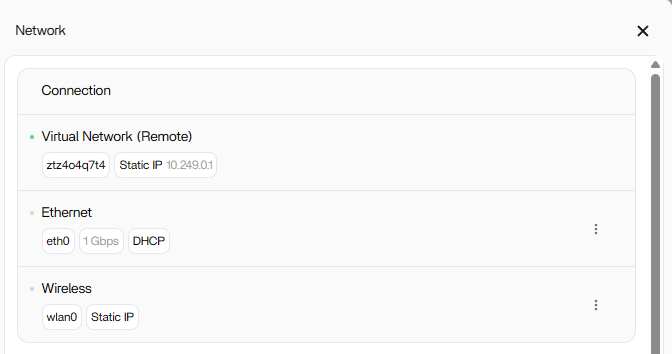
The current ZimaOS networking documentation describes physical Ethernet interfaces, DHCP, static IP configuration, link speed, and remote access through Settings > Network.
current Ethernet, DHCP, static-IP, and Remote Access settings in ZimaOS
Use current documentation to check whether wireless support has changed for your hardware and release rather than assuming the June 2025 support statement remains unchanged forever.
Use Ethernet When Network Reliability Is Critical
For services such as Home Assistant, cameras, storage, or other always-on workloads, the community repeatedly recommended Ethernet when possible. That recommendation aligns with the product's historically stronger wired-network support.
ZimaOS Wi-Fi Status FAQ
Why could the user SSH over Wi-Fi while ZimaOS still said “Searching for network address”?
The wireless interface was working at the Linux networking layer, but ZimaOS did not officially support Wi-Fi in that 2025 release and did not represent the interface correctly in its UI.
Does a wrong Wi-Fi icon mean the network is actually down?
Not necessarily. The original user could reach the dashboard. Later replies showed that a real outage should be distinguished by routing and gateway behavior, not by the UI indicator alone.
Was Home Assistant failure in the later reply caused by the Wi-Fi status bug?
The posted routing table pointed to a real missing-default-route problem, which is different from the original display inconsistency.
Should I configure critical ZimaOS services over Wi-Fi?
For the historical versions discussed in this thread, Ethernet was the safer supported path. Check current documentation for your exact release before relying on Wi-Fi.


