
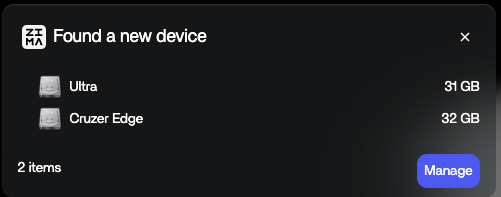
This thread captures a feature transition almost in real time. On March 19, 2026, two USB drives could appear on the ZimaOS dashboard but the Manage workflow did not offer normal array configuration. The next day, 777-Spider said IceWhale would support creating RAID from USB in the next version. By March 31, a community tester on ZimaOS 1.6.0 beta reported that two USB drives could be configured as RAID 1 successfully.
Current ZimaOS documentation now makes that behavior official at the storage level: USB drives follow the same storage logic as internal HDDs and SSDs and can be used as storage, added to an array, or used to expand existing space.
The Source Began with USB Drives Visible but Not Manageable
IceWhale Said USB RAID Was Coming in the Next Version
777-Spider gave a direct official reply on March 20: USB drives would support RAID creation in the next version.
The same reply also pointed the user to a community-created Linux client, but that was separate from the storage feature.
A 1.6.0 Beta User Confirmed Two-USB-Disk RAID 1
On March 31, a community tester said USB drives were usable as regular drives in 1.6.0 beta and explicitly confirmed: “I setup a raid1 on two USB drives no problem.”
The original poster then upgraded to the beta and reported their own RAID 1 setup was in progress.
Current ZimaOS Officially Supports USB Drives in Arrays
Current IceWhale Storage documentation says USB drives follow the same logic as internal storage. A new drive can be set up from Settings > Storage, and USB media can be added to an array.
Use the current ZimaOS USB storage and array workflow rather than the March 2026 beta procedure.
RAID 1 Mirrors the Data Across Both Drives
With two equal-capacity USB HDDs, RAID 1 provides roughly one drive's usable capacity and keeps a mirrored copy on the second member. If one drive fails, the array can continue operating in degraded mode until the failed drive is replaced and rebuilt.
USB Adds a Different Failure Surface from Internal SATA/SAS
The RAID logic may be the same, but USB adds cables, enclosure electronics, power adapters, hubs, and bridge chips. A loose cable can make a healthy disk disappear from the array just as effectively as a failed drive.
For an always-on USB RAID, prefer stable powered enclosures, short reliable cables, and avoid hubs that power-cycle or sleep drives unpredictably.
One Dual-Bay Enclosure vs Two Separate Enclosures
The source later asked which enclosure topology people were using but did not receive a final public answer. Either arrangement can work if ZimaOS sees each physical disk independently.
A multi-bay enclosure that hides the individual disks behind its own proprietary RAID controller is a different architecture and can prevent ZimaOS from managing the disks as separate RAID members.
USB RAID 1 Still Is Not a Backup
Both disks remain attached to the same host and often the same power source. Accidental deletion, malware, filesystem corruption, theft, or enclosure failure can affect both copies.
Keep an independent backup on another device or cloud/off-site destination if the data matters.
USB RAID 1 FAQ
Did USB RAID work at the start of the March 2026 thread?
No. Drives were visible but not manageable as normal RAID members.
Was RAID 1 later confirmed on ZimaOS 1.6.0 beta?
Yes. A community tester explicitly confirmed a two-USB-drive RAID 1.
Does current ZimaOS officially support USB drives in arrays?
Yes. Current Storage documentation says USB drives can be used as normal storage or array members.


