
The source UrBackup installation failed for several independent reasons before it worked: the image pull was rewritten through a mainland-China-only mirror, the first bind paths did not exist on the ZimaOS host, backup-directory permissions were wrong, and the app launcher URL/ports were confusing.
The durable lesson is to treat UrBackup as a normal stateful Docker application: use real host storage paths, persist both backup data and UrBackup database/state, verify runtime-user permissions, and confirm the WebUI/network listeners before relying on it for client backups.
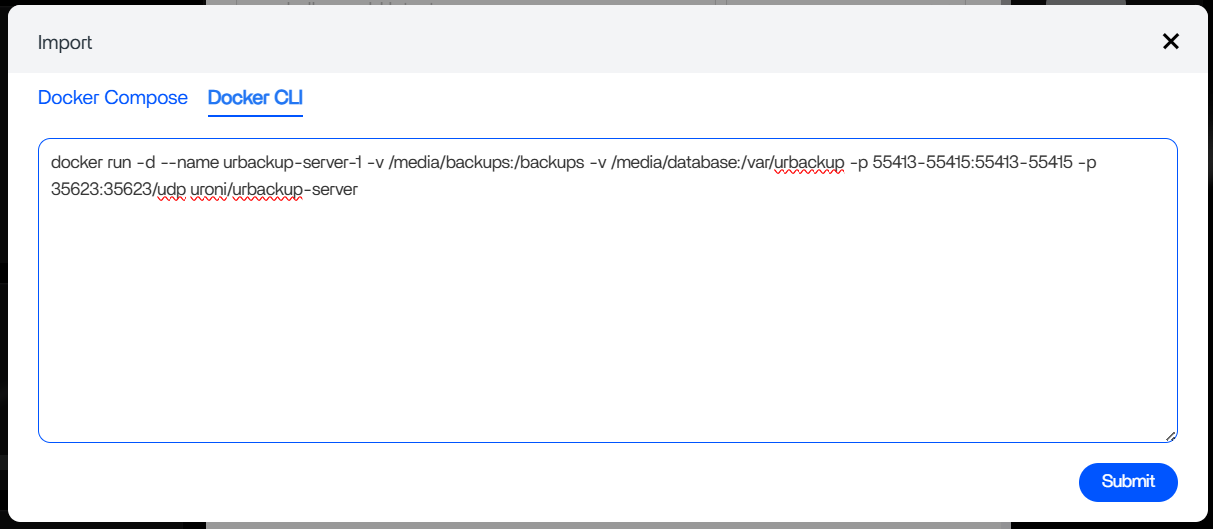
The First Image Pull Was Rewritten to an Unusable Mirror
The daemon returned a pull-denied message for docker.1panel.live/uroni/urbackup-server. The official UrBackup download page still identifies uroni/urbackup-server as the official Docker image.
See the current official UrBackup Docker image.
Bind Mounts Must Point to Real ZimaOS Host Folders
The working recap used real storage under paths such as /media/Safe-Storage/UrBackup/backups and /media/Safe-Storage/UrBackup/data, mapped to /backups and /var/urbackup. Inspect your actual host path instead of copying the source storage name literally.
Permission Denied Means the Container User Cannot Write
The source hit No permission to access "/backups/urbackup_tmp_files". Its fix used a specific UID/GID and matching host ownership. Do not freeze 1000:100 as a universal identity; verify the current runtime user.
Persist Both Backups and UrBackup State
The repository contains client backup data while /var/urbackup contains server database/state. A usable recovery plan should preserve both as appropriate.
The Source Used Host Networking
The maintained uroni/urbackup-server image currently documents host networking as one supported Docker pattern and exposes the normal UrBackup service ports. Host networking simplifies discovery but removes Docker network isolation.
The WebUI Needs the Correct Port
The source corrected the ZimaOS launcher to port 55414. The launcher is only a convenience URL; real service health should be checked from logs and listeners.
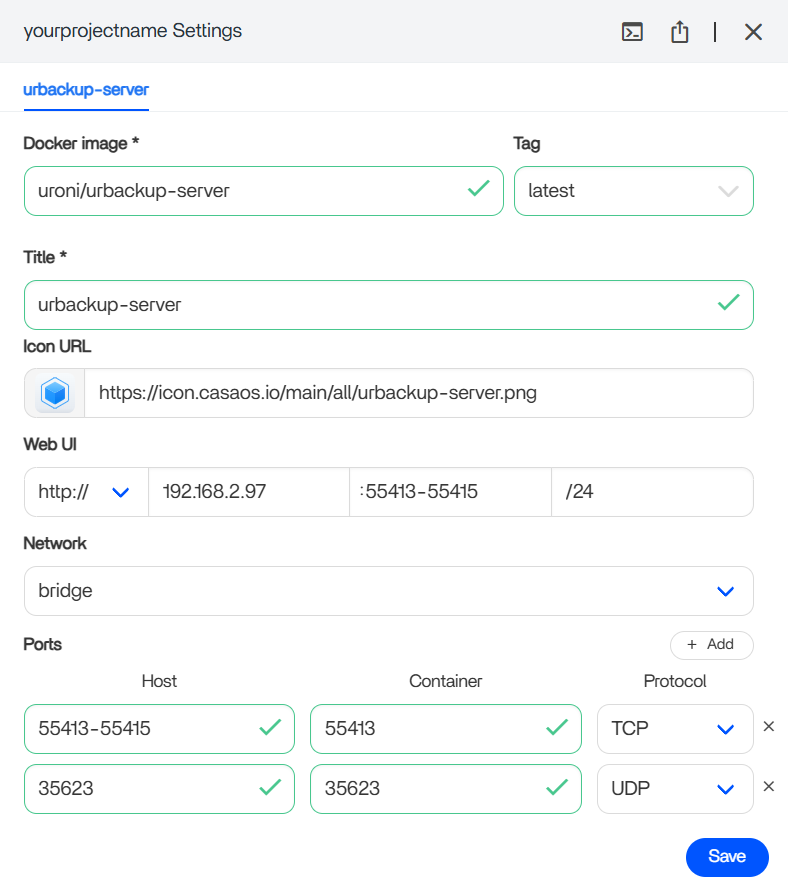
Prefer a Reproducible Compose Definition
Current ZimaOS App Store 2.0 and custom-app workflows support standard Docker Compose. Keep the image, persistent paths, timezone, restart policy and networking in one Compose definition.
Use the current ZimaOS Compose model.
A Running Dashboard Is Not the Final Test
Register one client, complete a small backup, restart the container/host, then perform a file restore. This verifies networking, permissions, database persistence and backup storage together.
Put the Backup Repository on Data Storage, Not the System Disk
UrBackup can consume hundreds of gigabytes or more. The repository path should point to a real ZimaOS storage space with known capacity and health, not to the small operating-system drive.
Before onboarding clients, confirm the host path in ZimaOS and watch free space during the first full backup.
The UrBackup Database Is Part of the Restore System
The files under /backups are only one half of a usable server. UrBackup's state/database under /var/urbackup tracks clients, backup metadata, retention, and server configuration.
Document and protect both persistent mappings so a container recreation does not leave a pile of backup files without the expected server state.
Use Least-Privilege Write Access
The source-specific UID/GID adjustment fixed one deployment, but recursive ownership changes across an entire storage pool are risky. Create a dedicated UrBackup directory and grant the container identity access to that directory rather than broad write access to unrelated NAS data.
Host Networking Exposes UrBackup Services Directly on ZimaOS
When host networking is used, UrBackup listeners are host listeners. If ZFW or another firewall protects the NAS, permit only the ports and client networks required for backup/discovery. Do not publish UrBackup service ports directly to the public Internet.
Test a Restore Before Calling the Backup Server Finished
Complete one client backup, restart ZimaOS or recreate the container, verify the client history remains, then restore several files to a separate location. This validates image availability, permissions, persistent state, networking, and actual recoverability—not just the green dashboard.
UrBackup on ZimaOS FAQ
Did the source user eventually get UrBackup working?
Yes.
Should every ZimaOS system use PUID 1000 and PGID 100?
No. Those were source-specific values.
Is host networking mandatory?
Not universally. It is a documented image option and the source used it successfully, but it reduces network isolation.


