
The error Folder '/tv/' is not writable by user 'abc' means Sonarr can see the mounted directory but the process running inside the container does not have permission to write to it. The same problem can appear in Radarr as a movie-root folder error.
In the July 2025 IceWhale Community case, both applications came from the ZimaOS App Store and used the default PUID=1000 and PGID=1000. The user's media folders lived on a RAID storage pool. An IceWhale team member suggested setting both IDs to 0, and the original poster confirmed that this made the folders writable. That is an important source result, but running the application with root-equivalent IDs grants much broader filesystem access than is normally needed. Current LinuxServer.io documentation recommends matching PUID/PGID to the owner or group of the host directories instead.
What “Folder Is Not Writable by User abc” Means
The ZimaOS App Store package in the thread used LinuxServer-style Sonarr and Radarr containers. These images run the application process as an internal user commonly displayed as abc, while PUID and PGID map that internal process to numeric user and group IDs on the host filesystem.
If the host directory belongs to a different UID/GID and its permission bits do not allow the mapped process to write, Sonarr or Radarr can browse the mount but cannot create, rename, move, or import media there.
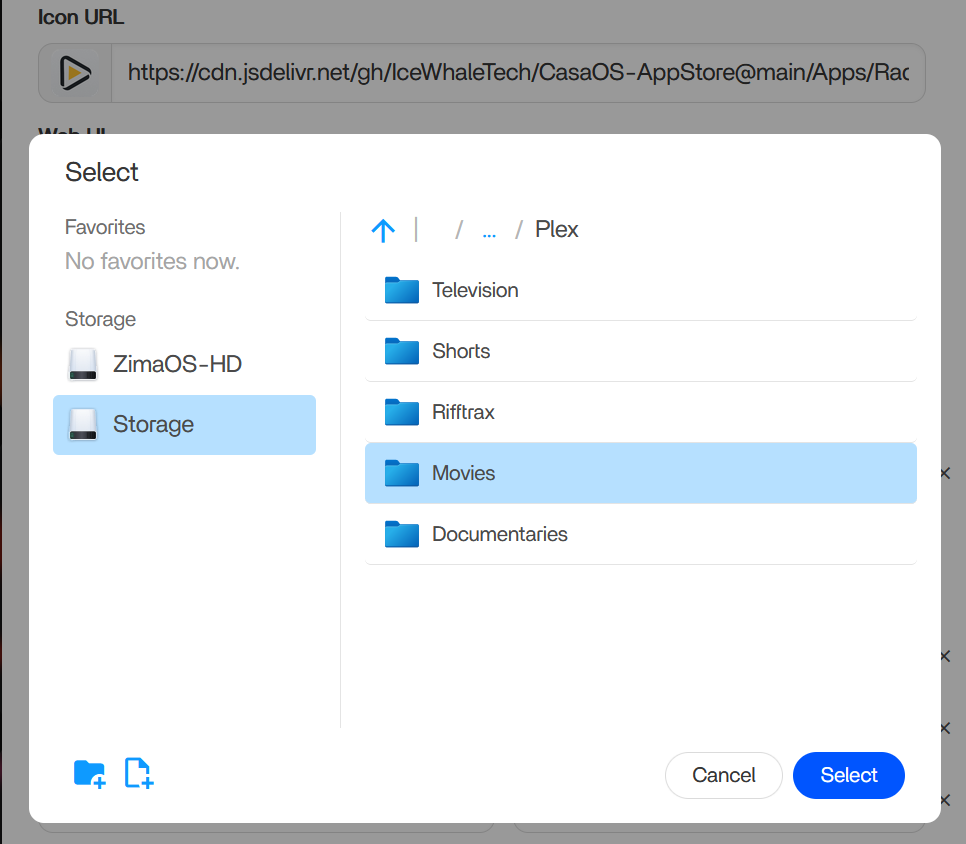
The Original ZimaOS App Store Mappings
The post included separate configuration screenshots for Radarr and Sonarr. The applications could see the configured host volumes, but root-folder creation failed inside the applications.
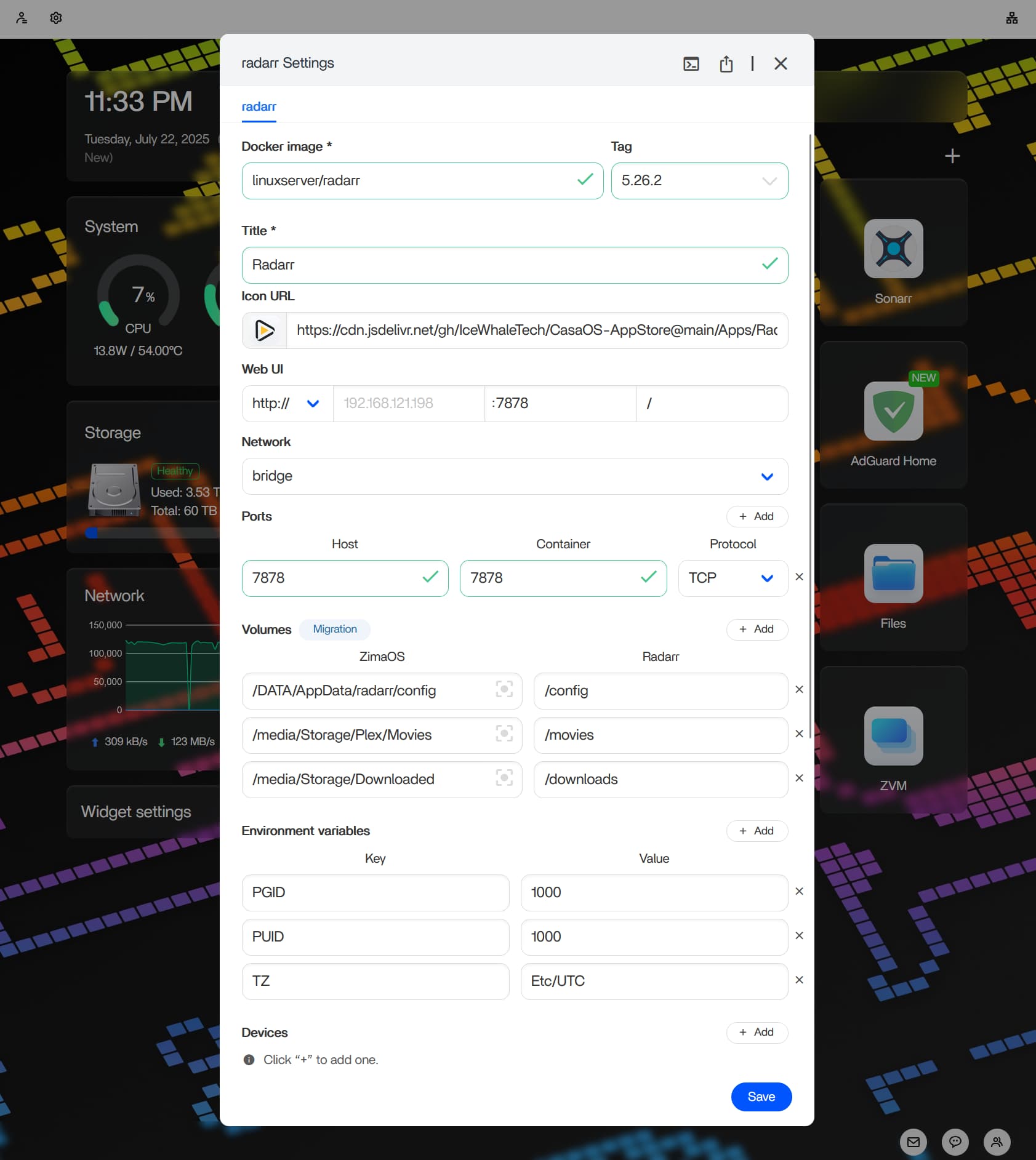
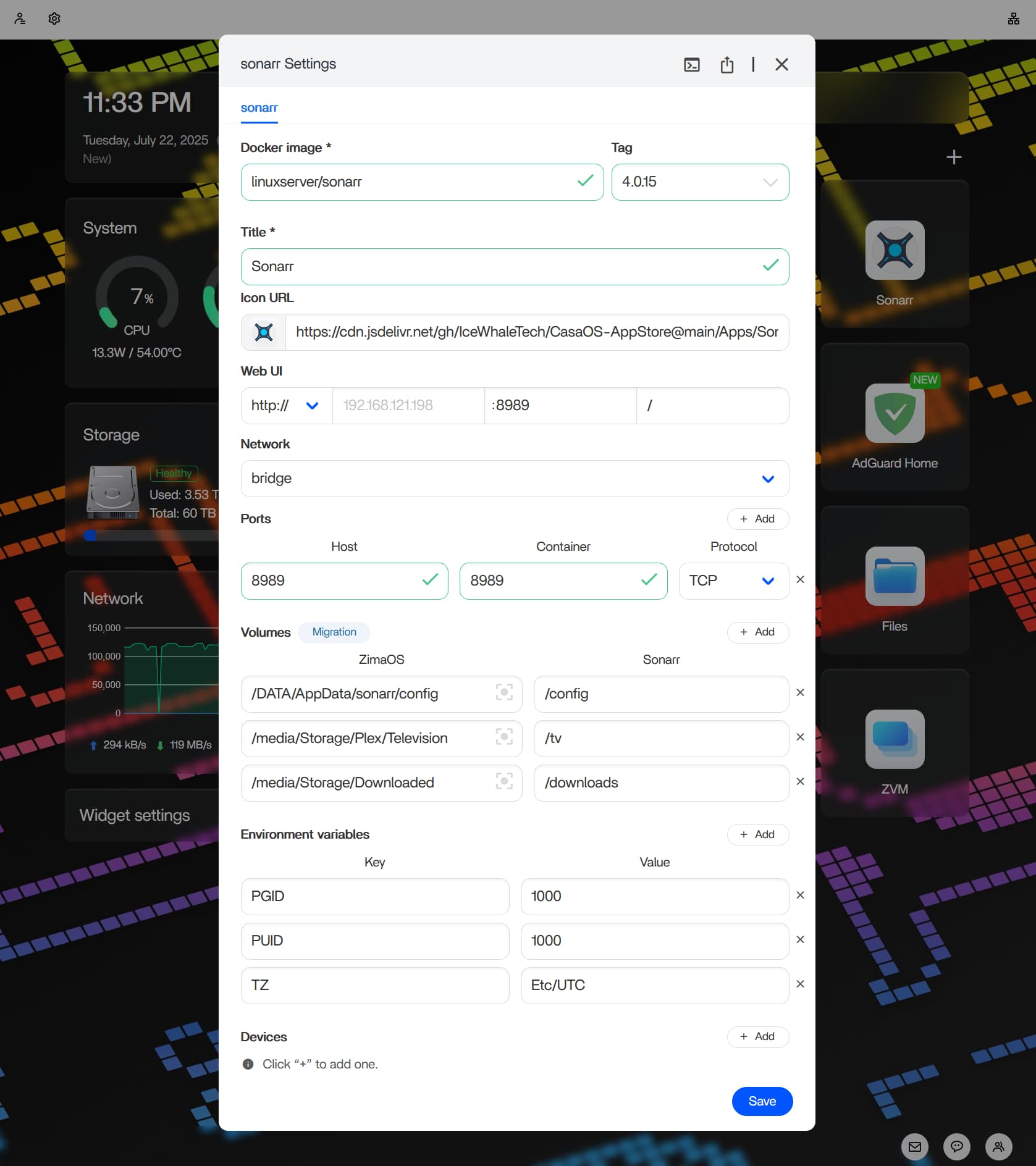
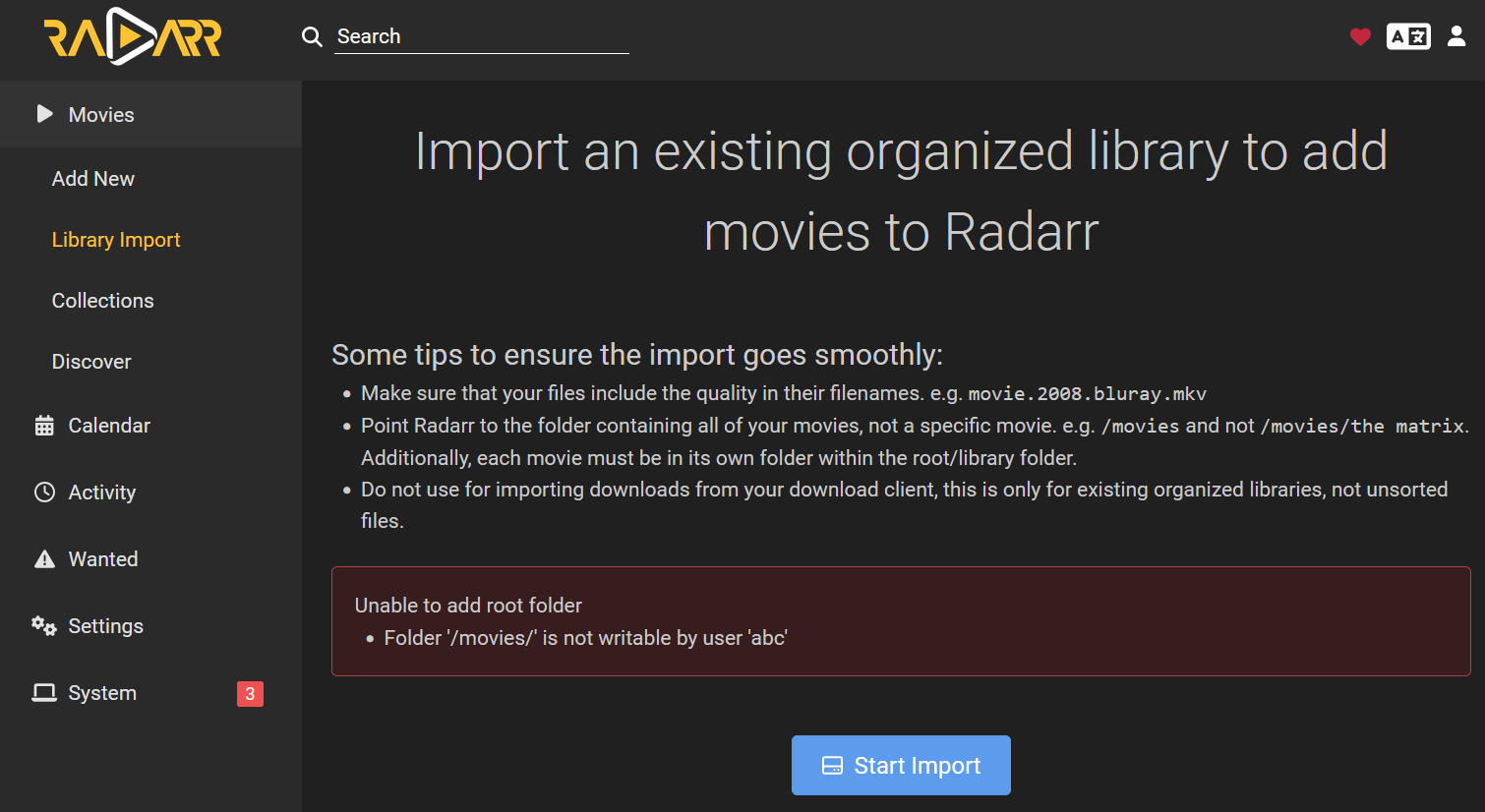
The Sonarr and Radarr Errors
Sonarr returned:
Unable to add root folder
Folder '/tv/' is not writable by user 'abc'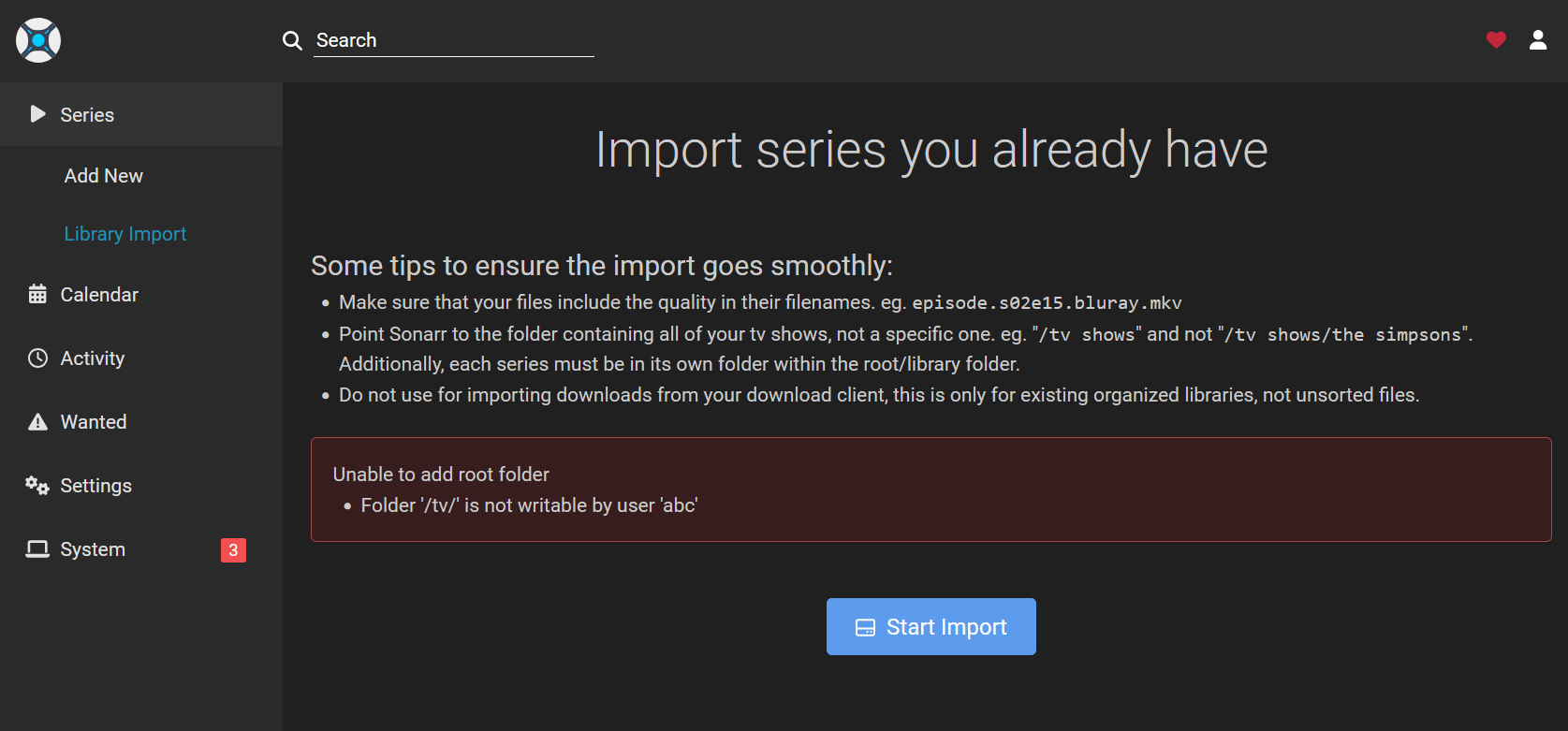
Radarr showed the corresponding problem for the movie path:
The Community Fix: PUID=0 and PGID=0
An IceWhale team member replied:
PUID=0
PGID=0
The original poster changed both values to zero and reported that the issue appeared resolved. This is therefore the confirmed resolution for that specific July 2025 ZimaOS App Store configuration.
However, UID 0 and GID 0 are root-level identities on Linux. Running Sonarr or Radarr with those IDs can allow the application to write to locations far beyond the intended media library if those paths are mounted into the container. Use this as a diagnostic or compatibility workaround only when you understand the access it grants.
Preferred Fix: Match PUID and PGID to the Host Storage Ownership
Current LinuxServer.io Sonarr and Radarr documentation explains the intended design: set PUID and PGID to a host user/group that already owns or has write access to the mapped volume.
LinuxServer's guidance says permission issues arise when a host volume is owned by IDs that do not match the IDs supplied to the container. Their recommended pattern is:
PUID=1000
PGID=1000
only when UID 1000 and GID 1000 are actually appropriate for the media paths. The number 1000 is not inherently correct; it is simply a common first non-root Linux user ID.
See the current LinuxServer Sonarr documentation and LinuxServer Radarr documentation.
How to Inspect the Storage Owner and Permissions
If the ZimaOS Files interface does not show the numeric Linux owner/group values you need, inspect the actual host path from an authorized terminal.
First identify the real host directory mapped to /tv or /movies. Then inspect it:
ls -ldn /REAL/HOST/PATH
stat /REAL/HOST/PATH
The numeric output helps you determine which UID and GID currently own the directory. Do not run these commands against the container-only path /tv from the host unless that is genuinely the host path.
If your intended media-management account is available on the host, you can inspect its IDs with:
id USERNAMEThen set the Sonarr/Radarr PUID and PGID to the IDs that correspond to the access model you deliberately want.
Do Not Blindly chown /tv Inside the Container
Another community reply suggested:
sudo chown abc:abc /tv/That advice is risky when copied without context. A bind-mounted directory's ownership is ultimately represented by numeric IDs on the host. The name abc exists inside LinuxServer containers and may not exist as a meaningful host account. Changing ownership recursively can also affect an entire media library unexpectedly.
Before using chown, confirm:
- the exact host path being changed;
- the desired host UID and GID;
- whether other services such as qBittorrent, SABnzbd, Jellyfin, or SMB users need access to the same files;
- whether a shared group is more appropriate than changing ownership.
Back up important configuration and avoid recursive permission changes until you understand their effect.
Plan Shared Media Permissions Across the Entire ARR Stack
Sonarr and Radarr rarely operate alone. A download client creates files first, then Sonarr or Radarr imports them, and Jellyfin may read the result. If every container uses unrelated IDs and mounts, one application can create files that another application cannot modify.
A cleaner design is to give the applications a common group or compatible PUID/PGID mapping for the shared dataset. LinuxServer also recommends well-planned volume paths so download clients and ARR applications can use hardlinks or atomic moves where appropriate.
For example, instead of treating downloads and media as unrelated isolated mounts, a single shared host data tree can make permissions and path consistency easier to reason about:
/data
├── downloads
├── media
│   ├── movies
│   └── tv
The exact ZimaOS path depends on your storage pool and should not be copied blindly.
When Is the Root-ID Workaround Useful?
Setting PUID/PGID to 0 can be useful as a short diagnostic:
- If the error disappears immediately, the container mount itself is probably correct.
- The remaining problem is then likely host ownership or permission mapping.
Once confirmed, the safer long-term goal is to give the container only the permissions needed for its media and download paths. If your exact ZimaOS storage model makes a non-root mapping impractical, document why root IDs are required and limit the mounted directories carefully.
Restart the Apps After Changing PUID or PGID
PUID and PGID are applied when the container starts. After changing them in ZimaOS:
- Save the app configuration.
- Restart or recreate the Sonarr/Radarr container through ZimaOS.
- Open the root-folder settings again.
- Test creating or selecting the mapped folder.
If the folder remains unwritable, compare the host directory's numeric ownership and mode with the IDs now used by the container.
Sonarr/Radarr ZimaOS Permission Checklist
- Confirm the host media path is mounted into Sonarr or Radarr.
- Confirm the container path is the one being selected inside the app.
- Inspect the host path's UID, GID, and permission bits.
- Check the current
PUIDandPGIDin the ZimaOS app settings. - Prefer IDs that match the intended host owner/group.
- Restart the container after changing IDs.
- Use PUID/PGID 0 only with an understanding of the root-level access it grants.
- Avoid broad recursive
chmod 777or blindchownfixes. - Make sure download clients and media servers use a compatible shared-permission model.
Sonarr and Radarr Permissions FAQ
Who is user abc?
abc is the internal service user name commonly used by LinuxServer.io containers. PUID and PGID determine which numeric host identity that process uses for mapped-volume access.
Why does PUID=1000 and PGID=1000 fail?
Those values only work when UID/GID 1000 has the required access to the host media directory. If your ZimaOS RAID directory belongs to another user or group, the container may be able to see it but not write to it.
Does PUID=0 and PGID=0 fix the problem?
It fixed the original community case, as confirmed by the author. It also grants root-equivalent access inside the mapped filesystem, so it should not automatically be the preferred permanent configuration.
Should I chmod 777 the media folder?
No as a default fix. World-writable permissions are unnecessarily broad and can hide the actual ownership mismatch. Match the container identity and shared group permissions deliberately instead.
Should Sonarr, Radarr, and the download client use the same PUID/PGID?
They do not always need identical user IDs, but they need a compatible ownership/group model for any files and folders they share. Using a consistent shared group is a common way to avoid import and rename failures.


