
What an Endless Network Address Search Can Mean
The original poster installed ZimaOS on an older computer and reached a setup screen that remained on “Searching for network address.” They had already tried Wi-Fi, Ethernet cables, and adapters, and later confirmed that DHCP was enabled on the local network.
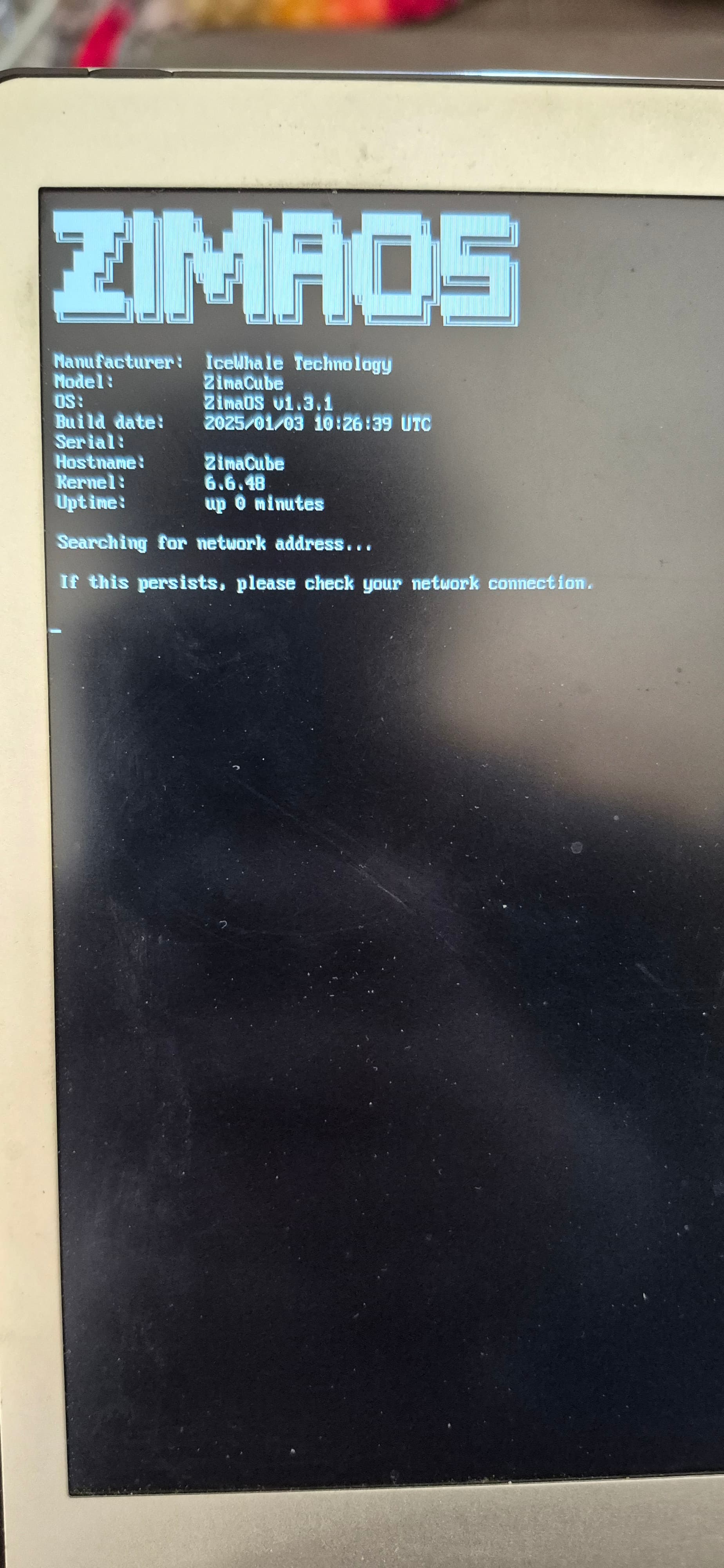
The hardware information visible to ZimaOS identified an Intel Wireless 3165 adapter, but the discussion never produced a model for a recognized wired NIC. IceWhale staff concluded that, in this specific case, ZimaOS was not recognizing the computer's wired network card.
This diagnosis belongs to a May 2025 troubleshooting thread and should not be treated as a complete current hardware compatibility list. For newer releases, check the current ZimaOS information and the current ZimaOS download page.
Initial Setup Required a Wired Network in This 2025 Thread
An IceWhale staff reply stated that initial installation required a wired network. The same discussion also said that ZimaOS had very limited wireless-card support at that time and would not automatically connect to a Wi-Fi network without additional setup.
That means a visible Wi-Fi adapter is not enough to prove that the installation has a usable network path. For this troubleshooting case, the wired interface was the important device to identify.
Check the Wired NIC, Not Only the Wi-Fi Adapter
The original poster repeatedly reported an Intel Wireless 3165, which is a wireless adapter. Staff asked specifically for the wired network-card model and suggested booting another operating system if necessary to identify the Ethernet controller.
Another staff reply suggested looking for NICs based on Intel or Realtek chips, especially models similar to those used in Zima hardware and available for third-party systems. Treat that as historical compatibility guidance from the thread, not as a guarantee that every Intel or Realtek NIC is supported by every ZimaOS release.
Rule Out DHCP Before Assuming a Driver Problem
A community participant asked whether DHCP was active on the local network, and the original poster confirmed that it was. This is an important distinction: an endless address search can be caused by the network failing to assign an address, but it can also occur when the operating system does not recognize the intended wired interface.
A practical troubleshooting order is to confirm that the router or DHCP server is working, use a direct Ethernet connection for setup, and then verify that ZimaOS can actually see the wired NIC.
A Practical Troubleshooting Order
- Connect the ZimaOS machine directly to the local network with Ethernet for initial setup.
- Confirm that DHCP is enabled and working on the router or local network.
- Identify the wired Ethernet controller, not just the wireless adapter.
- If ZimaOS does not show the wired NIC, use another operating system to determine the exact controller model.
- Compare that hardware with current ZimaOS compatibility guidance before buying an adapter or reinstalling the system.
- If the system previously worked and only the dashboard later became unreachable, treat that as a separate problem rather than assuming it is the same installation-time NIC issue.
Do Not Confuse Initial Setup Failure with Later Connectivity Loss
A later participant described a different problem on a Beelink ME mini running ZimaOS 1.4.3: dashboard and client access disappeared even though an SMB share remained reachable. A soft reset restored access on two occasions, but the cause was not established publicly in the thread. IceWhale staff moved that case to private support.
Because the root cause was not published, that report should not be used as proof of a general ZimaOS networking defect or as a universal recommendation to reboot whenever the dashboard is unavailable.
Frequently Asked Questions
Why does ZimaOS stay on “Searching for network address”?
In the original case, IceWhale staff concluded that the wired NIC was not being recognized. DHCP availability and physical connectivity are also worth checking before reaching that conclusion.
Can I complete the initial installation over Wi-Fi?
According to the May 2025 staff response in this thread, initial installation required a wired network, and wireless-card support was very limited at that time. Check current ZimaOS documentation for newer releases before assuming that the same limitation still applies unchanged.
How do I find my wired network-card model?
If ZimaOS only reports the wireless adapter, the staff recommendation was to inspect the machine from another operating system and identify the wired Ethernet controller there.
Does an Intel or Realtek NIC guarantee compatibility?
No. Staff suggested Intel or Realtek-based NICs as a direction to investigate, but the thread does not provide a universal compatibility guarantee for all chipsets or ZimaOS versions.


