
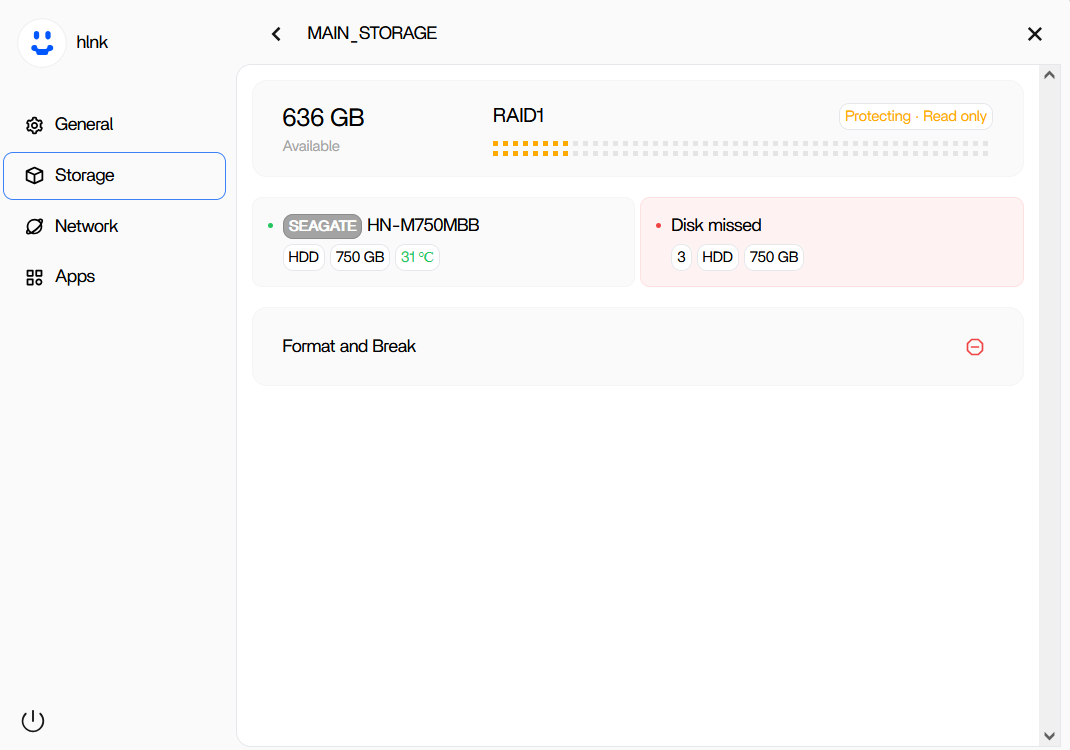
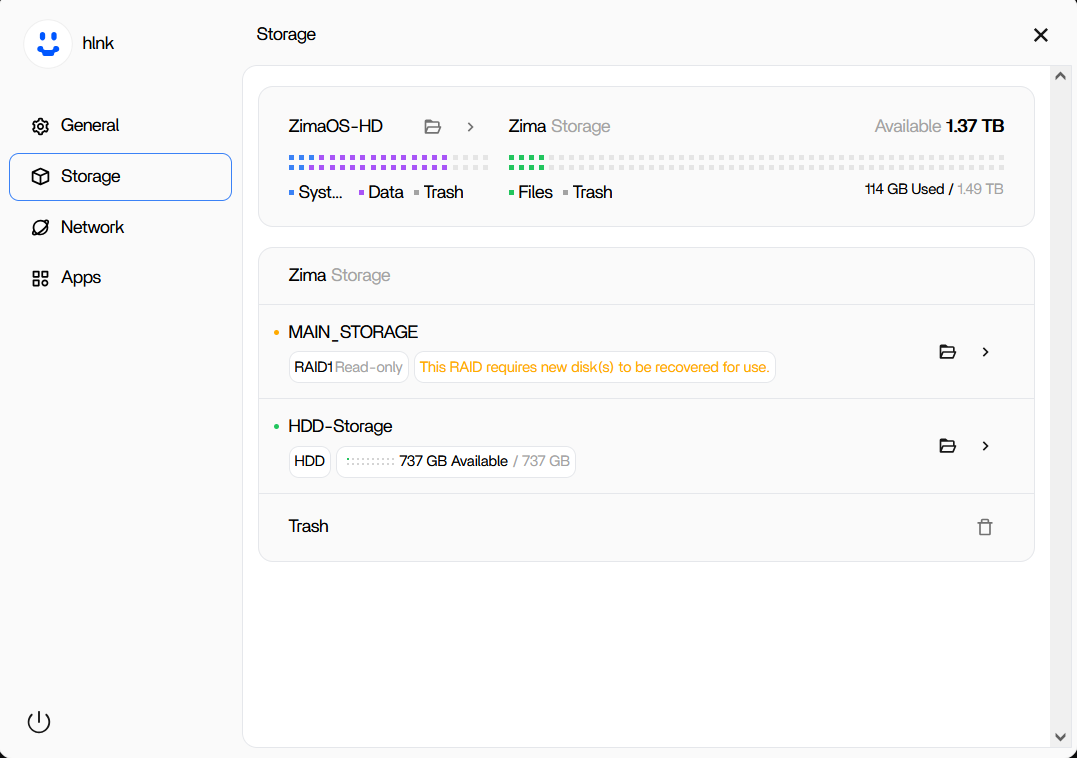
This thread documents a real product gap that later became a built-in feature. In ZimaOS 1.4.1, a two-disk RAID 1 entered degraded/read-only state after one 750 GB drive failed. The replacement disk was visible as a separate healthy HDD, but the Storage UI did not offer a clear “replace and rebuild” action.
IceWhale initially handled affected users through engineering support and CLI diagnostics. Zima-Giorgio then announced that ZimaOS 1.4.4 would provide a more comprehensive RAID 1 repair process. Current official 1.4.4 release notes confirm that RAID1 repair was added for degraded or damaged arrays.
The Source RAID Entered Protecting / Read-Only State
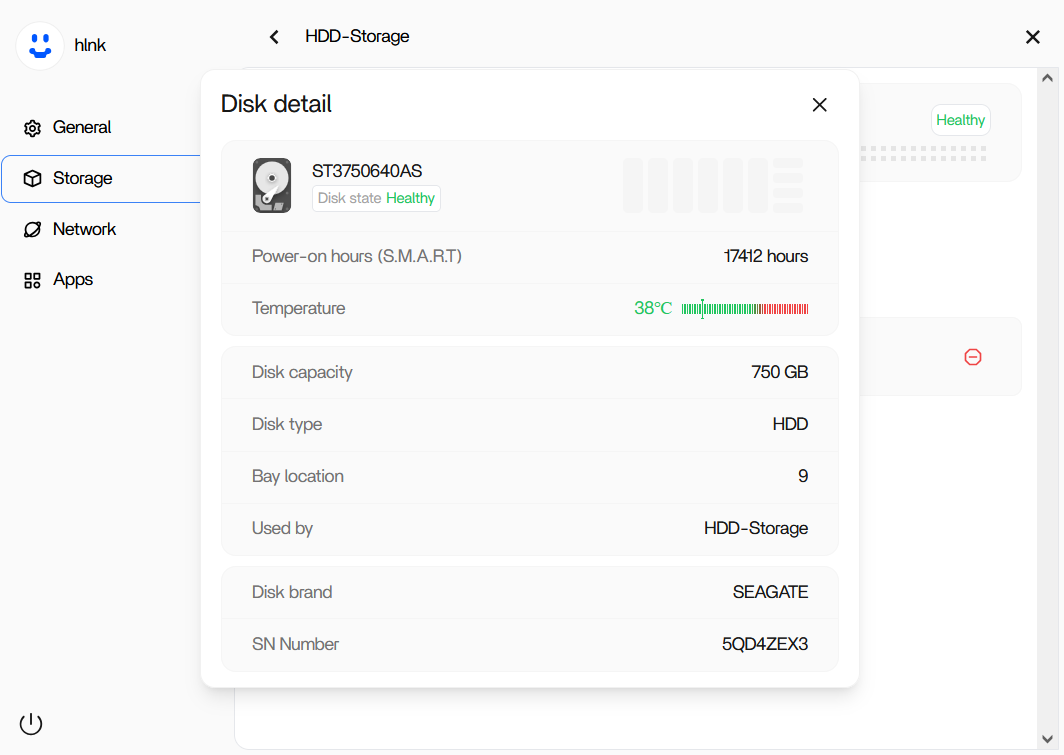
The Replacement HDD Was Detected Separately
The 1.4.1 Storage Page Warned That New Disks Were Required
IceWhale Told Users to Avoid Risky Self-Repair
Zima-Giorgio offered engineering assistance and asked experienced users to collect lsblk and mdadm -D /dev/md0 output. He did not publish a destructive rebuild recipe.
After engineers repaired a later user's array privately, he explicitly warned against performing root-level RAID operations without sufficient knowledge or direct engineering instruction.
ZimaOS 1.4.4 Added RAID 1 Repair to the WebUI
On September 4, 2025, Zima-Giorgio said 1.4.4 would provide a more comprehensive RAID 1 repair process. When another user asked for CLI help on 1.4.4, Giorgio replied that 1.4.4 could perform the repair through the WebUI.
Current IceWhale release notes confirm: “Added RAID1 repair feature: repair can be performed when the RAID1 array is degraded or damaged.”
Use the official ZimaOS 1.4.4 RAID 1 repair capability instead of reproducing old root/mdadm experimentation.
1.4.4 Also Fixed Previously Used Disks During Recovery
The same release notes say ZimaOS fixed an issue where previously used disks could not be selected during RAID recovery. That is directly relevant to replacement-drive workflows where a disk may already contain old signatures or have been initialized separately.
Use a Replacement Disk at Least as Large as the Failed Member
A RAID 1 rebuild needs a replacement member large enough for the array's existing data layout. Nominally identical “750 GB” or “2 TB” drives can differ slightly in sector count, so a drive with less usable capacity may be rejected.
Back Up Readable Data Before a Risky Recovery When Possible
A degraded RAID 1 has already lost redundancy. If the remaining disk fails during rebuild, the array may be lost. Copy irreplaceable data to an independent drive before performing invasive recovery whenever the array is readable and the data is not already backed up.
Do Not Click Create RAID Over Existing Member Disks
If ZimaOS shows old RAID members as unused or separate disks, creating a new RAID can overwrite metadata. Determine whether you are repairing an existing degraded array or intentionally creating a new empty array before proceeding.
A RAID 1 Rebuild Is a High-Load Period for the Surviving Disk
During a rebuild, ZimaOS must read the surviving member extensively while writing the replacement. If the remaining old disk is already marginal, this is one of the times it is most likely to reveal unreadable sectors or other failure.
That is why an external backup of irreplaceable data should come before the rebuild whenever the degraded array is still readable.
Do Not Format the Replacement Just Because It Appears as Separate Storage
In the source case, the user had already formatted the new disk and ZimaOS displayed it as HDD-Storage. Later 1.4.4 fixes specifically addressed disks that had been used previously being unavailable for RAID recovery.
On a current system, follow the RAID repair workflow and let ZimaOS prepare the selected replacement. Formatting or creating another storage space first can add metadata that the recovery UI then has to work around.
Read-Only Diagnostics Are Safer Than Manual RAID Mutation
The commands Zima-Giorgio requested—lsblk and mdadm -D /dev/md0—were diagnostic reads used to identify the device and array state. That is very different from commands that add members, zero superblocks, force assembly, or recreate arrays.
If support asks for CLI output, collect the requested read-only information exactly and avoid improvising destructive mdadm operations from unrelated Linux tutorials.
Verify the Array After Rebuild Completes
Do not consider recovery complete the moment the replacement disk is accepted. Wait for synchronization/rebuild to finish, confirm the RAID returns to healthy/protecting status, open representative files, and verify the applications that depend on the pool.
Keep the external backup untouched until those checks pass.
Prepare for the Next Disk Failure While the Array Is Healthy
RAID 1 gives time to replace a failed member; it does not remove the need for backup. Keep an independent copy of important data, record disk models/serials, and periodically check health so a degraded state is noticed before a second member fails.
RAID 1 Recovery FAQ
Was RAID 1 repair missing from the ZimaOS 1.4.1 UI?
The source user could see the degraded array and replacement disk but had no normal repair action.
Did IceWhale add a WebUI repair flow later?
Yes. IceWhale said 1.4.4 could repair RAID 1 through the WebUI, and the official release notes list RAID1 repair as a new feature.
Should current users run root mdadm commands from the old thread?
No. IceWhale explicitly warned users not to perform root-level RAID operations unless they understood the risks or were instructed by engineers.


