
qBittorrent cannot write to an external ZimaOS drive just because the drive appears in Files. The qBittorrent container must first receive that host folder as a Docker volume, and qBittorrent must then use the container-side path—not the physical ZimaOS host path—as its save location.
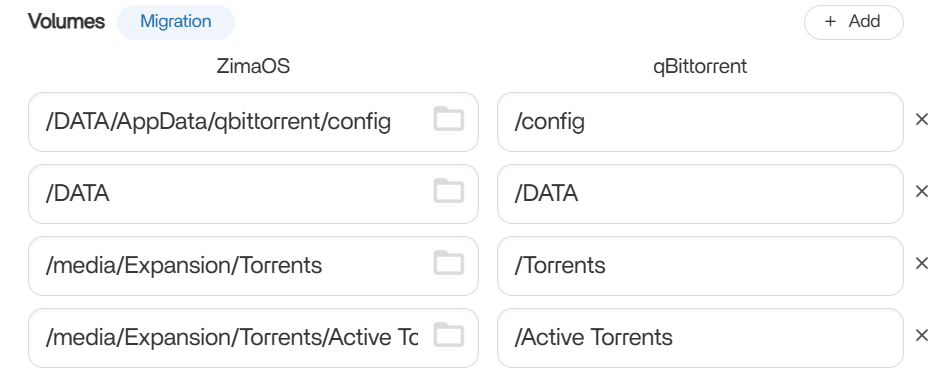
The source thread points in the right direction but does not show a final user-confirmed fix. The screenshots are useful because they reveal the intended architecture: external host folders mapped to simple paths such as /Torrents and /Active Torrents.
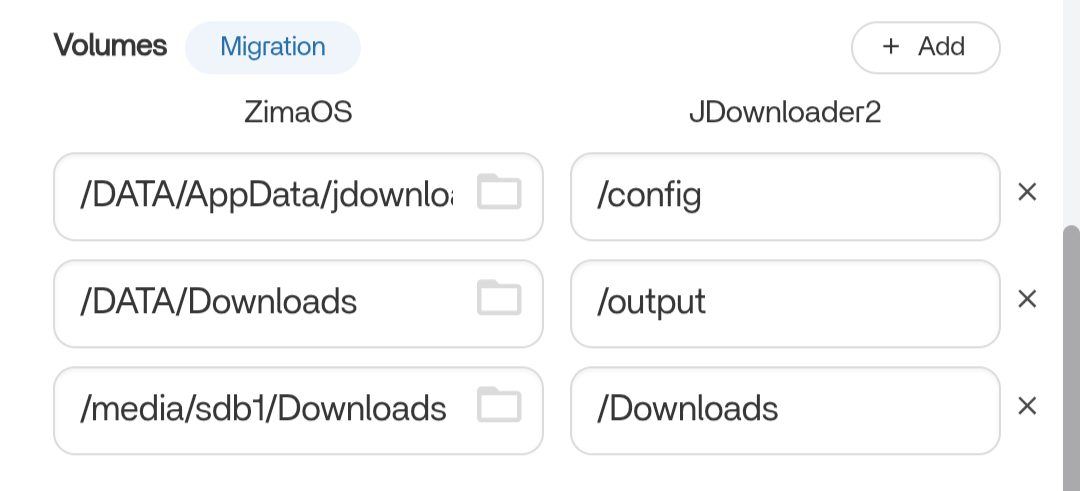
A Docker Volume Mapping Has Two Sides
For example:
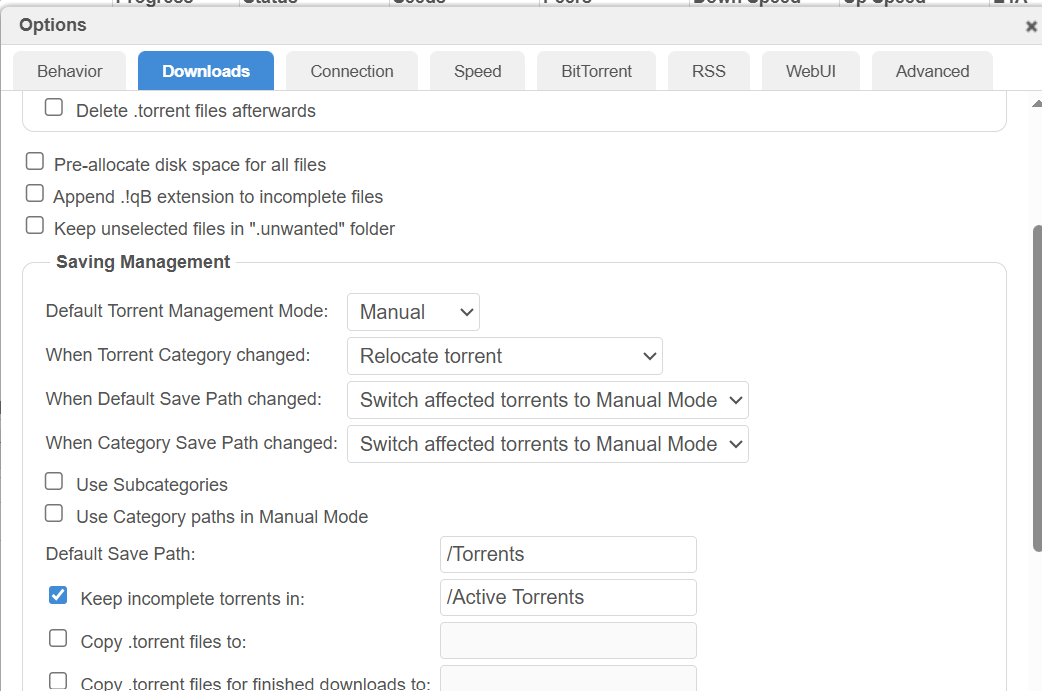
/media/Expansion/Torrents → /TorrentsZimaOS uses the left-hand path. qBittorrent uses the right-hand path. Inside qBittorrent, the default save path should therefore be /Torrents, not /media/Expansion/Torrents.
The Source User Mapped Torrent Folders into qBittorrent
The ZimaOS Volume Mapping Must Match Those Container Paths
Current ZimaOS Documentation Uses the Same Host-vs-Container Model
IceWhale's current Docker path documentation explicitly explains that an application should use the path mounted inside its container, while the ZimaOS side points to the real storage folder.
Use the current ZimaOS Docker volume model.
If the Path Exists but Torrents Still Error, Check Write Permission
From the qBittorrent container/terminal, verify the mapped directory exists and can create a disposable file. A valid path with no write permission produces a different failure from a missing volume.
Avoid solving every permission problem with permanent 0777 or root. Match the container identity/group to the target folder when possible.
Check the External Drive Filesystem
Current ZimaOS supports common USB filesystems including NTFS, exFAT, ext4, and Btrfs. Filesystem semantics can affect ownership and permissions, especially on NTFS/exFAT.
Incomplete and Completed Torrents Can Use the Same External Drive
If you enable “Keep incomplete torrents in,” map that path too. Otherwise qBittorrent may try to write incomplete data to an unmapped internal path even though the completed-download path is correct.
Keep Large Torrent Payloads Off the 128 GB System Drive
The source use case is exactly where external storage makes sense. Keep qBittorrent configuration/AppData small and persistent, while placing multi-terabyte payloads on the external storage device.
Test the Path from Inside the qBittorrent Container
A fast way to separate path and permission problems is to open the app terminal and inspect the container-side folder. If /Torrents does not exist, the Docker volume mapping is wrong. If it exists but a small test file cannot be created, the mapping works and the next layer is permissions/filesystem behavior.
Make Sure the External Drive Is Mounted Before qBittorrent Starts Writing
If an external USB disk is disconnected or fails to mount, a stale host path can cause an app to write into an unintended local directory instead. After reboot or reconnect, verify the drive is present in ZimaOS Storage/Files before starting large downloads.
Category Paths Must Also Stay Inside Mapped Container Storage
qBittorrent categories can override the default save path. A torrent may therefore error even when /Torrents is correct if its category points to another unmapped path. Review category-specific save locations when only some torrents fail.
Existing Torrents May Keep Their Old Save Path
Changing the global Default Save Path does not always rewrite every existing torrent's location. For already-added torrents, inspect the torrent's current save path and use qBittorrent's managed “set location”/relocation behavior rather than moving partial files behind its back.
External qBittorrent Drive FAQ
Should qBittorrent use the full ZimaOS host path as its save path?
Normally no. It should use the container-side path created by the Docker volume mapping.
Does the source contain a confirmed final fix?
No. The thread ends after the user posts their settings.
What should be checked after the volume path?
Verify the mapped directory exists inside the container and that qBittorrent's runtime identity can write to it.


