
The source qBittorrent problem had two layers. First, qBittorrent must save to a path that exists inside the container. Second, the qBittorrent process must have write permission to the host folder behind that container path. The user had already solved the mapping layer—the folder was visible—but the execution log still showed Permission Denied.
The community fix created a dedicated download folder and used a very broad chmod -R 777 as a quick permission test. The original poster confirmed that downloads then worked. That result proves the failure was a write-permission problem, but 777 should not be the permanent recommendation on a current system.
The Host Path and qBittorrent Path Are Different Names for the Same Storage
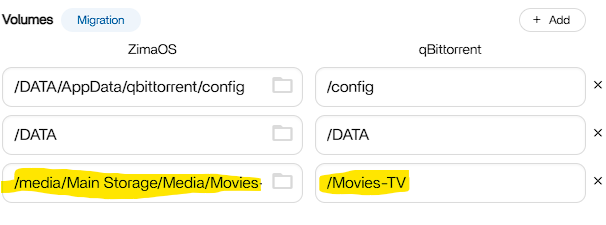
/Movies-TV.The source used:
-
Host:
/media/Main Storage/Media/Movies -
Container:
/Movies-TV
Inside qBittorrent, the save path must use /Movies-TV/..., not the raw host path.
Visibility Proved the Mapping Worked; Permission Denied Proved Writes Did Not
The user's qBittorrent execution log reported Permission Denied. That is different from No such file or directory:
- No such file/directory: mapping or path is probably wrong.
- Permission denied: the container can reach the path but cannot write to it.
A Dedicated Download Folder Is Easier to Permission Correctly
The community created a subfolder such as:
/media/Main Storage/Media/Movies/qbittorrent-downloadsand set qBittorrent's container-side destination to:
/Movies-TV/qbittorrent-downloadsThis is better than granting a downloader write access to an entire media tree if it only needs one staging directory.
chmod 777 Was a Diagnostic Shortcut, Not a Good Final Permission Model
The community reply used recursive chmod 777 and the original poster confirmed it solved the problem. That establishes causality, but world-writable permissions let every local process identity write to the directory.
A safer permanent fix is to identify the qBittorrent container's runtime UID/GID and grant only that user/group the required write access.
Check Ownership Before Changing It
Useful read-only checks include inspecting the folder owner/group and mode before modifying anything. If qBittorrent runs as a configurable PUID/PGID, align those values with a host group that has write permission to the downloads directory.
Avoid recursive ownership changes across an entire shared media library when only one folder needs to be writable.
Current ZimaOS Makes App Volume Paths Explicit
Current IceWhale documentation explains that App Store applications run inside containers and their important folders are mapped to real host storage. Those mappings can be viewed and edited from app settings.
Use the current ZimaOS Docker path model before editing permissions.
Separate the Download Staging Folder from the Final Media Library
A common architecture is:
- qBittorrent writes to a dedicated downloads folder;
- Sonarr/Radarr or another organizer imports completed files;
- Jellyfin/Plex reads the final media library, often read-only.
This gives each application only the access it needs.
Test with One Small Download First
After changing the mapping or permission:
- restart qBittorrent;
- confirm the save path resolves inside the container;
- download a small legal test file;
- check the execution log;
- verify the file appears on the intended host storage.
qBittorrent Download Path FAQ
Was the source volume mapping itself wrong?
The community concluded it was visible/correct; the remaining error was write permission.
Did chmod 777 make the source case work?
Yes, and the original poster confirmed success. It should be treated as a broad diagnostic shortcut rather than the preferred permanent permission.
Which path should qBittorrent use internally?
The container-side path defined in the ZimaOS volume mapping, such as /Movies-TV/qbittorrent-downloads.


