
If qBittorrent can see a folder in ZimaOS but every torrent immediately fails, changing only the download path inside qBittorrent is not enough. The host folder must first be mounted into the Docker container, and the user running qBittorrent inside that container must have permission to write to the mounted host directory.
That is what happened in the January 2026 IceWhale Community thread. The original poster mapped a media folder to /Movies-TV, but the qBittorrent Execution Log showed Permission denied. A dedicated subfolder plus writable host permissions resolved the source case. The community used chmod -R 777 as a quick fix, but current LinuxServer guidance favors matching PUID/PGID to host ownership rather than leaving the directory world-writable.
Host Path vs Container Path
A ZimaOS path is not automatically visible inside qBittorrent. A normal mapping is:
Host: /DATA/Downloads
Container: /downloads
Then qBittorrent should save to a container path such as /downloads/qbittorrent.
The Original Mapping
Host: /media/Main Storage/Media/Movies
Container: /Movies-TV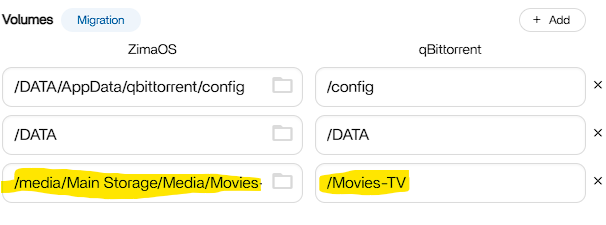
Create a Dedicated Download Folder
The working community layout created:
/media/Main Storage/Media/Movies/qbittorrent-downloadsand used this inside qBittorrent:
/Movies-TV/qbittorrent-downloadsInspect Permissions
ls -ld "/media/Main Storage/Media/Movies"
ls -ld "/media/Main Storage/Media/Movies/qbittorrent-downloads"
If the directory exists but the log says Permission denied, the container identity lacks write access.
The Community-Confirmed Quick Fix
chmod -R 777 "/media/Main Storage/Media/Movies/qbittorrent-downloads"The original poster confirmed this worked. However, 777 grants read/write/execute broadly, so use it as a diagnostic or temporary workaround rather than the ideal permanent permission model.
Preferred Long-Term Fix: Match PUID and PGID
The current LinuxServer qBittorrent image supports PUID and PGID specifically to avoid bind-mount permission conflicts. Its documentation recommends making the host directory ownership compatible with the IDs supplied to the container.
LinuxServer qBittorrent documentation
PUID=1000
PGID=1000
Those values are only examples. Check the intended host account with id USERNAME and use the actual IDs or a compatible shared group.
Restart and Test
- Save the volume mapping.
- Restart/recreate qBittorrent.
- Set the Default Save Path to the mapped container path.
- Start a small test download.
- Read Tools → Execution Log if it still fails.
What the Errors Mean
- Permission denied: the path exists but is not writable.
- No such file or directory: the container path is missing or incorrectly mapped.
qBittorrent Download Path FAQ
Should qBittorrent use the ZimaOS host path?
No. It should normally use the container-side path defined in the volume mapping.
Did chmod 777 solve the original thread?
Yes. The author confirmed it worked, but narrower PUID/PGID or group permissions are safer long term.
Why can qBittorrent see a folder but not write to it?
Docker mount visibility and filesystem write permission are separate. A mapped folder can be readable but not writable by the container user.


