
ZimaOS did not expose a dedicated “all application ports” dashboard in this January 2026 thread, so users fell back to Docker-level inspection and a community App Store tool called Dockpeek. Dockpeek can provide exactly the overview the original poster wanted: container name, image, published ports, status, and related metadata in one table.
The thread also captured an important Docker-specific failure. One user followed their normal habit of changing third-party app volume paths to /DATA/AppData/... and accidentally replaced Dockpeek's special Docker socket mount. The app opened but displayed no containers. Reinstalling it without changing the socket volume restored the list.
A Port Inventory Has Two Different Meanings
For Docker apps, it is useful to distinguish:
- container port: the port the application listens on inside Docker;
- host port: the port ZimaOS exposes on its own network interface.
A mapping such as host 3420 → container 8000 means users connect to the ZimaOS host on 3420 even though the application listens on 8000 inside its container.
Dockpeek Gives a GUI View of Container Ports
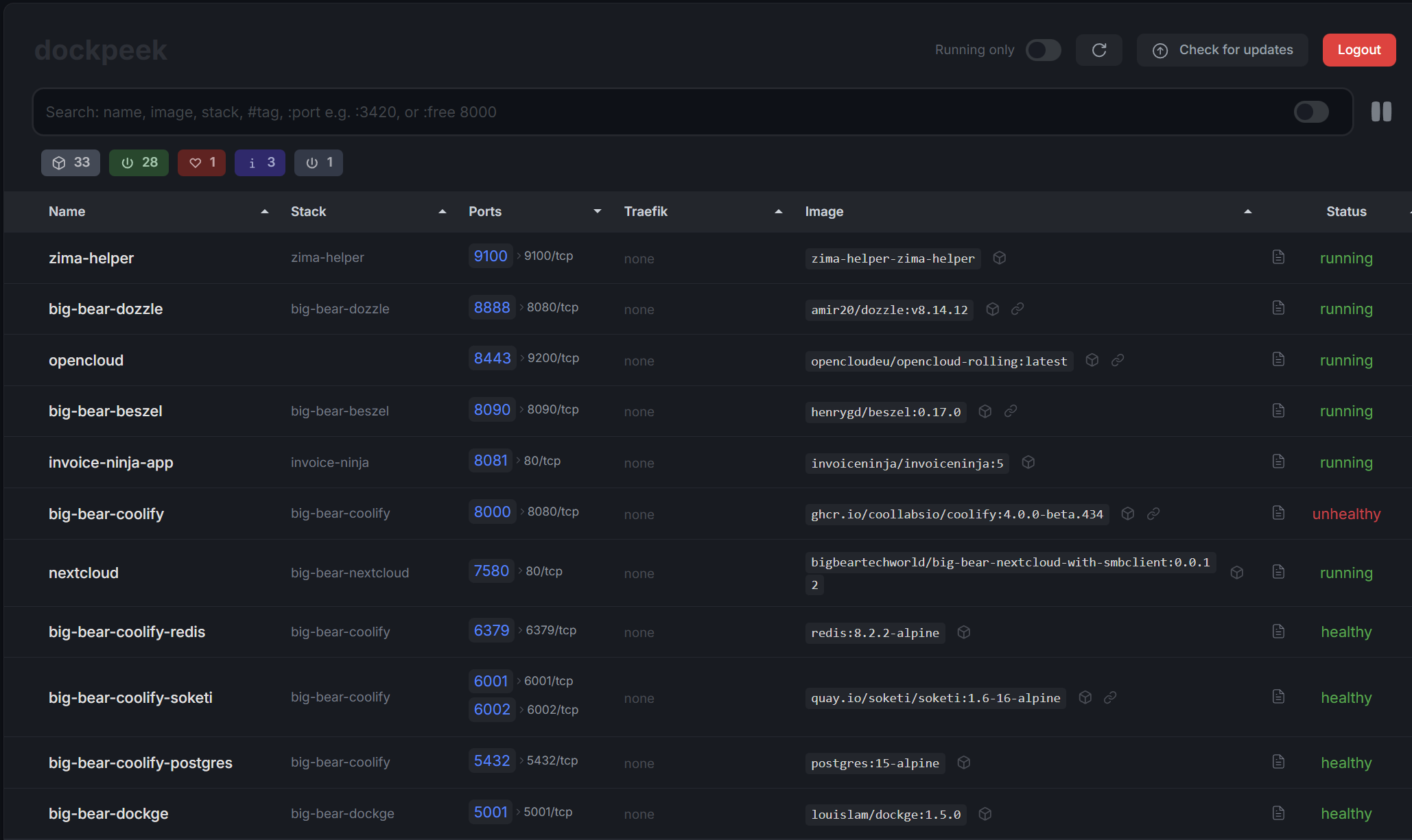
The source screenshot shows containers with published ports such as 9100, 8888, 8443, 8090, 8081, and 7580 alongside the corresponding application names and images.
An Empty Dockpeek Screen Does Not Mean Docker Has No Containers
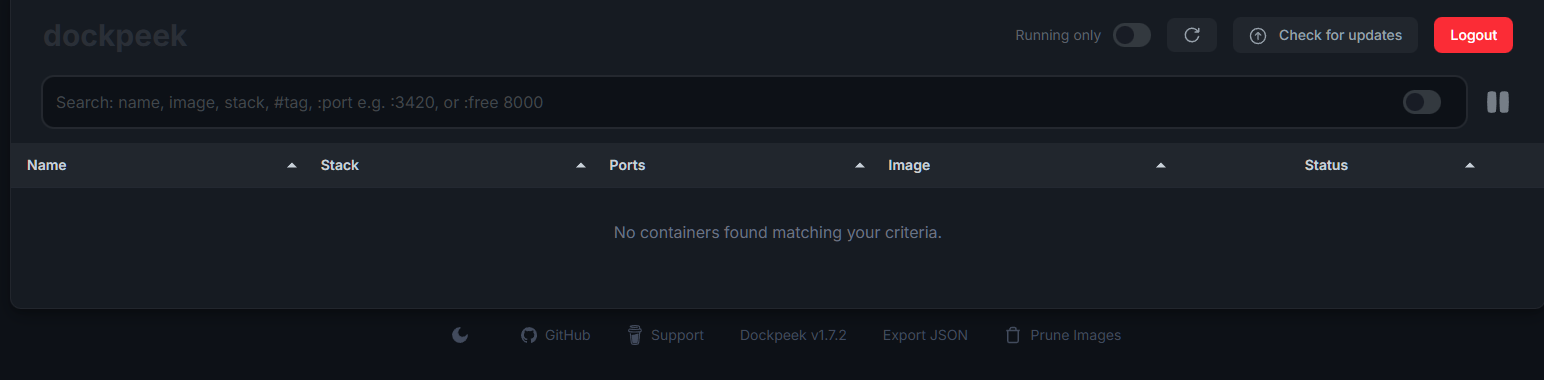
The problem was not Docker discovery itself. Dockpeek needs access to Docker's Unix socket so it can query the daemon.
Keep /var/run/docker.sock Mapped to the Same Container Path
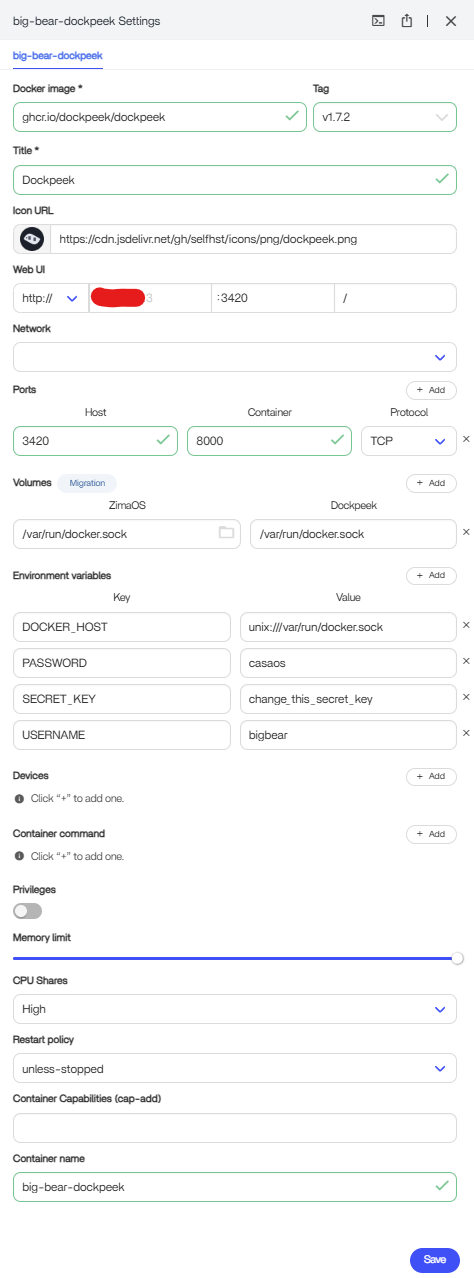
DOCKER_HOST value to enumerate containers.This volume is not application data. Replacing it with a normal AppData folder removes Dockpeek's connection to the Docker daemon.
Not Every Volume Should Be Migrated to AppData
The user explained that third-party App Store packages had trained them to scrutinize volume paths and move persistent data into standard AppData locations. That is usually sensible for application databases and configuration, but special mounts such as Docker sockets, devices, certificates, or host system files have a different purpose.
Current ZimaOS explains how normal application data maps to host storage. Use that model for persistent data, but do not rewrite a special system mount unless you understand why the container needs it.
A Port Already in Use Must Be Traced to Its Current Owner
The original poster specifically wanted to free ports 80 and 443 after a previous Nginx installation. A community reply speculated that ZimaOS itself was using at least port 80. The thread did not contain an IceWhale-confirmed rule that both ports are permanently reserved on every version.
Before deleting an app or changing a dashboard port, identify the actual listener or Docker mapping on the current system.
Docker CLI Can Also Produce a Port Inventory
A community member shared Docker commands that list container names, images, and port assignments and can export them to a text file. Because those commands were community-generated rather than IceWhale instructions, this page keeps the idea rather than presenting the exact shell pipeline as an official ZimaOS procedure.
For users who prefer the terminal, Docker's container inspection provides the underlying data that Dockpeek visualizes.
Docker Socket Access Is Powerful
A container that can access /var/run/docker.sock can inspect and potentially control the Docker daemon depending on what the application does. Treat Dockpeek and similar management tools as privileged infrastructure rather than ordinary web apps.
Do not expose the Dockpeek WebUI publicly without authentication and an appropriate access-control layer.
ZimaOS Port View FAQ
Can Dockpeek show which ZimaOS app owns a published Docker port?
Yes. The source screenshot shows container names, images, port mappings, and status together.
Why did Dockpeek show no containers for one user?
They changed the required /var/run/docker.sock volume. Reinstalling without changing that special mount restored the list.
Should every third-party app volume be moved into /DATA/AppData?
No. Persistent app data often belongs there, but special mounts such as the Docker socket must keep their intended host resource.


