
The strongest evidence in this source thread is not the 600 MB/s Files screenshot—it is the later direct-storage test. A user whose ZimaOS WebUI copy stayed around 600–650 MB/s measured roughly 2.3 GB/s direct writes with dd and about 2.2 GB/s writes with fio. That rules out an OS-wide “NVMe is capped to SATA III” explanation for that machine.
The more defensible conclusion is that the slow number belonged to the internal Files copy workflow or to copy-workload effects such as metadata, Btrfs CoW, buffering, or single-thread limits—not to the physical NVMe path itself.
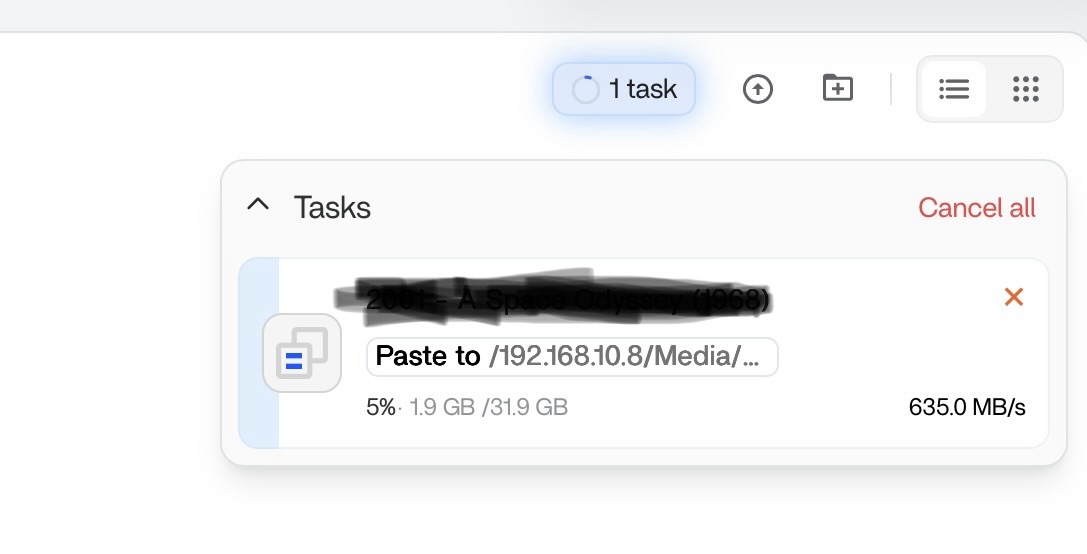
The Source Reproduced the Limit Across Several Copy Paths
Dave reported similar behavior across single NVMe-to-NVMe, NVMe-to-RAID0, RAID0-to-single NVMe, and 10GbE workflows. Another user later said Windows-to-ZimaOS SMB could reach full 10GbE while internal Files copy still stayed around 650 MB/s.
Direct dd Writes Reached About 2.3 GB/s
The source used dd if=/dev/zero of=/DATA/testfile bs=1G count=10 oflag=direct status=progress and posted a result near 2.3 GB/s—far above SATA III practical throughput.
fio Also Reached About 2.2 GB/s
The source's fio run reported roughly 2163 MiB/s / 2268 MB/s writes. Even though the selected synchronous engine effectively capped queue depth at one, the result still proved the storage stack could exceed the Files copy number by several times.
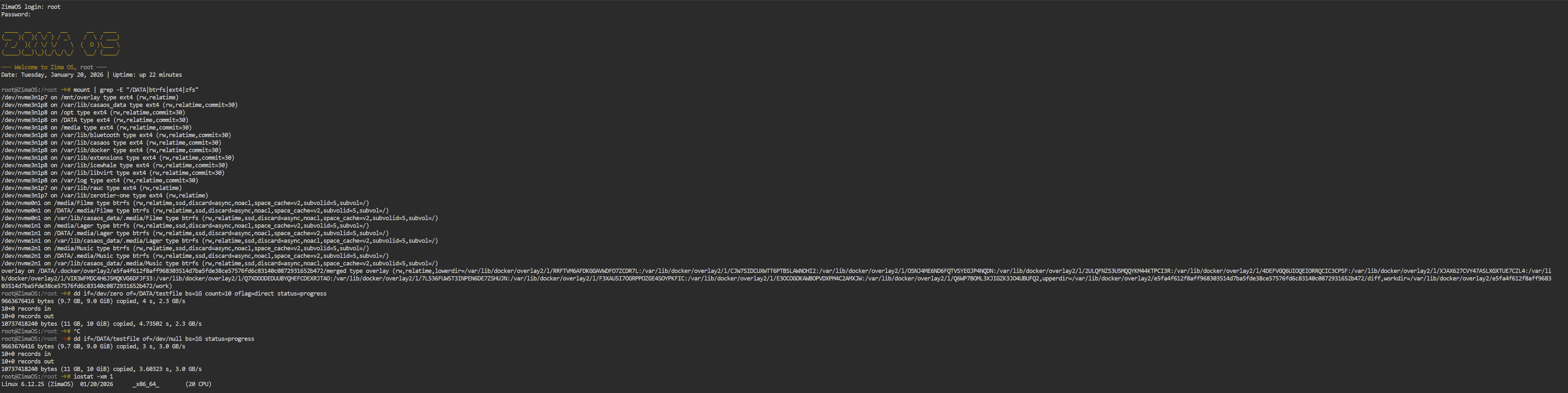
Treat the Source dd Read Number Carefully
The source also measured around 3.0 GB/s reading the freshly written test file to /dev/null. Because that read did not explicitly use direct I/O or flush page cache, caching may influence the number.
Low Overall CPU Does Not Rule Out a Single-Thread Bottleneck
A userspace copy pipeline can saturate one core while total CPU remains modest on a many-core system. Monitor per-thread CPU and disk utilization during the slow Files copy.
Compare the Same Large File Across CLI and Files
Use the same source, destination and large test file for Files and CLI copies, then compare with a disposable direct-I/O benchmark. This separates UI/backend copy overhead from raw device capability.
File Count and Btrfs Metadata Can Change Real Copy Speed
Thousands of small files require repeated metadata operations, and Btrfs copy-on-write behavior can change the cost of an internal copy.
Do Not Call This a Universal Current ZimaOS Throttle
The source provides strong evidence of a historical Files/internal-copy bottleneck on multiple systems. It does not establish that current ZimaOS 1.7.1 still has exactly the same ceiling on every hardware and filesystem combination.
An Internal Copy Can Read and Write the Same Storage at Once
If the source and destination are on the same physical NVMe or the same RAID pool, the drive must service reads and writes simultaneously. The visible copy throughput is therefore not comparable with a one-direction sequential write benchmark.
Record the physical source and destination devices before comparing results. “Internal copy” describes the software path, not necessarily two independent SSDs.
Check PCIe Link Width and Generation Before Comparing Marketing Numbers
A high-end NVMe can be limited by a PCIe x1/x2 link, an older generation, chipset lane sharing, or a platform slot wired differently from its physical connector size. A raw benchmark that reaches 2+ GB/s already rules out a 600 MB/s ceiling, but it may still be below the SSD's desktop-spec maximum for legitimate topology reasons.
Sustained Copies Can Trigger SSD Thermal or SLC-Cache Limits
Short benchmarks and long file copies exercise SSDs differently. A drive may start very fast and then fall after its pseudo-SLC cache fills or temperature rises. Monitor NVMe temperature and sustained throughput over a long enough window before attributing every decline to Files.
Page Cache Can Make Some Tests Look Faster Than the Device
The source's direct write result is strong evidence because it used direct I/O. Read tests performed immediately after writing can be influenced by memory cache unless the benchmark explicitly bypasses it.
For repeatable comparisons, use a benchmark configuration that states whether direct I/O is enabled and keep the test file size large enough to reduce cache distortion.
Re-Test the Current Files Pipeline Before Treating 600 MB/s as a Fixed Product Limit
The thread spans ZimaOS versions before the current release. If Files still appears capped today, reproduce it with the same large file, same source/destination, and a current CLI/direct-I/O comparison. That produces actionable evidence instead of carrying an old numeric ceiling forward indefinitely.
NVMe Speed FAQ
Did the source prove ZimaOS limits NVMe to SATA speed?
No. Direct dd and fio writes exceeded 2 GB/s on the same system.
What did the source most strongly implicate?
The internal WebUI/File Manager copy pipeline or workload overhead rather than the NVMe device itself.
Should the freshly written dd read result be treated as pure disk speed?
Not necessarily. Without direct read I/O/cache control, page cache can influence the result.


