
The source produced a working local reverse-proxy design: move the ZimaOS dashboard away from port 80, reserve ports 80/443 for the reverse proxy, create local DNS records, and point Nginx proxy targets at the ZimaOS server's static LAN IP plus each app's real port.
The key design choice was to avoid a DNS loop. The user's Bind9 records gave friendly names such as food.sdak, while the Nginx upstream destination remained the ZimaOS static IP—for example 10.66.66.30:9925—instead of proxying the hostname back through itself.
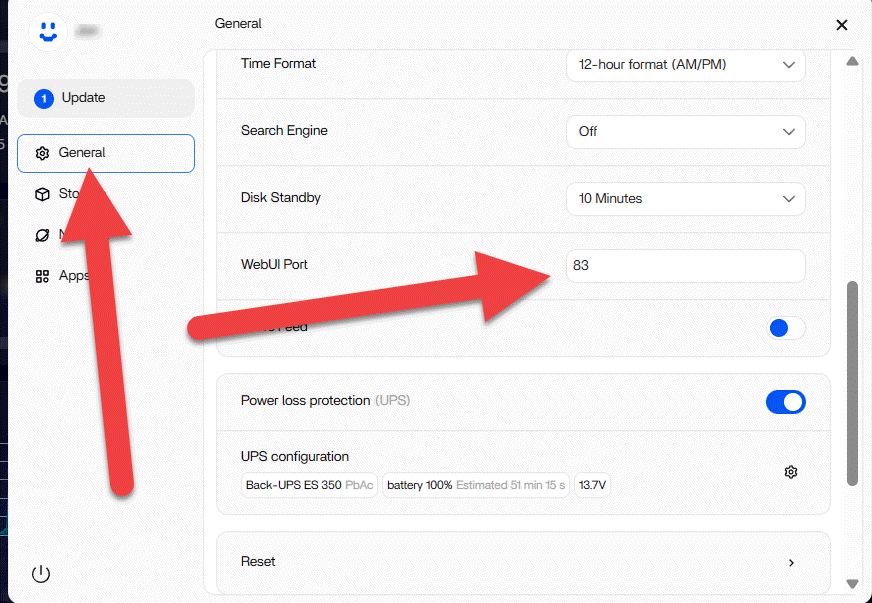
Move the ZimaOS WebUI Off Port 80
In the source, the user changed the ZimaOS WebUI to port 83. The exact alternate port is not important; choose one that is unused and document it.
After changing it, confirm direct access first:
http://ZIMA_LAN_IP:83Do not add Nginx until the new direct dashboard URL works.
Port 443 May Need the Same Planning
The community reply noted that ZimaOS HTTPS settings live under Developer Mode and can conflict with a reverse proxy that also wants 443. Decide which service should own 443 before enabling both.
If Nginx terminates HTTPS, the backend can remain private HTTP on the LAN unless your security model requires TLS on both hops.
Use a Stable LAN IP for the Reverse-Proxy Target
The source user assigned a static IP to the ZimaOS host and used that address in the Nginx upstream configuration. Current ZimaOS supports DHCP or Manual static network configuration under Settings → Network.
See the current ZimaOS static-IP workflow.
Create Local DNS Records for Friendly Names
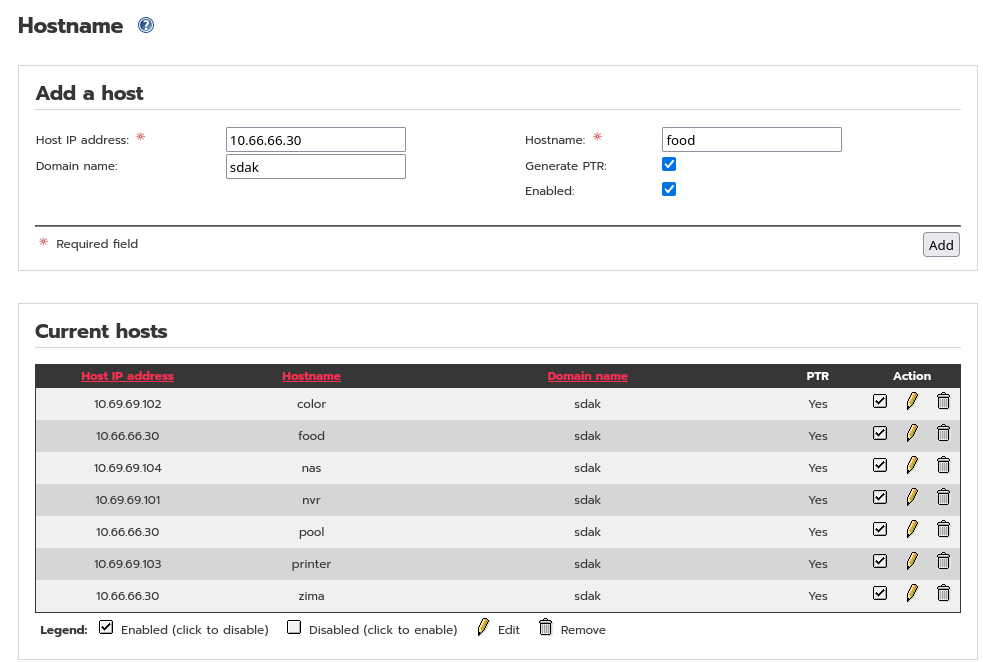
For a home-only DNS namespace, avoid using .local for ordinary unicast DNS when possible because that suffix is conventionally used by mDNS. Use your real internal domain or another deliberately managed local namespace.
Point Nginx at IP:Port Backends
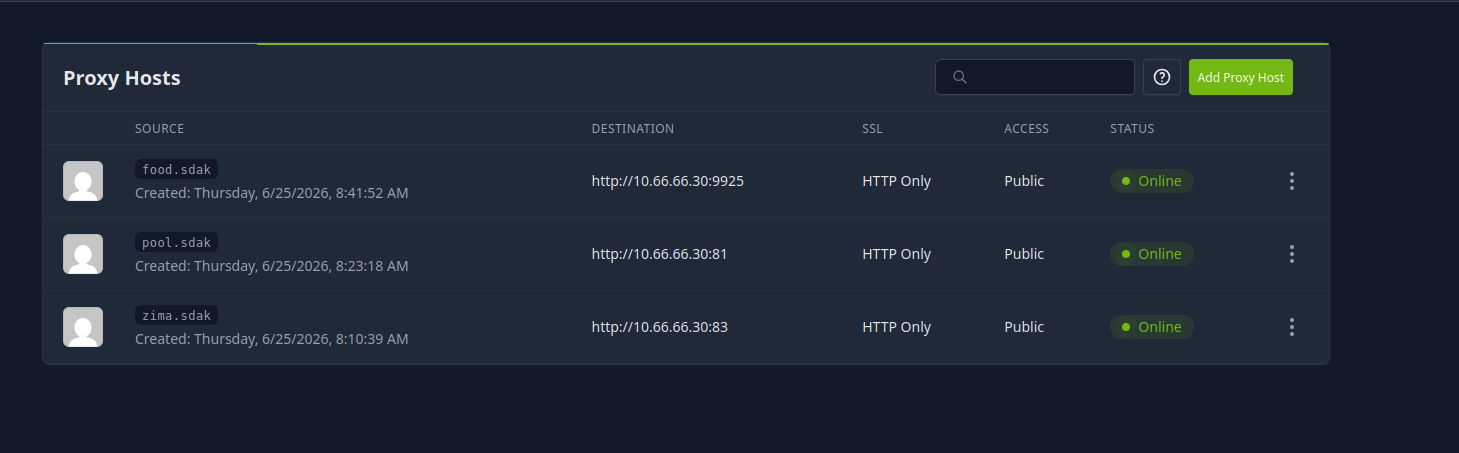
This avoids resolving the public/friendly hostname from inside the same proxy and accidentally sending traffic back into the proxy again.
Preserve WebSocket/Upgrade Traffic for Interactive Apps
ZimaOS and many self-hosted apps use long-lived WebSocket or HTTP upgrade connections. A page can appear visually loaded while live widgets or app dialogs fail if the reverse proxy does not forward the required upgrade headers.
Use the appropriate Nginx/Nginx Proxy Manager WebSocket support for applications that require it.
Local DNS Does Not Require Public Internet Exposure
The source goal was local convenience, not publishing the NAS to the Internet. Keep the proxy listeners and DNS records restricted to trusted networks unless you intentionally design external access with authentication, certificates, firewall rules, and an appropriate threat model.
Reboots Fixed ARP/State in the Source, but Are Not the Core Configuration
The user rebooted both ZimaOS and IPFire after changing ports and reported that this released stale ARP/network state. That was source-specific cleanup, not a universal requirement after every proxy change.
Nginx Reverse Proxy FAQ
Where did the source change the ZimaOS WebUI port?
Settings → General.
Why did the source use the static IP as the Nginx destination?
To avoid a DNS/proxy loop and make the backend target deterministic.
Do local reverse-proxy names need to be exposed to the Internet?
No. The entire design can remain inside the LAN with local DNS.


