
The source data was not obviously lost. After a ZimaOS reset, the RAID6 still existed and directories such as upload, pgdata, thumbs, profile, and encoded-video were still present. The problem was that the reinstalled Immich stack was not connected to the old database/library state in a way that restored the previous photo catalog.
The safest source advice was: do not delete or move the old upload and pgdata folders yet. Immich does not rebuild its full catalog simply by seeing image files on disk. The database contains file paths, users, albums, metadata, and application state. Current Immich v3 documentation makes that relationship explicit and recommends backing up both the asset files and the database.
First Confirm the Real RAID Mount Path
The source used:
ls -la /media
find /media -maxdepth 4 -type d \( -iname "immich" -o -iname "pgdata" -o -iname "upload" \)
and found:
/media/photos/immich
/media/photos/immich/pgdata
/media/photos/immich/upload
That established that the old Immich folders still existed on the RAID.
/media/ZimaOS-HD → /DATA Did Not Prove Immich Was Using the OS Drive
The user was alarmed by:
/media/ZimaOS-HD -> /DATAbut the community correctly explained that this is a ZimaOS mount/symlink relationship. Its presence does not tell you which host paths the Immich containers are actually using.
Inspect Docker's Effective Mounts
The thread recommended checking:
docker inspect immich-server --format '{{json .Mounts}}'
docker inspect immich-postgres --format '{{json .Mounts}}'
That is more reliable than assuming a screenshot or old memory reflects the running container configuration.
The Old pgdata Is as Important as the Old Photo Files
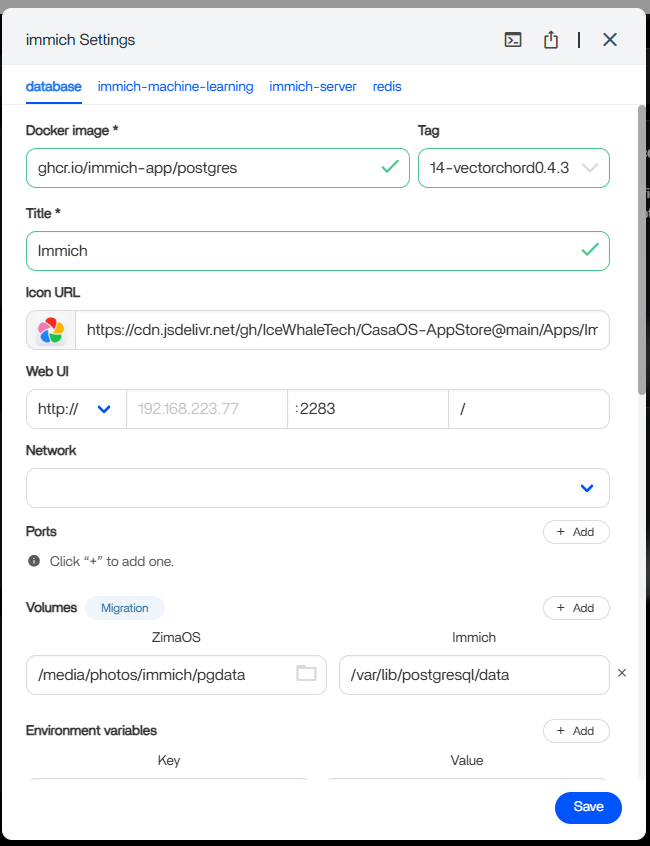
If the reinstall initialized a brand-new database instead of the old one, the files can still exist while Immich appears empty.
Current Immich Uses UPLOAD_LOCATION and DB_DATA_LOCATION
Current Immich v3 Compose separates the host asset location and Postgres location using UPLOAD_LOCATION and DB_DATA_LOCATION. Upstream explicitly says network shares are not supported for the database path.
Use the current Immich storage model.
A Database Backup Is Safer Than Reattaching a Live Old pgdata Directory Across Versions
The source was on Immich v2.7.2. Current Immich is v3. When recovering across versions, upstream's database backup/restore workflow is safer than assuming an old Postgres datadir can simply be attached to a newer database image.
See the current Immich backup and restore process.
Do Not Manually Rearrange Immich's Internal Asset Folders
Current Immich documentation warns that folders such as library, upload, thumbs, profile, and encoded-video are application-managed. Moving or deleting individual files behind Immich can create missing/untracked assets.
The Source User Did Not Confirm a Successful Recovery
Community members proposed several mapping approaches, including a single parent mount, but jerlo ultimately set the issue aside and started over on another system. Therefore the forum does not validate any one path mapping as the final fix.
Current Immich Prefers a Managed Upload Root Rather Than Hand-Mapping Every Child Folder
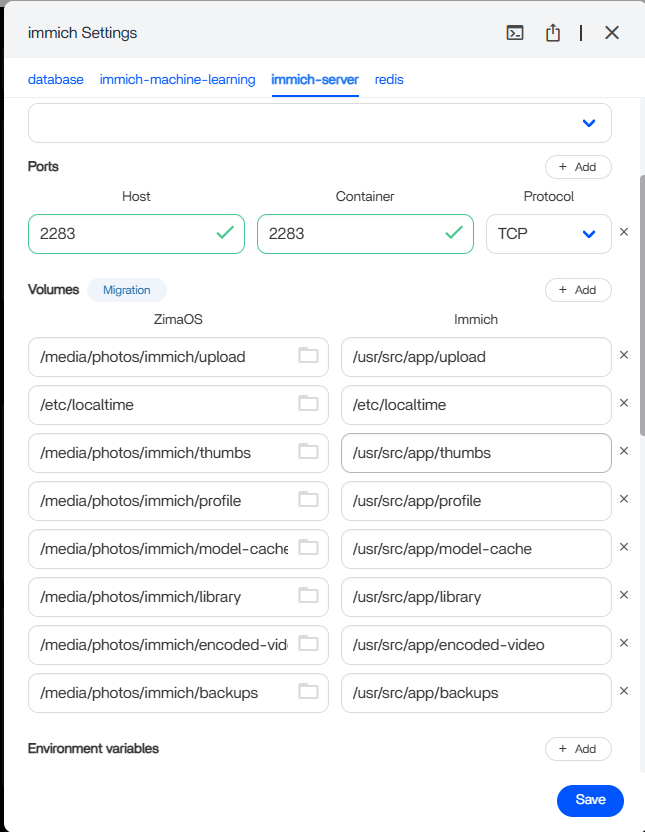
The source screenshots manually mapped upload, thumbs, profile, library, encoded-video, and backups one by one. Current upstream Compose instead centers the host configuration on UPLOAD_LOCATION, with Immich managing its internal child directories beneath that root.
When rebuilding on a newer Immich release, use the current Compose/storage layout instead of reproducing a historical set of child mappings unless the package specifically requires them.
Keep the Postgres Data Path on Supported Local Storage
Current Immich documentation explicitly says network shares are not supported for DB_DATA_LOCATION. A locally attached RAID/storage filesystem may be appropriate, but an SMB/NFS-mounted database directory is not the supported database path.
A Complete Immich Recovery Needs Both Assets and Database
Current Immich backup documentation says database backups contain metadata and user information but do not contain the photo/video assets. The asset tree must be backed up separately and restored alongside a compatible database backup.
That explains why “the upload files are still there” was reassuring but insufficient in the source case.
Do Not Attach an Old Live pgdata Directory to a Different Postgres/Image Version Casually
A raw Postgres data directory is version-sensitive. If the old environment and new package use different Postgres or Immich versions, prefer a supported database dump/restore or documented migration route. Make a byte-for-byte backup of the old pgdata before experimenting.
Immich Recovery FAQ
Did the ZimaOS reset erase the source RAID6 photo folders?
No. The user said the RAID and existing directories/files remained intact.
Will mapping old photo files alone restore the Immich library?
Not necessarily. Immich also needs the corresponding database/catalog state.
What should be protected before experimenting?
The complete asset storage plus the database or a verified database backup.


