
A ZimaOS dashboard can appear in the browser while important backend data is still missing. In this February 2026 community case, the user could see the GUI after a restart, but installed apps did not appear, system information was blank, and the Plus license temporarily showed as inactive.
The system was a custom NAS running ZimaOS 1.5.4 with an LSI HBA and ten drives. Reinstalling ZimaOS had not solved the recurring behavior. The eventual breakthrough came from isolating the storage hardware rather than focusing on the NVIDIA and Wi-Fi warnings visible in the boot logs.
Why the GUI Could Load Without Apps or System Information
A community responder pointed out that the frontend could load while the main zimaos.service backend was repeatedly exiting and being restarted by systemd. That matched the visible symptoms: the page shell appeared, but app data, system information, and license state were unavailable until the backend stabilized.
The same logs contained NVML errors on a machine without an NVIDIA GPU and Wi-Fi errors on a machine without a Wi-Fi adapter. The community diagnosis was that these messages were not the root cause of this case. The more important signal was the repeated failure of the main ZimaOS service.
This Was a ZimaOS 1.5.4 Case
The report was made on ZimaOS 1.5.4 after an update from 1.5.3. Do not assume that the same startup behavior or log messages apply unchanged to later releases. The current ZimaOS documentation lists newer releases, so use this page as a troubleshooting pattern rather than a current bug statement.
For current release information, see ZimaOS.
Isolate the Storage Layer Before Reinstalling Again
The original machine had ten disks, including eight drives attached through an LSI HBA. The first useful test was to reduce the hardware set and boot with fewer disks attached.
After eight HBA-connected drives were removed, the system started much faster. The user then reconnected drives methodically and found that one 8 TB Seagate IronWolf drive reproduced the boot loop even when connected by itself on another SATA path. With that disk removed, ZimaOS returned to an approximately two-minute boot in the user's environment.
This is the strongest result in the thread: the problematic drive was a reproducible trigger on that specific system. It is not evidence that all IronWolf drives, NTFS disks, HBAs, or large-capacity disks cause ZimaOS startup failures.
A Drive Can Look Normal in a Quick Test and Still Trigger the Problem
The user moved the suspect drive to a Windows machine through a USB 3.0 enclosure and ran Seagate diagnostics. The short test did not show an obvious failure, which made the case more subtle than a simple dead-disk diagnosis.
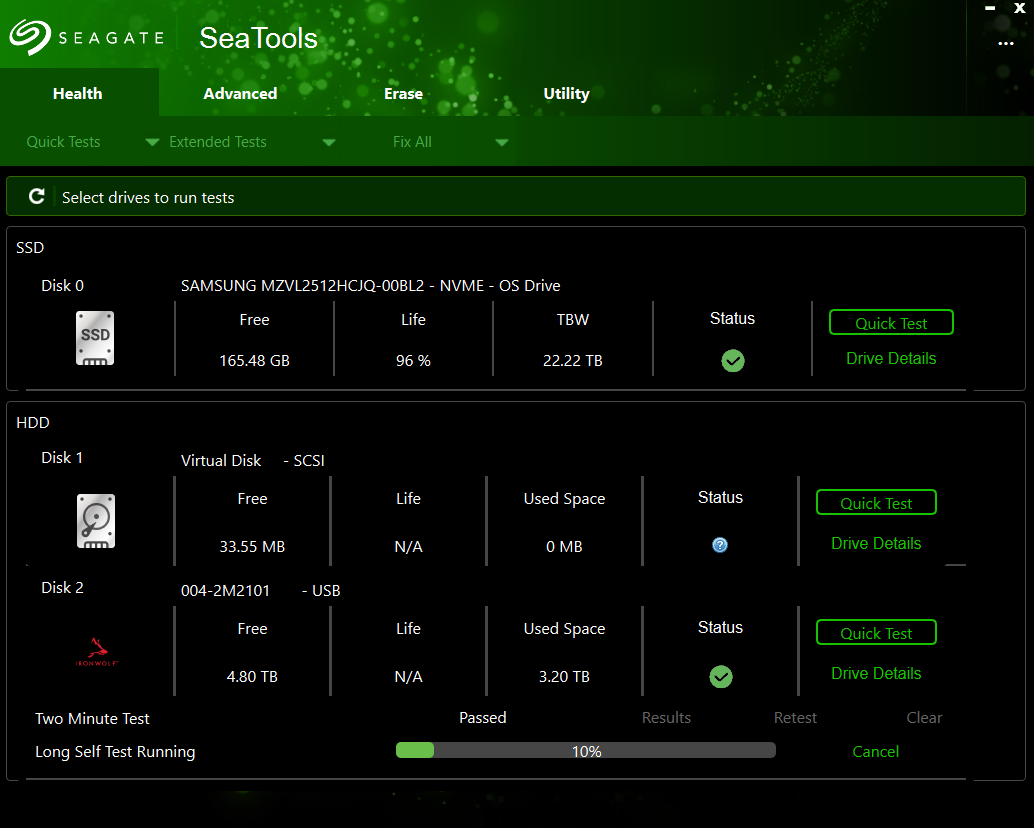
A SMART details screenshot showed more than 35,000 power-on hours while several classic failure counters shown in the test remained at zero.
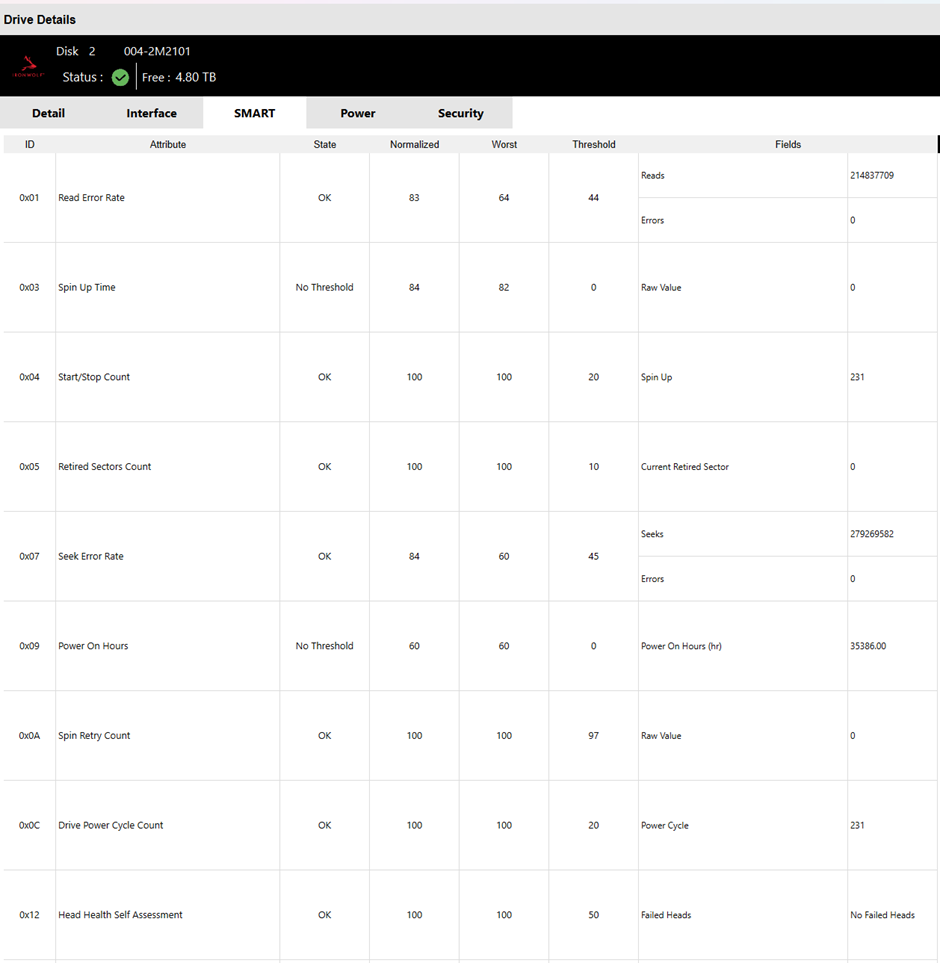
A later community interpretation also noted a small Ultra DMA CRC error count and cautioned that testing through USB is not equivalent to testing the drive on the original SATA or HBA path. Those observations are useful clues, but they were community analysis rather than an IceWhale hardware diagnosis.
A Practical Troubleshooting Process from This Case
- Confirm whether the browser is showing only a partial dashboard or whether the entire machine is unreachable.
- Check whether the main ZimaOS backend is repeatedly failing rather than assuming every warning line is causal.
- Power the machine down before changing disk connections.
- Reduce the system to the minimum storage set needed to boot.
- If the GUI becomes stable, reconnect additional drives gradually and reproduce the failure methodically.
- Test a suspected drive on a different port or controller path where practical.
- Back up important data before performing extended disk diagnostics or replacing storage hardware.
The community thread included shell commands for inspecting services, logs, block devices, and SMART data. Because those commands were not provided or confirmed by an IceWhale team account in this discussion, they are intentionally not reproduced here as official ZimaOS instructions.
Why the Plus License Looked Inactive
In this case, the inactive Plus state appeared together with the missing apps and system information while the backend was failing. Once the system booted normally without the trigger drive, those partial-GUI symptoms cleared. The thread therefore treats the license display as a symptom of incomplete backend startup, not as evidence that the user's Plus entitlement had actually been removed.
ZimaOS Partial GUI FAQ
Are NVIDIA and Wi-Fi errors always the cause of a ZimaOS boot loop?
No. In this case, the machine did not have those devices, yet the repeatable trigger was a storage device. Do not diagnose a restart loop from one warning line alone.
Did reinstalling ZimaOS fix the problem?
No. The user had reinstalled repeatedly. Hardware isolation was what narrowed the problem to a specific 8 TB drive.
Did SMART immediately show that the drive was bad?
No. The short Windows test looked normal and several common SMART failure counters were zero. The key evidence was that connecting this drive repeatedly triggered the startup loop while removing it restored normal boot behavior.
Does this prove ZimaOS 1.5.4 cannot handle many disks or an LSI HBA?
No. The system booted with the other disks after the suspect drive was removed. The thread does not establish a general HBA or disk-count incompatibility.


