
If Google Drive disappears from the ZimaOS Files interface after working for hours, first determine whether the cloud filesystem actually unmounted. In the source case, later diagnostics still showed fuse.rclone mounts and an active rclone rcd process even after the drive had vanished from the UI.
That evidence makes the original incident different from a clean rclone process crash or authorization failure. A community responder interpreted it as a likely Files/UI state desynchronization, but IceWhale did not publish a confirmed root cause in the thread. Later reports of full-system freezing introduced a separate, more serious symptom that should not be merged into the first diagnosis.
The Cloud Drive Worked, Then Files Said It Was Not Mounted
The original user was running ZimaOS 1.5.3 on a ZimaBoard 832. Google Drive connected successfully and appeared in Files, but by the next morning the interface reported that the storage was not mounted. Attempts to disconnect or unmount it from the UI also failed.
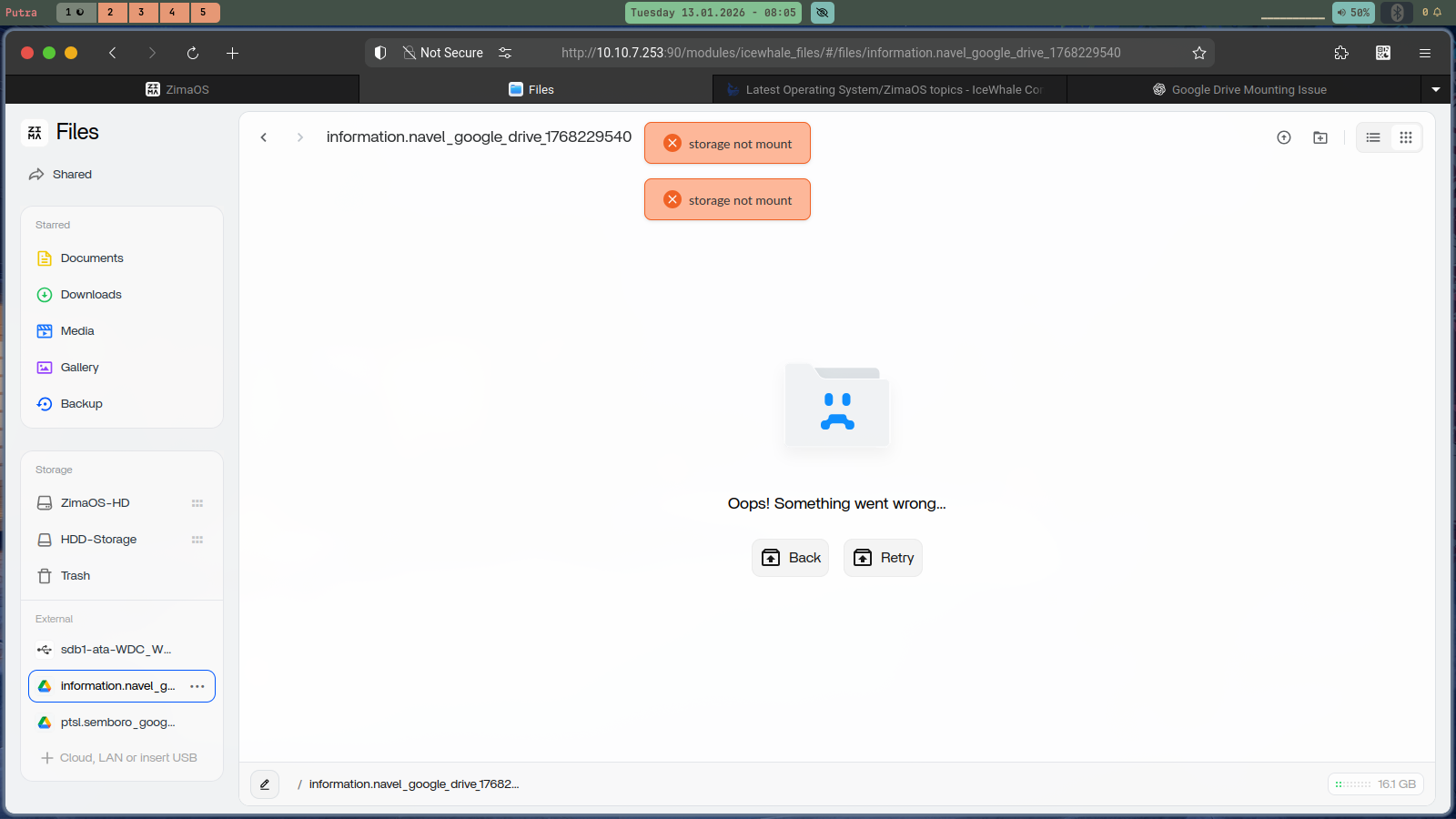
Check the Mount Layer Separately from the Files UI
The most useful follow-up in the thread was collected immediately after the drive “disappeared.” mount | grep -i google still returned multiple fuse.rclone mounts, and the process list still showed the main rclone remote-control process.
If you can reproduce the issue, capture the same evidence before rebooting or reconnecting:
mount | grep -i google
ps aux | grep -i rclone
If the FUSE mount and rclone process are alive, the investigation moves toward ZimaOS state tracking, the Files integration, or mount visibility rather than simply “Google Drive disconnected.” If both are gone, investigate authentication, network connectivity, rclone logs, and the mount lifecycle instead.
Capture Kernel and Service Errors at the Same Time
The source user's kernel log also contained repeated invalid-opcode traps involving libjpeg.so.8.2.2. The thread did not prove that those errors caused the cloud-drive disappearance, so they should be recorded as concurrent evidence rather than promoted to a root cause.
Use timestamps to correlate any rclone, FUSE, Files-service, kernel, or crash messages with the exact time the drive disappears. A log entry that merely exists somewhere in the boot history is much weaker evidence than one that repeats at the failure time.
Current ZimaOS Still Supports Google Drive Directly in Files
Current ZimaOS documentation continues to describe direct mounting of Google Drive, Dropbox, and OneDrive from the Files app. It also supports multiple accounts and removing a connected cloud drive from the storage list.
Current ZimaOS cloud-drive guide should be used for connection and authorization steps rather than the older 1.5.3 interface.
ZimaOS 1.7.1 Does Not Claim This Specific Fix
The August 24, 2026 ZimaOS 1.7.1 changelog lists security, memory, backup, USB, RAID, app-data, Docker, and YAML improvements. It does not list Google Drive, rclone, FUSE, cloud mounts, or swap-file handling as a named fix.
That absence means the old thread cannot be closed by simply saying “upgrade to 1.7.1 and it is fixed.” Updating to the current stable release is still a sensible first step before reproducing a historical bug, but verify the behavior and collect new evidence.
ZimaOS 1.7.1 full changelog provides the current release boundary.
A Later System Freeze Report Was a Different Failure
Another participant later reported a much broader system freeze and shared logs involving rclone unmount behavior and a /DATA/.swapfile dependency. That user proposed that swap placement on /DATA could contribute to a deadlock during unmount.
This is an informed community hypothesis, not an IceWhale-confirmed architecture defect. Do not delete, relocate, or disable the ZimaOS swap file based only on that theory. Changing swap while troubleshooting storage can create a separate stability problem.
What to Save Before Reconnecting the Drive
When the problem happens, save the ZimaOS version, Files screenshot, mount output, rclone process state, recent logs, and whether other local and cloud storage entries still work. Also note whether the system remains responsive through SSH and whether only the Files UI loses the drive.
Those details distinguish a UI-state problem from a real cloud unmount or a whole-system failure. Reconnecting immediately may restore access, but it also erases the most useful evidence for determining which layer failed.


