
If ZimaOS rejects a Docker Compose file during Install a Customized App → Import, do not assume the ZimaOS installation is corrupted. In the September 2025 community case, reinstalling ZimaOS and retrying in an incognito browser made no difference. The actual problem was the saved Compose YAML: formatting had been damaged while copying it into notes, and the exported definition contained more complexity than the application needed.
The user repaired the YAML, simplified the Syncthing service, and confirmed the import problem was solved. The thread also highlights an important ZimaOS use case: options such as tmpfs may not have a dedicated field in the visual editor, so Compose import remains necessary for advanced container settings.
What the Import Failure Looked Like
The original user ran ZimaOS 1.4.3 on a Beelink Mini and found that a previously exported custom application would no longer import after a clean reinstall.
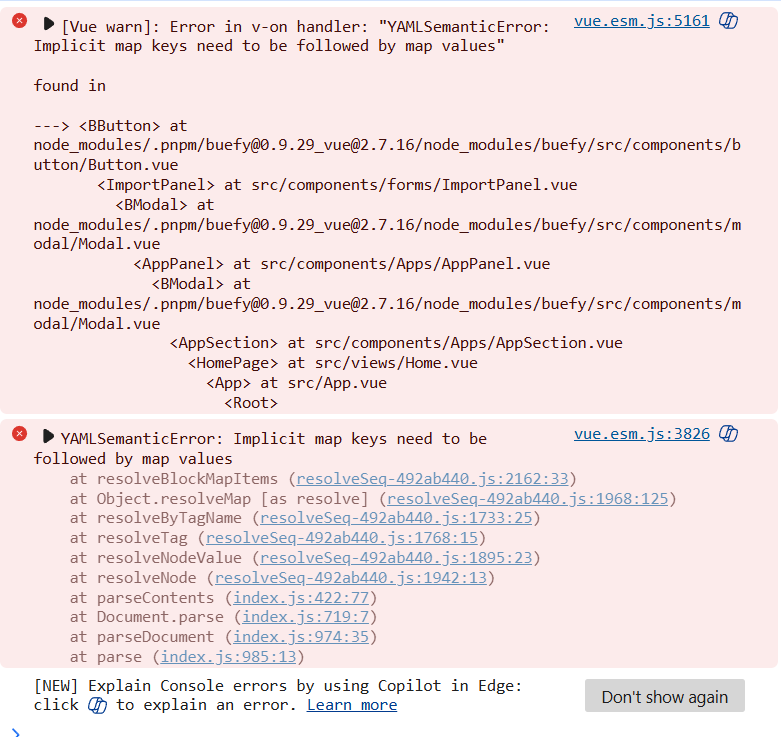

Validate the YAML Before Troubleshooting ZimaOS
YAML is indentation-sensitive. A single level shifted by a note-taking app can turn valid Compose into a completely different structure.
The source author eventually noticed that their saved export was badly formatted. Their note-taking workflow had altered the structure after the Compose file was copied from the old ZimaOS installation.
Before changing the ZimaOS host:
- paste the Compose file into a YAML/Compose validator;
- use spaces, not tabs;
- check every list item and child property indentation;
- confirm every bind mount has a container-side target;
- remove duplicate keys;
- compare the result with the current Docker Compose specification.
A Complete Bind Mount Needs Both Source and Target
A valid long-form bind mount looks like:
volumes:
  - type: bind
    source: /DATA/AppData/syncthing/data
    target: /var/syncthing
Current Docker Compose also supports optional bind settings such as:
bind:
  create_host_path: true
The main requirement is that the YAML structure is valid and that source and target are nested under the same mount entry.
Docker Compose services reference
Long Port Syntax Is Valid, but Keep It Simple
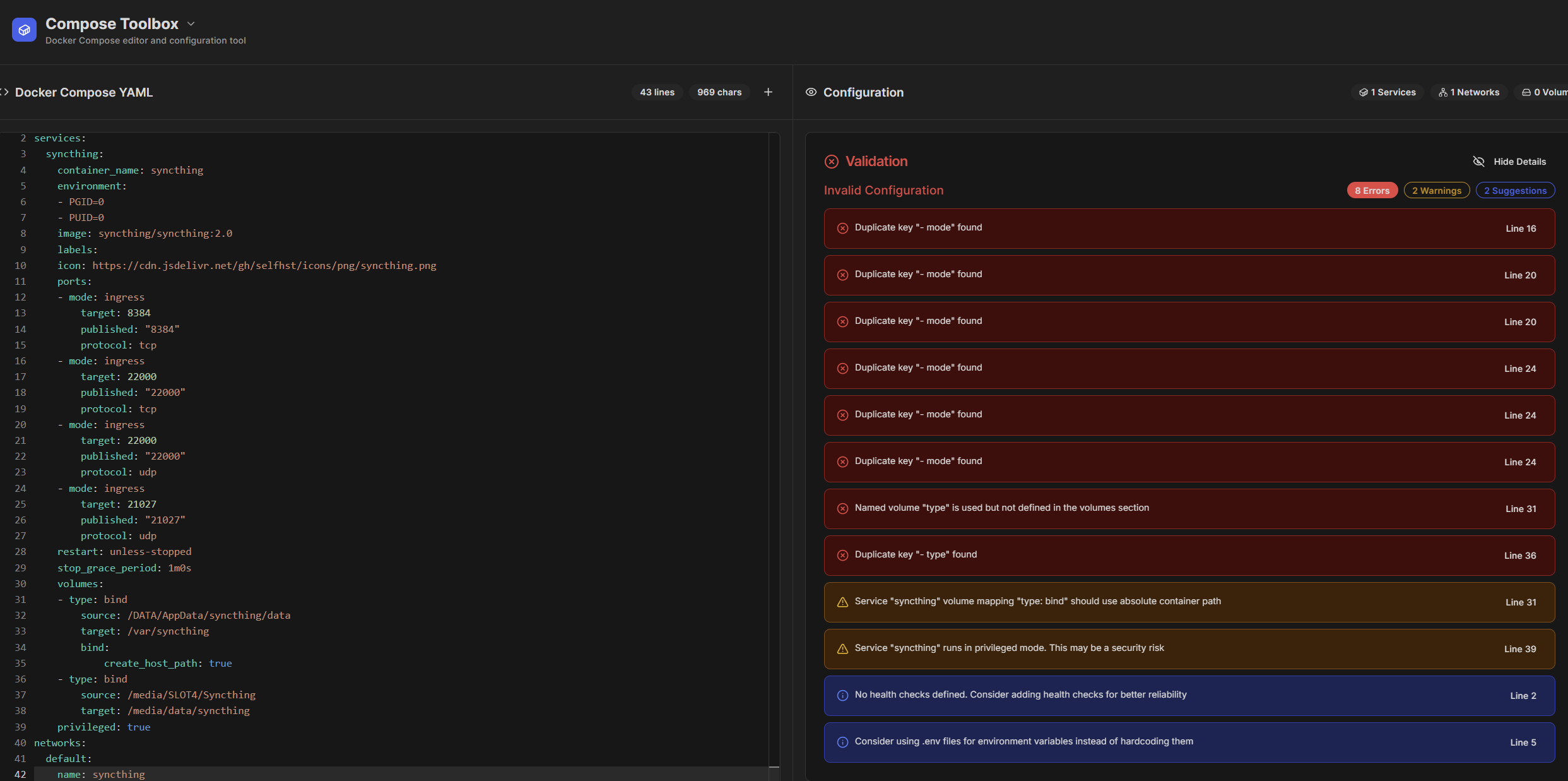
The old export contained verbose port entries such as:
ports:
  - target: 8384
    published: "8384"
    protocol: tcp
    mode: ingress
Current Docker Compose does define mode in long port syntax, primarily for Swarm publishing behavior. That means the key itself is not universally invalid Compose.
However, ZimaOS's 2025 importer and the damaged exported YAML did not handle the saved structure cleanly. For a normal single-host ZimaOS service, simpler syntax is often easier to validate:
ports:
  - "8384:8384"
  - "22000:22000/tcp"
  - "22000:22000/udp"
  - "21027:21027/udp"
Use the more advanced long form only when you actually need its options.
Use Host Networking Correctly
If the application needs Docker host networking, Compose provides:
network_mode: hostDo not combine network_mode with a networks list for the same service; current Docker Compose rejects that combination.
This is different from defining a normal user-created network named host.
tmpfs Is a Valid Docker Compose Feature
The source author's application required:
tmpfs:
  - /run
Current Docker Compose explicitly supports tmpfs mounts. It can also accept options:
tmpfs:
  - /run
  - /data:mode=755,uid=1000,gid=1000
In the source ZimaOS version, the visual custom-app form did not provide a field for this option, which is why the user needed Compose import instead of entering every setting manually.
Current ZimaOS Still Supports Docker Compose Import
Current ZimaOS documentation describes this workflow:
- open the dashboard;
- choose Install a customized app;
- click Import;
- open the Docker Compose tab;
- paste the YAML;
- submit and review the generated settings before installation.
ZimaOS custom app documentation
How the Broken and Corrected Compose Looked

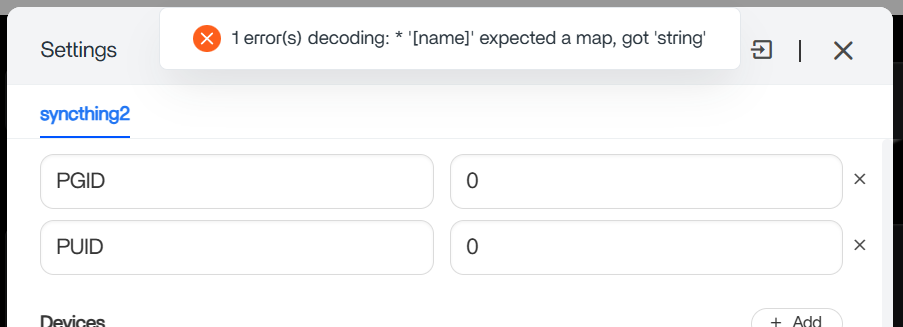
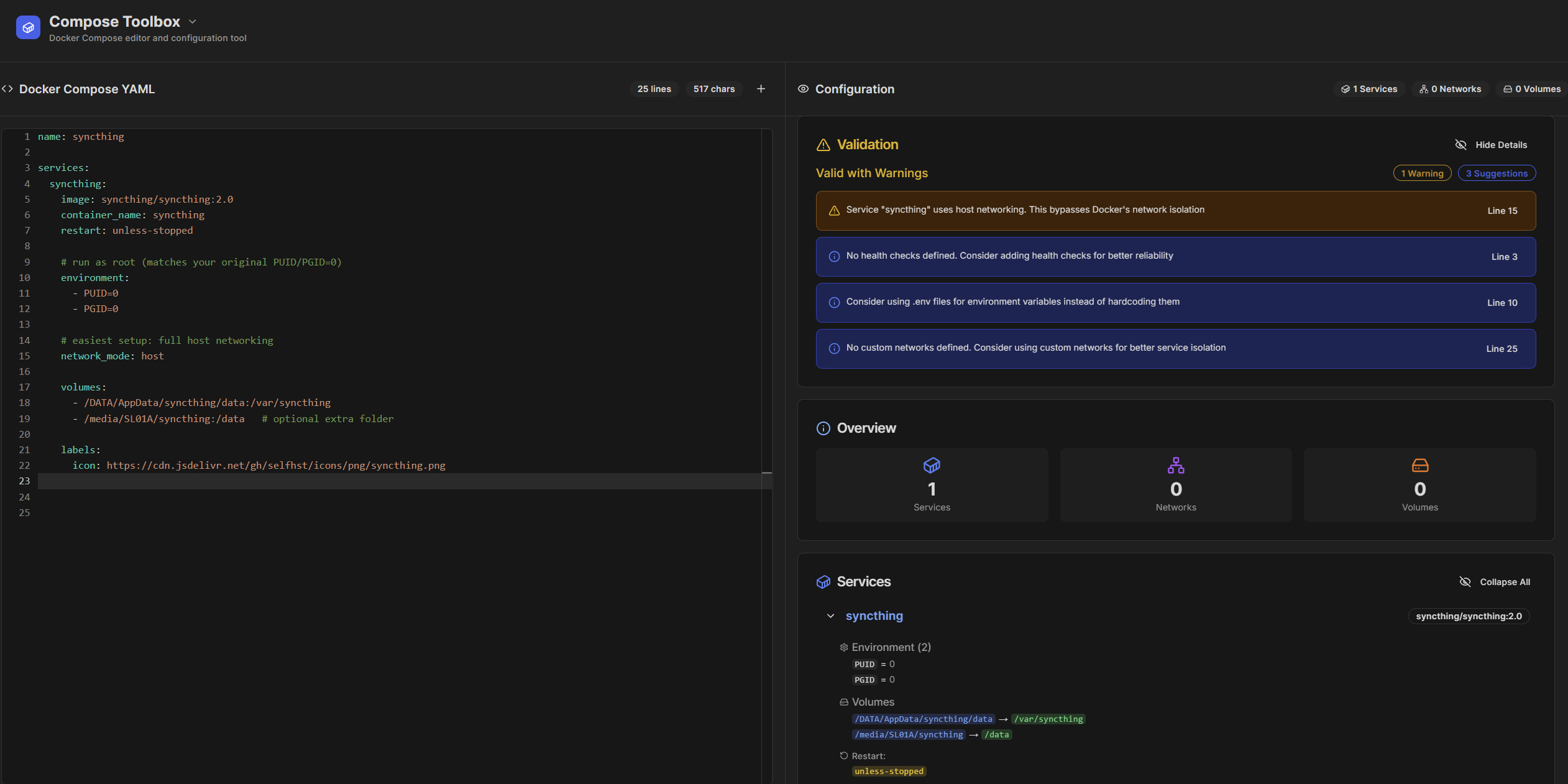
A Simpler Syncthing Structure
A clean single-host layout can look conceptually like:
services:
  syncthing:
    image: syncthing/syncthing:2.0
    container_name: syncthing
    restart: unless-stopped
    network_mode: host
    environment:
      - PUID=1000
      - PGID=1000
    volumes:
      - /DATA/AppData/syncthing/data:/var/syncthing
      - /media/SLOT4/Syncthing:/media/data/syncthing
    tmpfs:
      - /run
Use the PUID/PGID, paths, networking, and image tag appropriate for your own deployment. The source thread used root IDs while troubleshooting, but that is not a reason to run every Syncthing container as root.
An Exported ZimaOS Compose File Is Not an Untouchable Backup Format
The source author said the problematic file came from exporting containers before reinstalling ZimaOS. That is a useful backup, but exported application definitions can contain ZimaOS-generated metadata or syntax that is more verbose than a hand-written Compose stack.
Before relying on exported files for disaster recovery:
- store them in a plain-text or code-aware format;
- put them in version control if appropriate;
- validate them while the original system still works;
- separately back up persistent AppData folders.
ZimaOS Compose Import Checklist
- Validate YAML before importing.
- Replace tabs with spaces.
- Check list indentation under ports, volumes, environment, and networks.
- Make every bind mount include a source and target.
- Use
network_mode: hostif host networking is intended. - Do not combine
network_modeand servicenetworks. - Keep
tmpfsin Compose if the visual UI does not expose it. - Remove generated/advanced options that the application does not need.
- Keep a separate backup of application data; Compose alone is not the data.
ZimaOS Docker Compose Import FAQ
Was the original problem caused by browser cache?
No. The author reproduced it after a clean ZimaOS reinstall and in an incognito browser, then confirmed that formatting problems in the saved Compose were the real issue.
Does ZimaOS support tmpfs in the visual custom-app form?
The 2025 thread said the GUI did not expose that option. Docker Compose itself supports tmpfs, so import is the appropriate advanced path.
Are mode: ingress and protocol: tcp invalid Docker Compose?
Not universally. Current Compose supports long port syntax including mode. The practical lesson from the source case is to validate the entire YAML and remove unnecessary complexity when the ZimaOS importer cannot use the exported form reliably.


