
The ZimaOS “Install a customized app” form is much easier to use once you recognize that it is translating ordinary Docker Compose concepts into fields. The June 2026 source thread is a strong beginner example because the user already had Jellyfin working, wanted to add Subsyncarr for subtitle processing, and was worried about breaking the existing media server.
The community reply did not simply say “paste the Compose file.” It explained which values belonged in Docker Image, Tag, Network, Volumes, Environment Variables, Devices, and Container Command, and—most importantly—why environment values such as SCAN_PATHS must use paths visible inside the container.
Read the ZimaOS Form as Docker Configuration
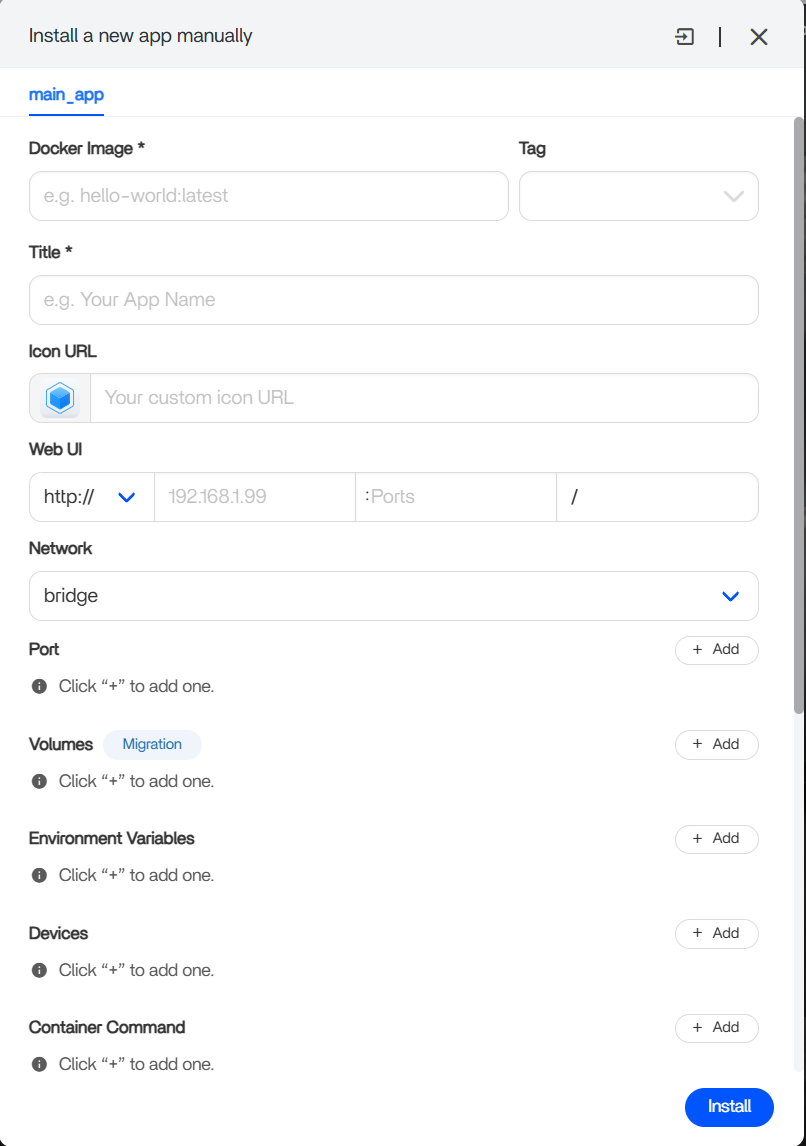
For the source example, the community mapped the basic Compose fields approximately like this:
- Docker Image →
mrorbitman/subsyncarr - Tag → the desired release tag, historically
latest - Title → a friendly app name such as
Subsyncarr - Network →
bridgeunless the app's current instructions require something else
Use the Upstream Compose Example as the Source of Truth
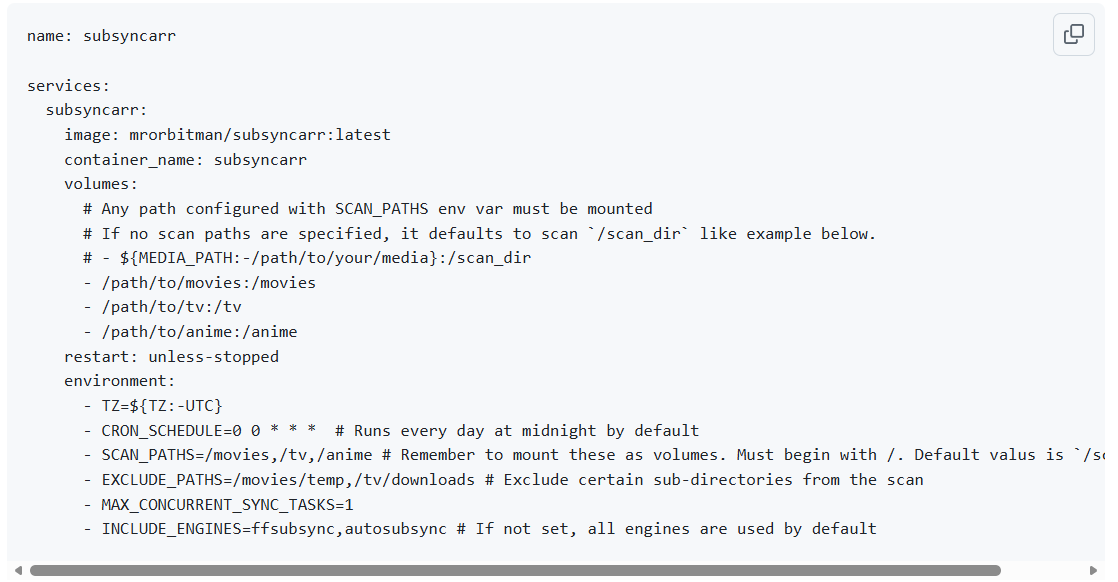
Subsyncarr has continued to evolve, so compare any old community screenshot with the current Subsyncarr container settings before installation.
Volumes Are the Most Important Part
A Docker volume has two sides:
- Host path: the real ZimaOS folder containing movies, TV, anime, or application data.
- Container path: the path Subsyncarr sees inside its own filesystem.
A mapping could conceptually look like:
Host: /DATA/Media/Movies
Container: /movies
The exact host folder depends on where your Jellyfin library actually lives. Do not copy another user's path. Check the ZimaOS Files app or inspect Jellyfin's existing volume mappings so both containers point at the same media.
The current explanation of how real ZimaOS storage folders become container paths is useful before adding any custom media application.
SCAN_PATHS Must Match the Container Side
This was the key teaching point in the original reply. If the host folder is mapped to /movies inside the container, then Subsyncarr should scan /movies.
Correct:
SCAN_PATHS=/movies,/tv,/animeIncorrect when those are only host paths:
SCAN_PATHS=/DATA/Media/MoviesThe container cannot see arbitrary ZimaOS host paths unless those folders have been explicitly mapped into it.
Translate Environment Variables One by One
The source Compose example included variables such as timezone, cron schedule, scan paths, excluded directories, and synchronization engines. Put each one into the Environment Variables section using the same value semantics expected by the upstream application.
Do not “improve” a cron expression or rename a container path while translating it. First reproduce the upstream configuration faithfully, then make changes after the app is known to work.
Current Subsyncarr Releases Have a Web UI
The 2026 community reply advised leaving Web UI and Ports empty unless the documentation said the application exposed one. That advice was correct for an unknown application, but current Subsyncarr releases now provide a Web UI on port 3000 and persistent application data.
If you want the dashboard, publish a host port to container port 3000 and set the ZimaOS Web UI field to that host address. If the port is already used, change only the host side unless upstream says the internal service port itself is configurable.
Persist Subsyncarr's Own Application Data
Media folders are not the only volumes that matter. Current Subsyncarr also has its own persistent data. Keep that application state on a host folder that survives container updates and include it in backups.
PUID and PGID Matter When Subtitles Must Be Written
A subtitle processor needs more than read access. It may need to create, rename, or modify subtitle files next to the media. Current Subsyncarr supports PUID and PGID, so align the container user with the ownership or group permissions of the media folders if scans work but subtitle writes fail.
Leave Devices and Container Command Empty Unless Upstream Requires Them
The community reply correctly advised not filling every field just because it exists. A device mapping is for hardware such as GPUs or serial devices. Container Command overrides the image's default startup command. Neither should be added without a specific upstream requirement.
Why This Should Not Break Jellyfin
Adding a separate container does not modify Jellyfin just because both applications read the same media folder. The larger risk is permissions: if Subsyncarr is allowed to rename or write files, make sure its configuration only touches the media and subtitle paths you intend.
Start with a small test library before pointing the application at the entire collection.
Custom ZimaOS App FAQ
Does SCAN_PATHS use the host path or container path?
Use the container paths created by your volume mappings.
Should I fill every field in the ZimaOS custom-app form?
No. Only configure ports, devices, commands, and other fields that the application actually needs.
Does current Subsyncarr have a Web UI?
Yes. Current releases expose a dashboard on port 3000.
Can Subsyncarr use the same media folders as Jellyfin?
Yes, as long as both containers map the same real host folders and their permissions are appropriate.


