
Bottom Line: ZimaOS Files Seeing a NAS Share Does Not Mean Every Docker App Can See It
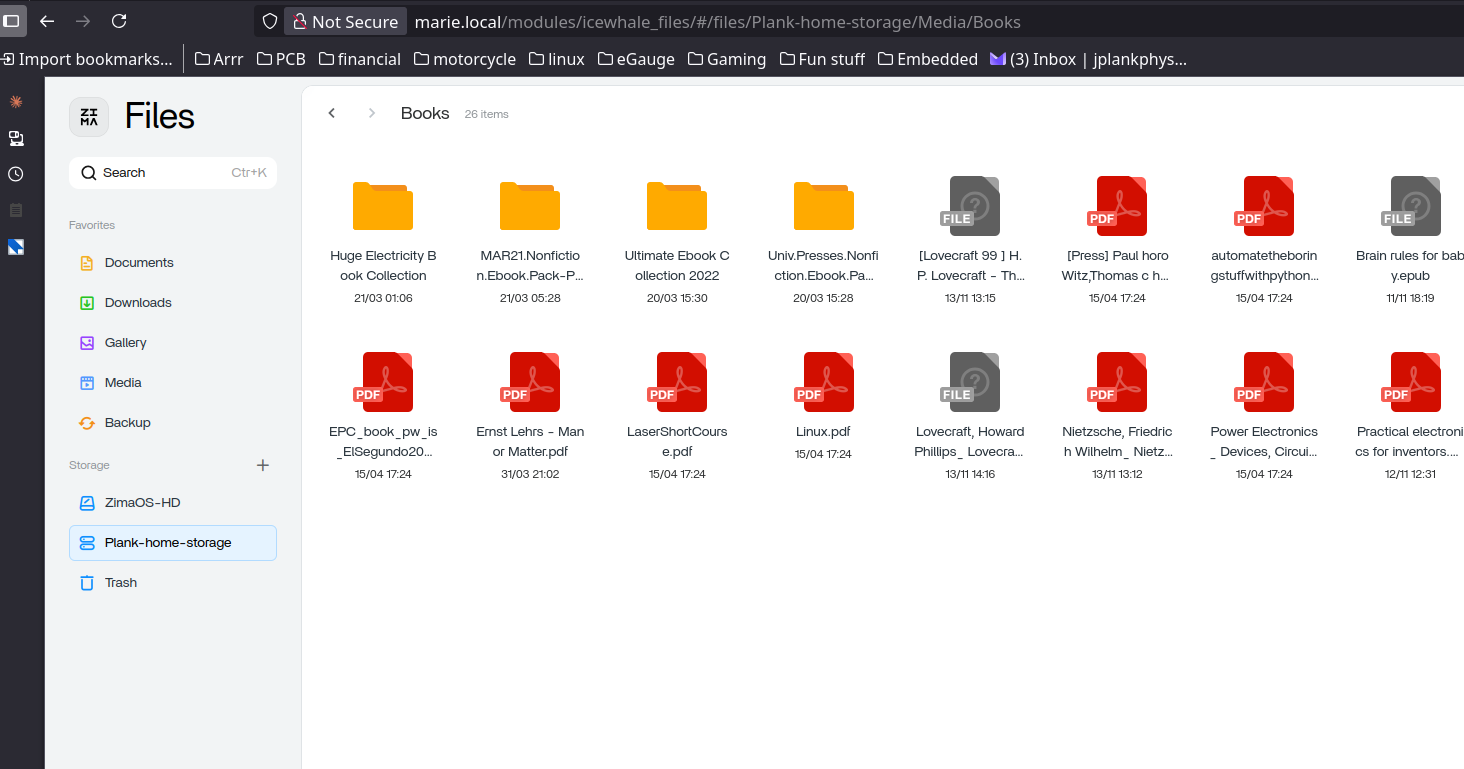
The host and the container have different filesystem views. ZimaOS Files may browse a mounted NAS under /media/Plank-home-storage/Media/Books, while Readarr, Audiobookshelf or another container sees only the paths explicitly mapped into that container. Bind the real ZimaOS host path into the container, then use the container-side path inside the application.
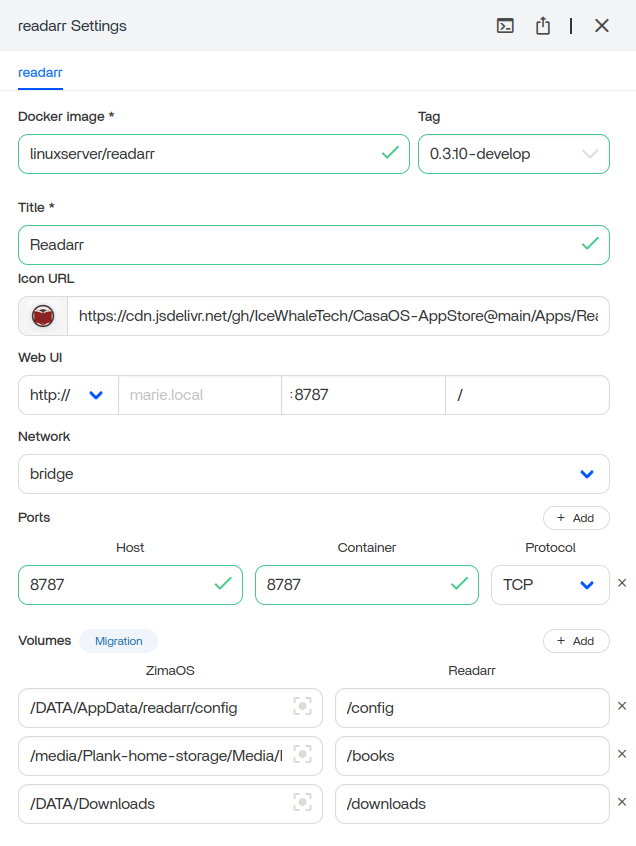
Read Every Volume Row as Host Path → Container Path
For example:
/media/Plank-home-storage/Media/Books  ->  /books
/DATA/Downloads                        ->  /downloads
The left side exists on ZimaOS. The right side exists inside Readarr. In the app, choose /books, not the host path. Current ZimaOS app paths explains this separation. Docker calls the same mechanism Docker bind mounts.
Prove the NAS Is Mounted on the Host First
findmnt | grep -i cifs
mount | grep -i cifs
ls -la /media
If the NAS share is absent here, Docker cannot use it either. Fix the SMB/NFS mount first. If Files can browse it, move to the container mapping rather than changing the remote NAS.
Then Prove the App Can See the Container Path
docker exec -it READARR_CONTAINER sh
ls -la /books
If /books is missing, inspect Volume settings. If it exists but is empty, confirm the host path points to the correct mounted folder. If files are visible but imports fail, the problem has moved to permissions, naming or app-specific library rules.
Do Not Mount the Same NAS Independently Inside Every App
Mounting remote storage once at the ZimaOS host layer and bind-mounting it into apps gives one place to manage credentials and reconnection. The tradeoff is dependency on the host mount. A missing remote mount can become dangerous if an app writes to an empty local directory with the same path.
The NAS file sharing helps separate remote storage from app access.
Permissions Still Matter After the Path Is Correct
touch /books/.write-test
rm /books/.write-test
If the test fails, do not use chmod 777 permanently. Check SMB credentials, container UID/GID and the volume read/write mode.
Use One Shared Path Strategy Across the *arr Stack
Readarr, Sonarr, Radarr and download clients are easier to manage when they use consistent host paths. Inconsistent mappings are a common reason one app imports a file while another says the path does not exist.
The ZimaOS app requirements provides the broader app-storage model.
Keep App Data and Media Data Separate
Configuration belongs in AppData. Books/media belong on the NAS or storage pool. Downloads can live in a third path. The ZimaOS data migration is useful when storage layout changed after installation.
Remember That the Host NAS Mount Has Its Own SMB Lifecycle
A Docker bind mount does not make the remote SMB connection more reliable; it only exposes the already-mounted host directory. Linux's Linux CIFS mounts explain the host layer underneath the container mapping. If the remote NAS disconnects, the container path may remain present while the expected files vanish, so monitor the mount itself rather than only the app.
For automation-heavy *arr stacks, restart behavior matters. Confirm the remote share is mounted before starting apps that move or rename files, otherwise an application can create directories on the local filesystem where the network share was supposed to be.
FAQ
Why can ZimaOS Files see my NAS but Readarr cannot?
ZimaOS Files runs at the host layer. Readarr only sees directories explicitly mounted into its container.
Should I enter /DATA in Readarr?
Only if /DATA or a subfolder is actually mapped into the container. Usually use the container-side path such as /books.
What if the app sees the folder but cannot write?
Check the bind mode, SMB credentials and container UID/GID.
Can all *arr apps share the same media mount?
Yes. Consistent mappings usually make imports and hardlinks easier to understand.
Should app config live on the NAS share?
Keep container configuration on stable local AppData unless the app explicitly supports network filesystems for its database.


