
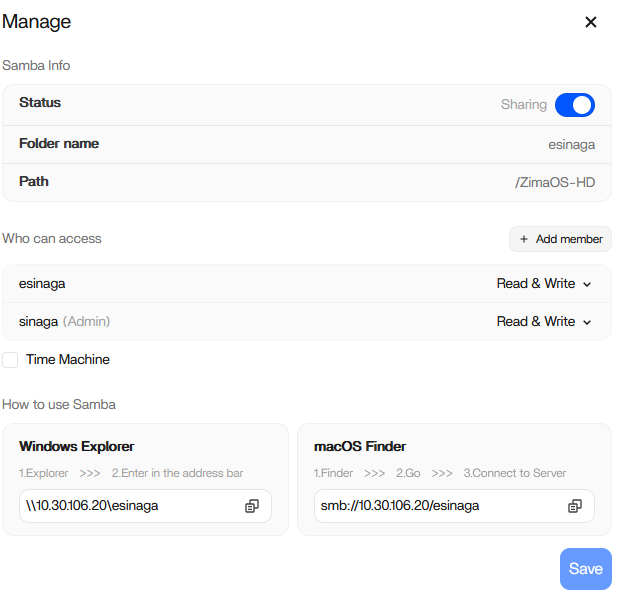
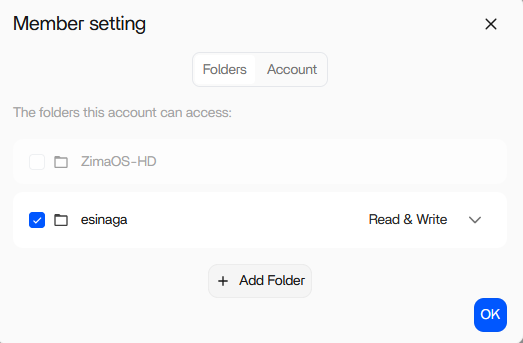
The source evidence strongly separates the server permission from the Android client path. The new member was explicitly granted Read & Write access, and the same shared folder worked from a computer. The Android ZimaClient still returned Permission Denied on two phones even after reinstalling the app.
That does not prove a particular ZimaClient bug because no IceWhale staff member diagnosed the thread. It does mean “you forgot to grant the member access” is an incomplete explanation. Current ZimaOS officially supports per-user folder permissions, so a current reproduction should compare the same credentials through ZimaClient and direct SMB before changing server ACLs.
First Confirm the Server-Side Share ACL
Current IceWhale multi-user Samba guidance expects the manager to assign a member to the shared folder and choose Read or Read & Write.
Use the current ZimaOS member-share workflow.
The PC Test Shows the Member Credentials Can Work
The original poster said the shared folder was accessible from a computer. That is the most useful isolation test in the thread because it shows the user/account/share can work at least through one client path.
Two Android Phones Failing Reduces the Chance of One Corrupt App Install
The user tried reinstalling ZimaClient and also tested another phone. Both still returned Permission Denied. That makes a single handset cache corruption less likely, although it does not identify the actual mobile authentication failure.
Test Direct SMB from Android
A community reply suggested testing the same username/password with a normal Android SMB client. If direct SMB succeeds while ZimaClient fails, the evidence points even more strongly at the ZimaClient/session layer rather than Samba ACLs.
If both fail, review the exact SMB credentials, username formatting, special characters, and server-side account state.
Fully End the Existing ZimaClient Session
Changing member permissions may not update an already-authenticated client session immediately. Sign out, remove the saved device/session if required by the current client, reconnect, and retest the same share.
Retest on Current ZimaOS and ZimaClient
The source was ZimaOS 1.6.1. Current ZimaOS and mobile clients have changed. Current ZimaOS documentation confirms that permissions are tied to ZimaOS accounts and that ZimaClient provides local/remote access.
The Later Mobile Connection Drops Were a Separate Symptom
The OP later said phone backup worked but the mobile connection frequently dropped. The thread did not establish whether that was the same permission problem, a network/P2P issue, or another client regression.
Keep “Permission Denied” and “connection lost” as separate test cases unless logs show a common cause.
Android Member Access FAQ
Were the member permissions visibly configured in the source?
Yes. The screenshots showed the member and folder with Read & Write access.
Did the folder work from a computer?
Yes, which is why the source evidence points away from a basic share ACL mistake.
Did the thread confirm an IceWhale fix?
No. It ended with the Android problem still unresolved.


