
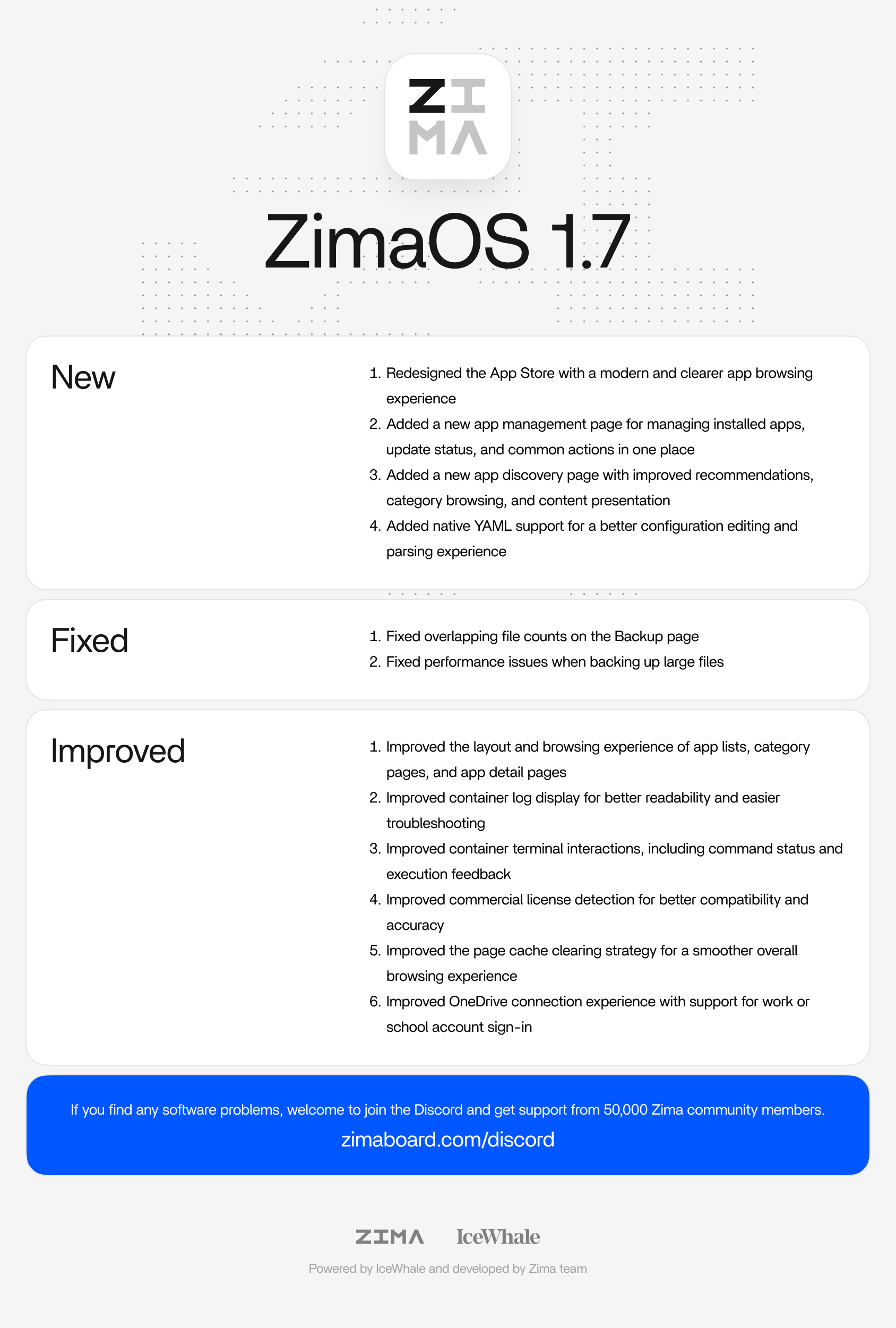
ZimaOS 1.7.0, released on July 28, 2026, was much more than a visual App Store refresh. IceWhale reworked app discovery, separated installed-app management into its own page, added native YAML support for advanced configuration, improved logs and terminal feedback, and fixed two Backup issues. The source announcement also generated a long community discussion about UI density, Plex launch behavior, custom Compose management, third-party app stores, and how the new YAML workflow should evolve.
A durable page should therefore distinguish three layers: the official 1.7.0 changelog, the practical meaning of those changes for self-hosters, and post-release community feedback that should not be misrepresented as universal regressions.
The Main Theme Was App Store 2.0
IceWhale described App Store 2.0 as a redesign of app discovery, management, and detail pages. Instead of treating the store as only a catalog, ZimaOS 1.7.0 tried to make it the central place for both finding applications and managing the ones already installed.
Four Official New Features
The official changelog lists four items under New:
- a redesigned App Store browsing interface;
- a dedicated app-management page for installed apps, update status, and common actions;
- a new discovery page with recommendations, categories, and richer content presentation;
- native YAML support for improved configuration editing and parsing.
These should be treated as the core release facts. Community comments about how attractive or compact the new interface feels are separate.
Native YAML Was the Most Important Power-User Change
Before 1.7.0, users who wanted to add Traefik labels, custom DNS, non-default networks, unusual volume flags, or other Compose-level settings often rebuilt an App Store package as a Custom Compose stack. Earlier IceWhale replies had described direct YAML editing as future work.
Version 1.7.0 turned that roadmap item into a shipped feature. Native YAML support made advanced configuration visible in the ZimaOS application workflow instead of forcing every power user to manage generated Compose externally.
Current ZimaOS app definitions still separate normal Docker runtime configuration from ZimaOS metadata. Use the current Compose and x-casaos structure when editing an application YAML.
What Native YAML Makes Easier
Examples of settings that are naturally expressed in Compose YAML include:
- custom Docker networks;
- reverse-proxy labels;
- container DNS servers;
- devices such as GPUs or serial adapters;
- advanced volume syntax;
- health checks and dependencies;
- additional environment variables;
- multi-container application stacks.
Native YAML does not remove the need to understand Docker. It removes one layer of friction between ZimaOS and Docker's actual configuration model.
Installed Apps Moved into a Central Management View
The new app-management page was designed to show installed applications, update status, and everyday actions in one location. That is a conceptual improvement over mixing discovery and management, especially for servers with many applications.
However, several replies criticized the amount of padding and vertical space in the new design. One user with a 42-inch 4K monitor said they could see substantially less information than in 1.6.2 and wanted denser editing panels.
That is useful product feedback, but it should not be rewritten as “App Store 2.0 is less functional.” The official change centralized management; the community debated the ergonomics of the chosen layout.
Discovery and Category Pages Were Also Rebuilt
IceWhale added improved recommendations, category browsing, and app-content presentation. This was aimed at users who do not already know the exact container they want.
The release specifically thanked maintainers of third-party app stores for supporting the broader ZimaOS application ecosystem, reinforcing that App Store 2.0 was designed around both official and community application sources.
Two Backup Problems Were Fixed
The 1.7.0 changelog contains two Backup fixes:
- overlapping file counts on the Backup page;
- lag when backing up large files.
These fixes are narrower than the USB auto-mount and wrong-destination issues addressed in ZimaOS 1.6.1. Do not merge every 1.6.x backup incident into the 1.7.0 changelog.
Container Log Display Was Improved
IceWhale said container logs were made easier to read and more efficient for troubleshooting. For a self-hosted NAS, that matters because many “ZimaOS app problems” are ultimately Docker pull errors, invalid environment variables, application startup failures, or storage-permission issues visible first in the logs.
Container Terminal Feedback Became Clearer
The terminal workflow also received clearer execution status and interaction feedback. This complements native YAML: users can change an app definition, redeploy it, then inspect the container without leaving the ZimaOS interface.
Other Improvements Were Less Visible but Still Part of the Release
The official changelog also lists improved commercial-license detection and a revised page-cache cleanup strategy. These do not define App Store 2.0, but they are part of the release and should not disappear from a complete summary.
A Plex Launch Problem Was Reported After the Update
One community member said Plex still showed as running but clicking its ZimaOS icon no longer opened the expected direct-IP WebUI, while other applications continued opening normally. That is an individual post-upgrade report, not an official 1.7.0 known issue in the source announcement.
The correct boundary is to preserve the report without claiming that 1.7.0 universally broke Plex.
Users Also Noticed Settings Not Mentioned in the Changelog
A user asked about a new Web UI Rendering Mode setting with Standard and Performance options because it was not described in the release notes. This is a reminder that a changelog may not document every UI control visible after an update.
A long-lived release page should avoid inventing undocumented behavior for such settings unless IceWhale publishes an explanation.
Native YAML Does Not Automatically Adopt Every External Compose Stack
App Store 2.0 gives more control over ZimaOS-managed applications. That should not be confused with automatic lifecycle management for every stack created outside ZimaOS through Portainer, Dockge, or raw docker compose.
Ownership still matters: who creates the stack, who stores its metadata, and who is expected to update or recreate it.
The Announcement Also Teased ZimaOS Photos
IceWhale used the release post to preview Photos as a future major feature. That preview was not part of the 1.7.0 changelog itself, so it should be described as a look ahead rather than a feature included in 1.7.0.
1.7.0 Is a Versioned Historical Release
The source announcement documents the state of ZimaOS on July 28, 2026. Later 1.7.x or newer releases can alter the App Store UI, YAML behavior, backup experience, or the issues users reported immediately after upgrading.
ZimaOS 1.7.0 FAQ
Did ZimaOS 1.7.0 add native YAML editing?
Yes. It is explicitly listed as one of the four new features.
Did 1.7.0 add a separate installed-app management page?
Yes. Installed apps, update status, and common actions were centralized there.
Were Backup fixes included?
Yes. The release fixed overlapping file counts and lag during large-file backups.
Did the release universally break Plex?
No such universal conclusion is supported. One user reported a Plex launch problem after upgrading.
Was ZimaOS Photos included in 1.7.0?
No. The announcement previewed Photos as a future feature.


