
This source is already an IceWhale repair procedure, so its most important rule should remain unchanged: do not delete either folder until you know which path is the active mount. In the reported 1.6.x cases, the directory ending in _1 was often the real active mount, while the original unsuffixed folder was only a leftover directory.
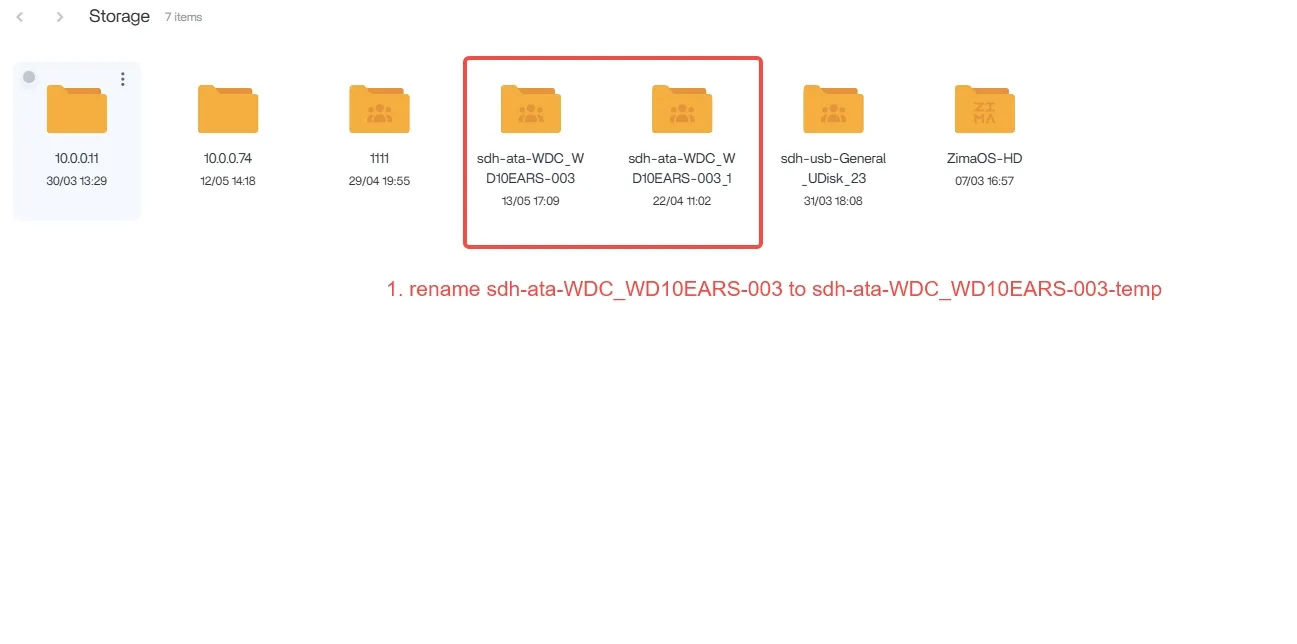
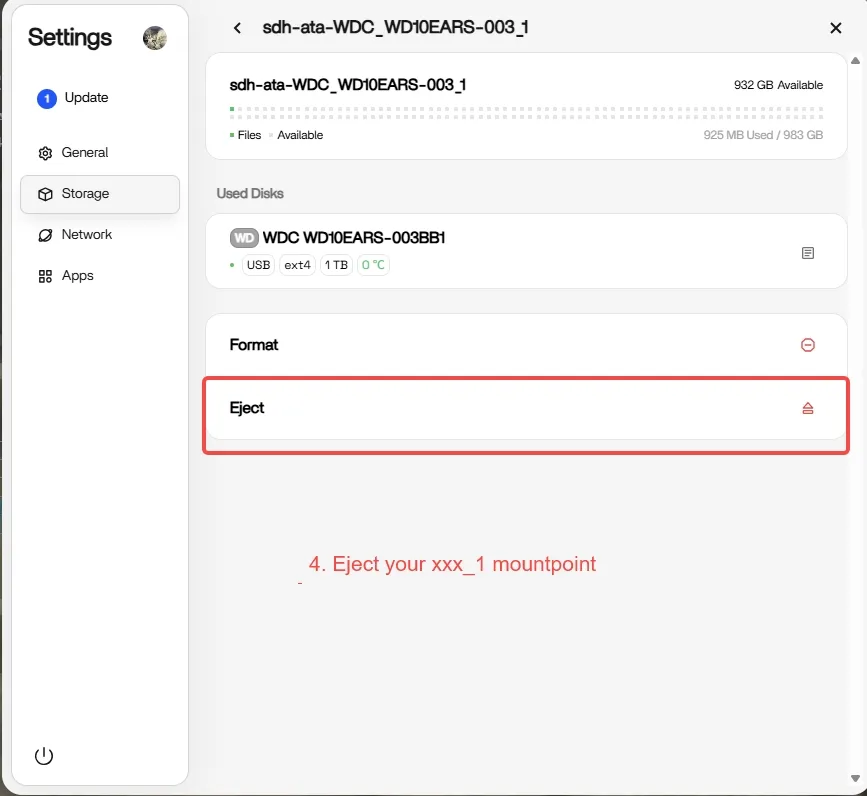
The workflow temporarily renames the old leftover folder, ejects the active _1 mount through Storage, then re-enables the disk with Keep all data and restores the original mount name. Choosing Format all is explicitly destructive.
_1.A Changed Mount Path Can Break Multiple Applications at Once
Plex, Jellyfin, Docker bind mounts, Backup, SMB shares, and ZVM can all reference a storage path by name. If the device suddenly mounts at ..._1, those applications may appear to have lost files even though the data remains on disk.
Identify the Active Mount Before Renaming Anything
Open Files and Storage and verify which path contains the actual live disk data. The source says the _1 folder is often active, but not always. If RAID or important AppData is involved and the state is unclear, contact support before proceeding.
Temporarily Rename the Original Leftover Directory
The guide renames the original unsuffixed directory to a temporary name so the old mount-point name becomes available. Use your own exact path, not the sample identifier.
Eject the Active _1 Mount Through Storage
Re-Enable the Disk with Keep All Data

Do not choose Format all. Formatting erases the disk.
Restore the Original Storage Name
Remove the _1 suffix during the enable flow so the disk returns to its former mount name. Existing applications can then find the old path again.
Keep the Temporary Folder Until Applications Are Verified
The official guide recommends retaining the renamed -temp folder for a few days. Verify Plex, Jellyfin, Docker, SMB, Backup and other dependent services before removing it.
The Bug Was Associated with the 1.6.x Storage/Mount Transition
ZimaOS 1.6.1 officially fixed inconsistent mount-point naming when device names contained spaces and optimized third-party disk display logic. Current ZimaOS is newer, so do not reproduce this repair unless the same duplicate active/leftover path state is actually present.
The _1 Suffix Can Look Like Data Loss Even When the Disk Is Fine
Applications often store absolute host paths. If /media/MyDisk becomes /media/MyDisk_1, Plex, Jellyfin, Backup, and Docker may suddenly report missing media or empty folders even though the filesystem is still mounted and intact.
That is why the official repair starts with mount identification rather than rebuilding libraries or reinstalling apps.
Back Up Critical Data Before Changing Mount Names
The official guide is designed to preserve data, but storage administration always carries risk. If the disk contains the only copy of irreplaceable files, make an independent backup before ejecting, renaming, or re-enabling it.
RAID and Multi-Disk Pools Need Extra Caution
The source explicitly warns users with RAID, Docker data, or important storage to contact support if they are unsure which folder is live. A RAID member should not be treated like an ordinary standalone disk simply because one mount name ends in _1.
Verify Every Dependent Service Before Deleting the Temporary Folder
After restoring the original mount name, test SMB access, Plex/Jellyfin libraries, Docker bind mounts, backup jobs, and any VM storage. Only after those paths resolve correctly should the old temporary directory be considered for cleanup.
Keep All Data and Format All Are Opposite Choices
The most dangerous mistake in this workflow is choosing a format option while trying to fix a naming problem. Read the confirmation dialog carefully and identify the disk by model/capacity before continuing.
_1 Storage Folder FAQ
Which folder is usually the active mount in the source issue?
IceWhale says the folder ending in _1 is often active while the original folder is a leftover.
Can I just delete the _1 folder?
No. That may be the live mounted disk path.
Which option preserves the disk data during the repair?
The official procedure says Enable (Keep all data), not Format all.


