
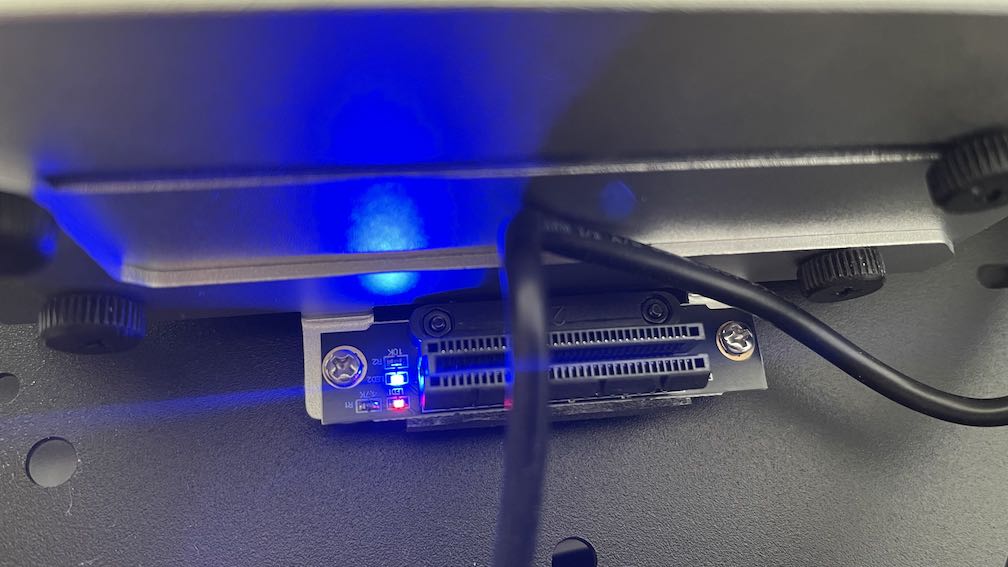
The steady LEDs on the ZimaBoard 2 PCIe riser are power/normal-operation indicators, not documented hard-drive activity lights. IceWhale support answered that the riser light indicates normal powered operation and recommended monitoring HDD activity in software instead.
The thread did not provide a verified separate meaning for the red LED versus the blue LED, so do not invent one. Treat both as board/riser status indicators unless IceWhale publishes a pin-level or LED-specific explanation.
What the Forum Answer Actually Confirmed
IceWhale support said the riser LED is a power indicator showing normal operation. The follow-up question asking exactly what red and blue each mean did not receive a separate official mapping.
There Is No Documented HDD Activity LED on the Tray
The user wanted a physical read/write indicator for the two SATA disks. The response was to monitor activity through the operating system instead.
Use iostat for Real Disk Activity
iostat -dx 1Look at read/write throughput, IOPS, utilization, and queue behavior for each physical disk. This is more informative than a single blinking light.
Use iotop to Find Which Process Is Causing I/O
iotop -oPaIf available in your environment, this helps identify whether Plex, Backup, Docker, indexing, or another process is touching the disks.
Btrfs Can Make Dashboard-Level Activity Less Obvious
The source user noted that btop did not show useful activity for their Btrfs-based RAID1 setup. Even when a high-level monitor is incomplete, kernel block-device counters still provide useful physical-disk activity.
Do Not Use LED Color to Diagnose a Drive Failure
A steady riser LED is not a SMART-health indicator. Use ZimaOS Storage health, SMART data, and RAID status for disk diagnosis.
Current ZimaBoard 2 Hardware Context
The current ZimaBoard 2 hardware guide documents dual SATA, PCIe expansion, and the board's normal power/setup path, but does not publish a red-vs-blue riser LED table.
The NAS assembly guide provides more context for multi-drive builds.
Monitor Btrfs RAID Activity at the Block Layer
Even when a dashboard tool does not show a useful per-filesystem graph, the underlying SATA disks still expose block-device counters. Commands such as iostat -dx 1 or cat /proc/diskstats let you see reads and writes without depending on Btrfs-specific UI support.
Do Not Infer RAID Health from a Static LED
A powered riser can look completely normal while a SATA disk is degraded, missing, or reporting SMART warnings. Use the ZimaOS Storage view and disk diagnostics for health decisions.
Photograph the Riser Before Hardware Changes
If the LED pattern changes after adding a PCIe card, moving the riser, or changing power, photograph the before/after state and record the attached hardware. That evidence is more useful to support than assuming a color meaning that was never documented.
FAQ
What does the red LED mean?
The thread did not provide a verified separate red-LED definition.
What does the blue LED mean?
Likewise, no separate official mapping was given; support only identified the riser indication as normal powered operation.
Is there an HDD activity LED?
No dedicated physical HDD activity indicator was confirmed in the source thread.
How should I watch disk activity?
Use tools such as iostat, iotop, SMART monitoring, and the ZimaOS storage UI.


