
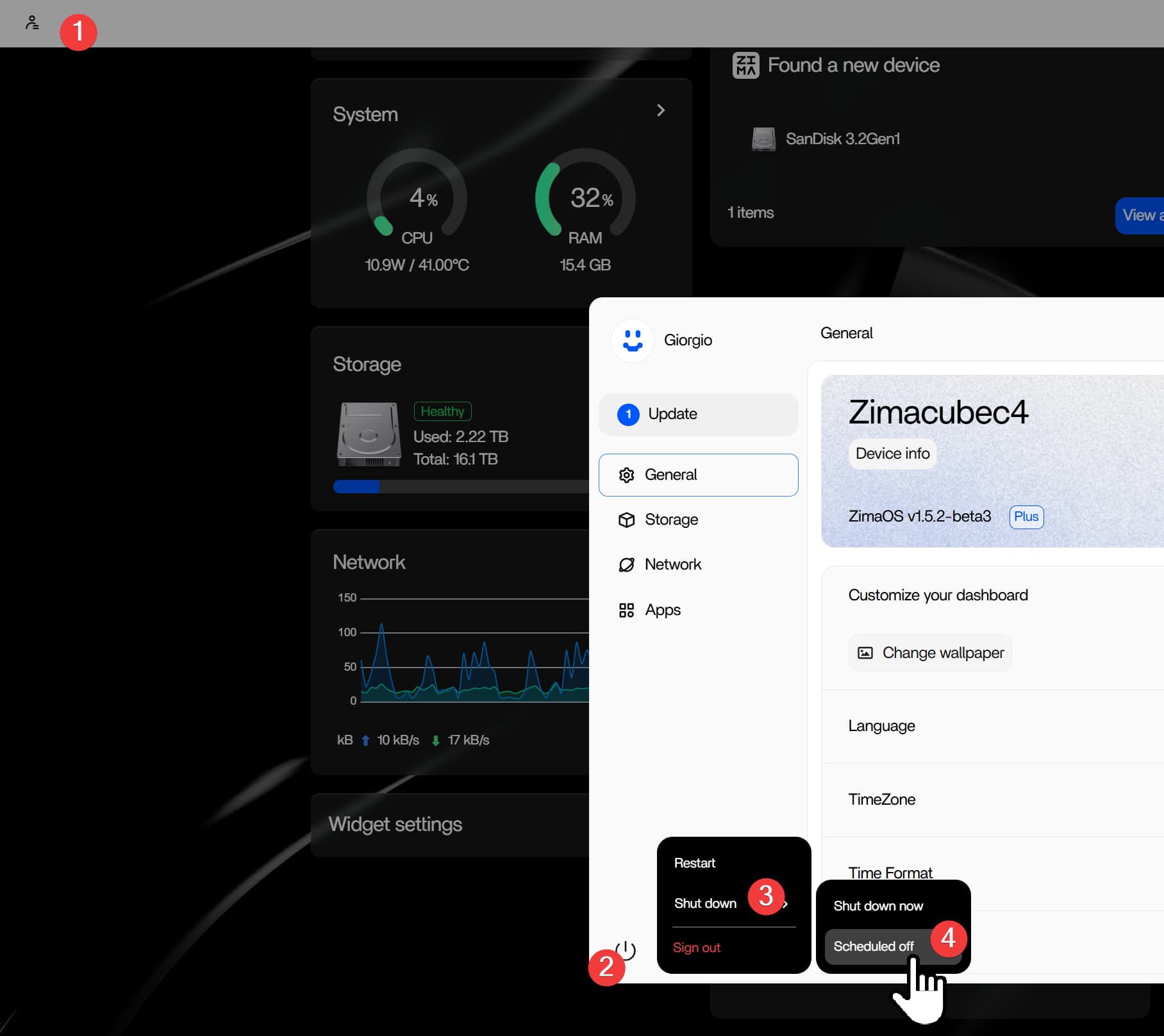
A ZimaBoard 2 media-server user wanted the system and its 3.5-inch hard drive to power down on a schedule instead of running continuously. The community discussion established that ZimaOS could schedule a daily shutdown, but it did not provide a verified built-in schedule for automatically powering the board back on.
The practical proposal was to combine a clean ZimaOS shutdown with a smart plug: let the operating system shut down first, cut AC power several minutes later, and restore AC power at the desired start time. The official reply said ZimaBoard 2 starts automatically when power is restored.
What Was Confirmed in the Community Thread
- ZimaOS included an automatic daily shutdown setting at the time of the November 2025 discussion.
- The ZimaOS team member did not know of a built-in scheduled power-on feature and recorded it as a feature request.
- The team proposed using a smart plug to restore power at a scheduled time.
- Another team member confirmed that
rtcwakewas present in ZimaOS, but the thread did not document a tested configuration for this ZimaBoard 2 workflow.
How the Smart-Plug Schedule Is Intended to Work
- Set the ZimaOS daily shutdown time.
- Schedule the smart plug to switch off several minutes later, after the operating system and disk have finished shutting down.
- Schedule the smart plug to restore power at the next desired start time.
- Confirm that the ZimaBoard 2 boots when AC power returns before relying on the routine unattended.
Do not use a smart plug as the shutdown mechanism. Cutting power while ZimaOS is running can interrupt disk writes, damage application databases, and increase the risk of filesystem corruption. The smart plug should remove power only after a clean operating-system shutdown has completed.
Why ZimaOS Could Not Simply Schedule a Normal Startup
Once a computer is fully powered off, normal operating-system services are no longer running. A future startup must be triggered by hardware or firmware that remains able to respond, such as an RTC alarm, a BIOS power-on schedule, Wake-on-LAN support, or restoration of AC power.
The official response said a native ZimaOS power-on schedule was not implemented at the time. A generic software timer inside the running OS therefore could not, by itself, restart a board after complete power removal.
What About rtcwake?
A ZimaOS team member said Linux rtcwake would normally be used for this type of task and that it was already included in ZimaOS. However, the post did not verify the board’s RTC alarm behavior, the correct sleep or power-off state, persistence across shutdown, or a reliable command for this exact setup.
For that reason, rtcwake should be treated as an advanced test path rather than the confirmed solution. The team referenced a general Linux rtcwake tutorial, but its commands are not a ZimaBoard-specific guarantee. Back up important data and test interactively before using any unattended wake schedule.
Can BIOS or RTC Scheduling Replace the Smart Plug?
A community participant suggested checking firmware for a scheduled wake option. Whether that works depends on the firmware and board implementation. The source thread did not confirm a BIOS setting that solved the request, so the possibility should not be presented as an available ZimaBoard 2 feature without testing the exact device and firmware version.
The Final Report About a Lost Shutdown Schedule Was Not Answered
The original poster later said the scheduled shutdown appeared to lose its schedule after shutdown and asked whether that behavior was normal. No reply in the thread confirmed the cause or a fix.
This leaves an important boundary: the smart-plug design was proposed, but the complete recurring cycle was not verified by the user. Before deploying it, run several supervised cycles and confirm that the ZimaOS shutdown schedule persists, the disk spins down cleanly, the plug delay is long enough, and the board starts correctly when power returns.
When Scheduled Power Cycling Makes Sense
A schedule may reduce noise and idle power use for a media server that is needed only during predictable hours. It is less suitable when the system provides backups, remote access, security recording, DNS, home automation, downloads, or other services that must remain available.
Frequent hard-drive start/stop cycles also have operational tradeoffs. Balance idle energy use against service availability, backup windows, drive behavior, and the risk of an interrupted task.
ZimaBoard 2 Scheduled Power FAQ
Can ZimaOS schedule an automatic shutdown?
Yes. The 2025 official reply showed a daily shutdown option in ZimaOS.
Can ZimaOS schedule ZimaBoard 2 to power on?
The team said a native scheduled power-on feature was not implemented at that time. The confirmed proposal used restored AC power from a smart plug.
Is it safe to turn off the smart plug while ZimaOS is running?
No. Schedule a clean ZimaOS shutdown first and leave enough time for the operating system and drives to stop before removing power.
Was rtcwake proven to work in this thread?
No. A team member confirmed that the utility existed in ZimaOS, but the thread did not report a successful, repeatable ZimaBoard 2 configuration.
Why did the shutdown schedule disappear after power-off?
The user reported this behavior, but the thread ended without an explanation. It remains an unresolved part of the source case.


