
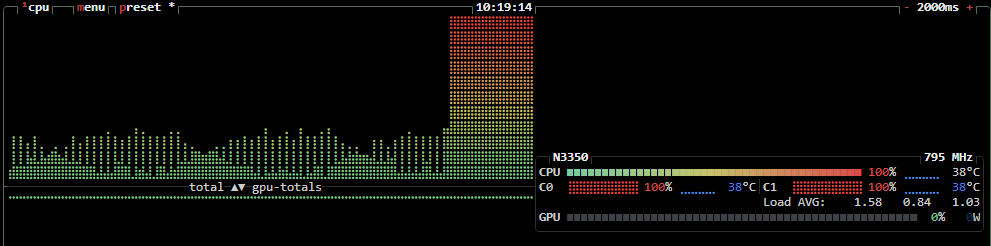
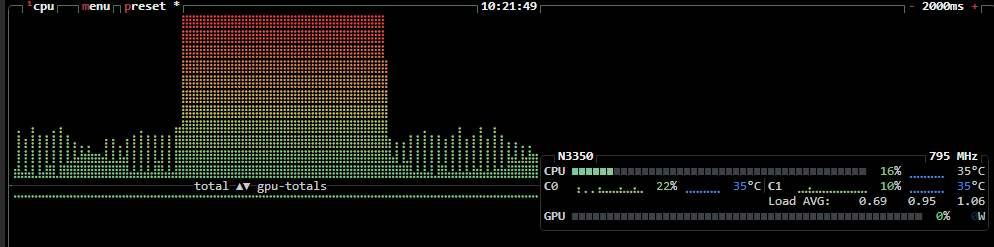
This source has a strong official troubleshooting chain. The ZimaBlade's N3350 stayed near 795-800 MHz even while Jellyfin drove CPU usage to 100%. Temperatures were only about 34-45°C, and the same behavior reproduced on a freshly installed ZimaBoard with the same processor. IceWhale then inspected the CPU frequency policy and found scaling_governor unexpectedly set to userspace.
Zima-Jerry proposed switching the governor to a dynamic policy. The original poster changed it to ondemand and explicitly confirmed that the CPU then boosted to roughly 2.3 GHz and responsiveness improved dramatically. A second user reported that the workaround reverted to userspace after reboot, and IceWhale replied that the next version would fix the issue. Therefore this should be treated as a historical ZimaOS governor regression with a source-confirmed runtime workaround—not a hardware-failure diagnosis.
The Source Evidence Did Not Support Thermal Throttling
The user had added a custom heatsink/fan and reported CPU temperatures below 45°C under load. They also noted that the system had previously been hotter—up to roughly 65°C—without the same responsiveness problem.
That made “the CPU is overheating and throttling to 800 MHz” a poor fit for the observed evidence.
The Same Behavior Reproduced on Another Fresh ZimaOS System
The OP later installed ZimaOS fresh on a ZimaBoard with the same processor and saw the same 800 MHz limit and slow Jellyfin behavior. This reduced the likelihood of one damaged ZimaBlade board.
IceWhale Asked for the Actual CPU Frequency Policy
The official diagnostic commands inspected:
cat /sys/devices/system/cpu/intel_pstate/no_turbo
cat /sys/devices/system/cpu/cpu0/cpufreq/scaling_available_governors
cat /sys/devices/system/cpu/cpu0/cpufreq/scaling_governor
These are read-only checks and are safer than immediately forcing a maximum clock or changing BIOS power settings.
IceWhale Found scaling_governor=userspace
Zima-Jerry said the source output showed userspace, while the expected ZimaOS policy at that point should not have left the CPU stuck there.
The suggested runtime choices included powersave or ondemand, depending on the available cpufreq driver/governors.
ondemand Was Source-Confirmed to Restore CPU Boosting
The source command was:
echo ondemand | sudo tee /sys/devices/system/cpu/cpu*/cpufreq/scaling_governorThe OP then reported boosts up to about 2.3 GHz and a dramatic responsiveness improvement.
This command came directly from IceWhale staff in the historical thread, but current systems may expose different default governors such as schedutil. Check current state before writing anything.
The Workaround Did Not Persist for Another User
Khapra said the commands fixed the issue during the running session, but after restart the governor returned to userspace. Zima-Jerry answered that the next version would be fixed.
Do not create a custom boot-time service on a current ZimaOS system unless the bug is actually reproducible on the current release and IceWhale has not already corrected it.
Jellyfin Was the Workload That Exposed the CPU Policy Bug
Thumbnail generation/transcoding drove CPU load high enough to make the frequency cap obvious. The app was not proven to be the root cause: the CPU governor state was the system-level problem that prevented the processor from responding to load.
Retest on Current Stable ZimaOS First
The source was on the 1.4.x release line. Current ZimaOS is much newer. On a current system, inspect the governor and frequency under load before applying the 2025 workaround.
Current ZimaBlade hardware documentation identifies the 3760 model with the same Intel N3350 platform, so the historical diagnostic remains useful when symptoms match.
Use the current ZimaBlade hardware baseline.
ZimaBlade 800 MHz FAQ
Did the source prove the ZimaBlade CPU was faulty?
No. The same issue reproduced on another system and changed immediately when the CPU governor changed.
What setting did IceWhale find?
scaling_governor was set to userspace.
Did ondemand work?
Yes. The original poster confirmed CPU frequency rose to about 2.3 GHz and Jellyfin/system responsiveness improved dramatically.


