
This December 2025 thread combined several different Pi-hole problems: port 67 was already in use, Gravity updates reported that DNS resolution was unavailable, port 80 conflicted with the ZimaOS dashboard, and a later power outage caused the user's previously working setup to fail again.
The thread was not a clean one-step solution. Some early community assumptions did not explain the user's later symptoms, so the useful lesson is to separate DHCP, DNS, web-interface mapping, upstream resolution, and persistent container state instead of treating them as one port problem.
Port 67 Is About DHCP, Not Normal DNS Filtering
The source user found a dnsmasq process already bound to port 67 and could not terminate it. Community replies explained that Pi-hole only needs port 67 when it is acting as a DHCP server. The user's router was already providing DHCP, so Pi-hole did not need to take over that role.
If Pi-hole is only being used for DNS filtering, keep DHCP on the router unless you have a deliberate network design that requires Pi-hole DHCP.
DNS Uses Port 53
Pi-hole DNS service uses port 53 over TCP and UDP. The community configuration in this thread focused on exposing DNS on port 53 while leaving DHCP disabled.
Pi-hole's own documentation should be used for current service and port requirements rather than assuming every 2025 ZimaOS container template is still identical.
current Pi-hole service and port requirements
Port 80 Was a Separate ZimaOS Dashboard Conflict
When the user attempted a clean Pi-hole installation, ZimaOS reported that port 80 was already in use. Zima-Jerry confirmed that the ZimaOS WebUI port can be modified.
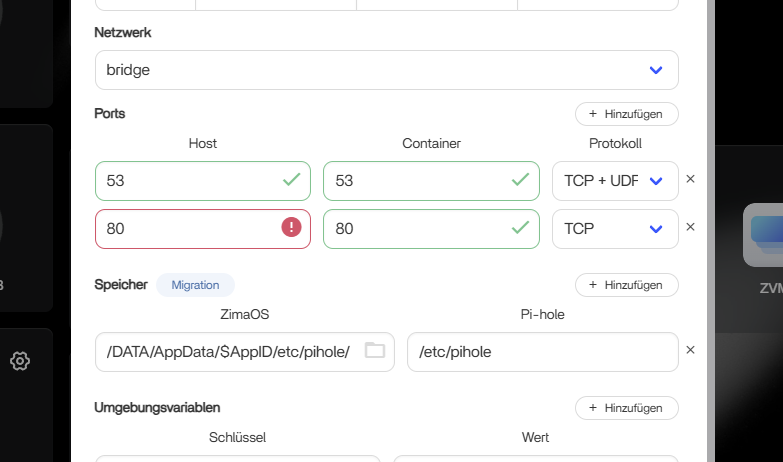
A simpler container-side alternative discussed in the thread was to leave the ZimaOS dashboard on its existing port and map a different host port to Pi-hole's internal web port. This changes only how the Pi-hole admin page is reached; it does not change DNS traffic on port 53.
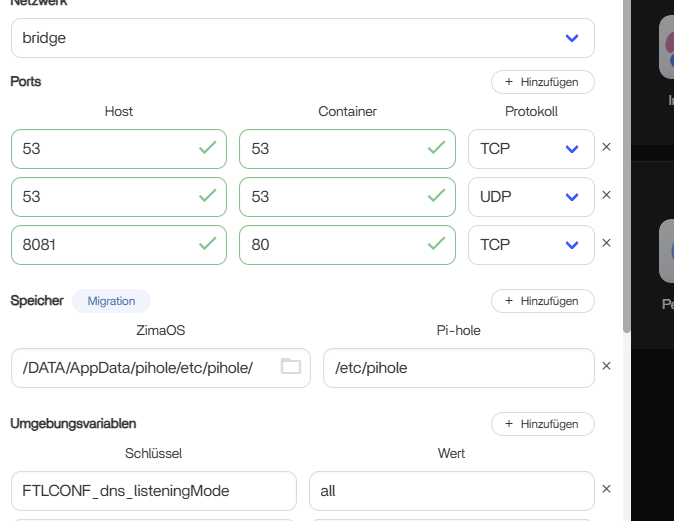
A Correct Port Map Did Not Automatically Fix Gravity
After cleaning up the port mappings, the original user still saw “DNS resolution is unavailable.” The thread then shifted from port conflicts to upstream DNS reachability. The important diagnostic distinction is:
- port mapping controls whether clients can reach the Pi-hole service;
- upstream DNS controls whether Pi-hole itself can resolve names and refresh Gravity data.
The thread did not publish an IceWhale-confirmed root cause for every DNS failure, so avoid claiming that port 67 alone explains a failed Gravity update.
The Setup Broke Again After a Power Outage
The user later reported that Pi-hole had been working correctly before a power loss, then failed again afterward. Community advice suggested that persistent AppData may survive an ordinary uninstall and can carry broken state into a reinstall.
Deleting an AppData directory is destructive because it removes persistent application state. The source recommendation was community troubleshooting, not an official IceWhale recovery procedure. Back up configuration and verify the exact application path before removing persistent data.
Check ZimaOS Health Before Rebuilding Pi-hole
The same power outage also affected the machine's boot behavior. Once the operating system itself became unstable, the thread correctly separated that from the Pi-hole container problem. A container cannot be expected to behave normally while the host is failing to boot or Docker services are not healthy.
Pi-hole on ZimaOS FAQ
Does Pi-hole need port 67 if my router already provides DHCP?
No for the DNS-filter-only setup discussed in this thread. Port 67 is relevant to DHCP service, while DNS filtering uses port 53.
What if ZimaOS already uses port 80?
Zima-Jerry confirmed that the ZimaOS WebUI port can be changed. Another approach is to map Pi-hole's internal web port to a different host port.
Can blocklists cause the “DNS resolution is unavailable” message?
The thread's troubleshooting focused on Pi-hole's ability to reach an upstream resolver, not on the contents of the blocklists.
Does uninstalling Pi-hole guarantee a clean reinstall?
Not if persistent AppData remains. The thread later explored stale or damaged persistent state after a hard power loss, but deleting that state should be treated as a destructive recovery step.


