
If PeaNUT still discovers your UPS after a ZimaOS reboot but its saved settings disappear, the problem is usually persistence rather than UPS connectivity. The configuration directory must be mapped to durable ZimaOS storage and the container must be able to write to that directory.
The March 2026 forum thread confirmed one fix for the PeaNUT build installed at that time: mapping a persistent host folder to /app/config. Current PeaNUT upstream documentation has since standardized persistent configuration under /config, so new installations should follow the current path rather than copying the old container path blindly.
What the Forum Fix Actually Proved
The original poster reported that all PeaNUT settings vanished after every ZimaOS restart even though Home Assistant continued to receive UPS data. A community member inspected the package and suggested changing the volume mapping so a host folder under ZimaOS app data was mounted at /app/config. The original poster replied that this “did the trick,” making it a verified fix for that specific package version.
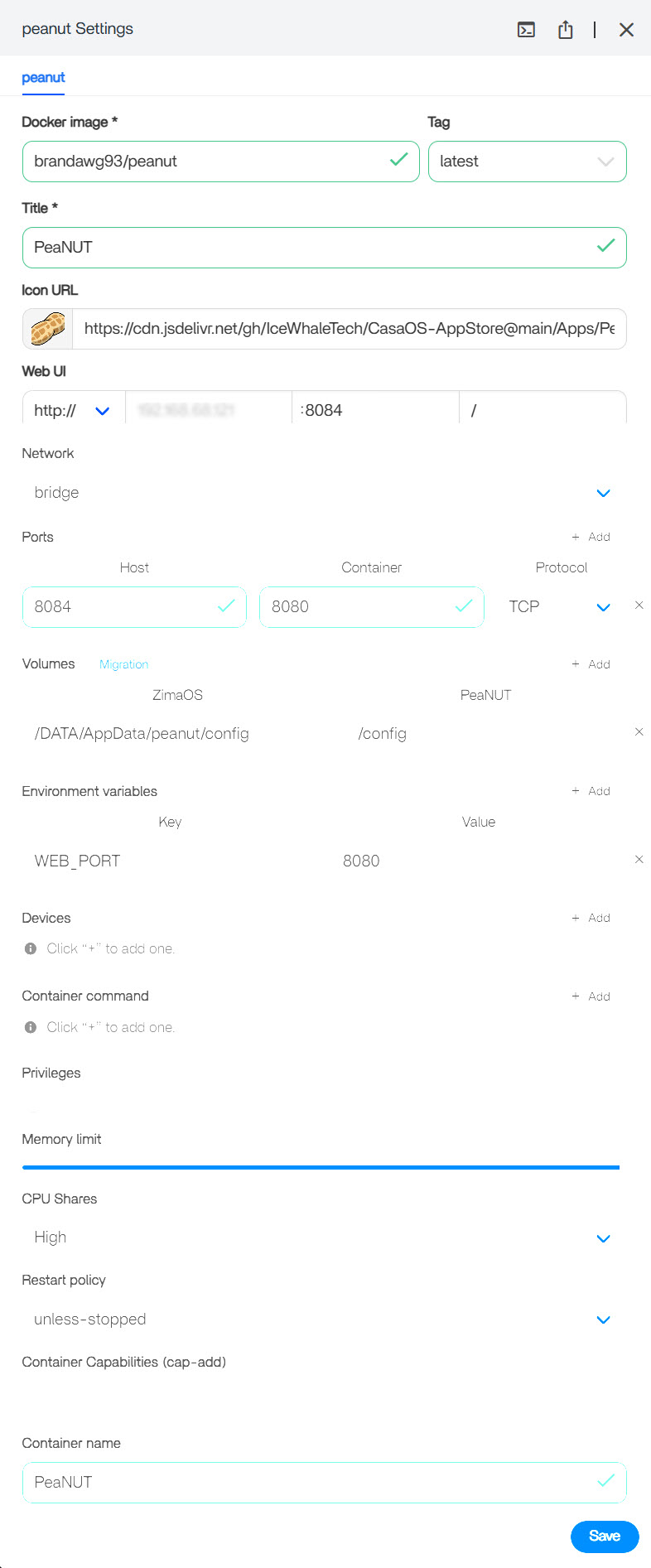
That result does not mean /app/config is the correct target for every PeaNUT image today. Container paths are part of the image contract and can change between builds.
For Current PeaNUT Builds, Persist /config
The current PeaNUT Docker documentation uses /config for persistent settings. Its current image also expects that directory to be writable by the service user, normally UID/GID 1000:1000.
In ZimaOS, map a durable host directory such as an app-data folder to /config, then restart the container and make a harmless settings change. Reboot once more and confirm the change survives. The same persistence principle is covered in the ZimaOS app-data migration guide.
Check Write Permissions Before Changing Paths Again
If the mapping is correct but settings still reset, inspect the PeaNUT logs for permission errors. Current upstream code explicitly warns when /config is not writable. Do not assume that adding unsupported PUID or PGID environment variables will fix the image; current upstream guidance instead focuses on making the host directory writable by the container's actual service user.
The upstream PeaNUT discussion forum is useful when a current image produces permission-specific errors.
Why docker exec May Fail
The original thread also showed docker exec -it PeaNUT sh failing because that PeaNUT image did not contain a shell. That is not evidence that the container is broken. Minimal images may intentionally omit sh or bash.

Start with container logs and the configured volume mapping. For broader container-persistence basics, the ZimaOS Docker app primer explains why host-mounted data survives container recreation and restarts.
Bottom Line
The old community fix was real for the PeaNUT package used in March 2026, but current PeaNUT builds document /config as the persistent directory. Use the container path documented by your installed image, make the host folder writable, and verify persistence with a reboot before changing anything else.


