
Nextcloud fits the requested central-cloud model, but SQLite is not the long-term default
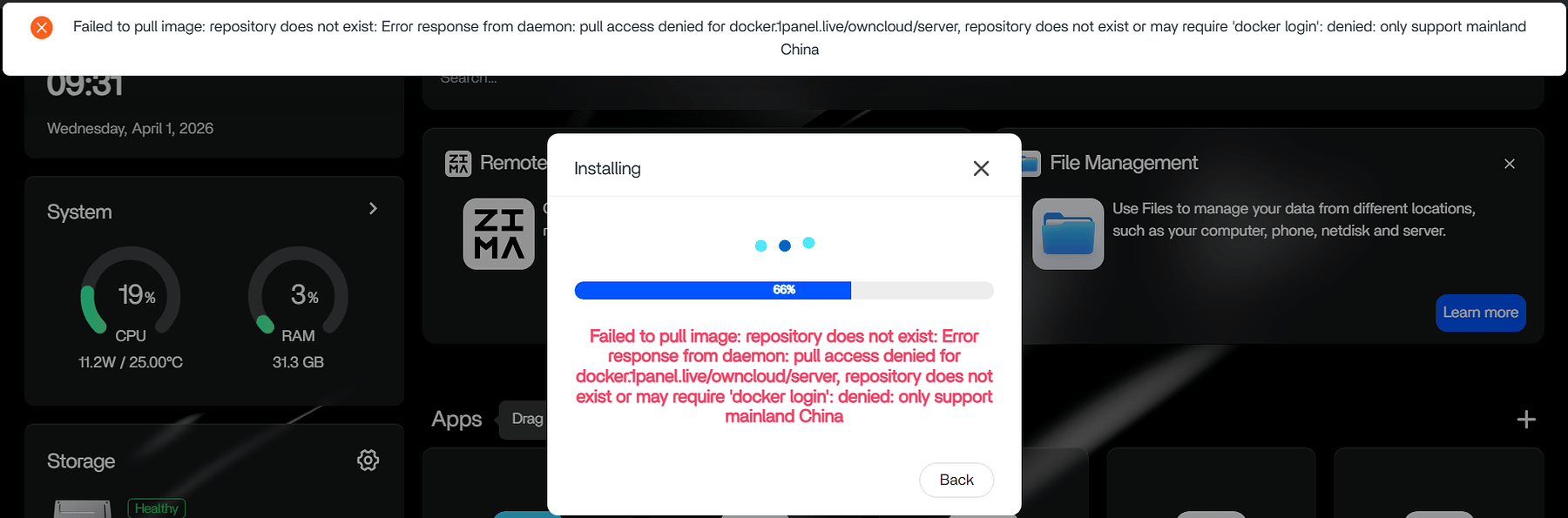
The user wants three accounts, a web interface, phone uploads, and desktop synchronization from one home server. That is a central cloud model, so Nextcloud fits the requirement more closely than Syncthing's device-to-device design. The thread confirms that a basic Nextcloud SQLite installation launched, while ownCloud failed to finish from the App Store and OpenCloud remained unresolved.
However, the thread's reassurance about SQLite goes further than Nextcloud's official guidance. The Nextcloud database-choice guidance says SQLite is for minimal or development instances and is highly discouraged when clients perform file syncing. For a long-lived three-user sync service, start with MariaDB or PostgreSQL if the package supports it; use SQLite only as a deliberate trial with a migration and backup plan.
Choose by workflow before troubleshooting an installation
Choose Nextcloud when each person needs an account, browser access, sharing, mobile uploads, and one authoritative server. Choose Syncthing when the real goal is to replicate selected folders among trusted devices without a central web-cloud experience. These are different operating models rather than interchangeable skins.
Do not conclude that OpenCloud or ownCloud is generally broken from this thread. The user did not provide the OpenCloud error, and the ownCloud screenshot shows an incomplete installation without a confirmed cause. Capture the first failing step, image version, volume mapping, and application log before changing packages.
For a beginner who needs a dependable household service, reduce moving parts: one supported app definition, one database path, one data path, one hostname, and one backup workflow. Avoid combining an AI-generated install sequence with a different GitHub Compose file unless every setting has been reconciled.
Map persistent storage before completing Nextcloud onboarding
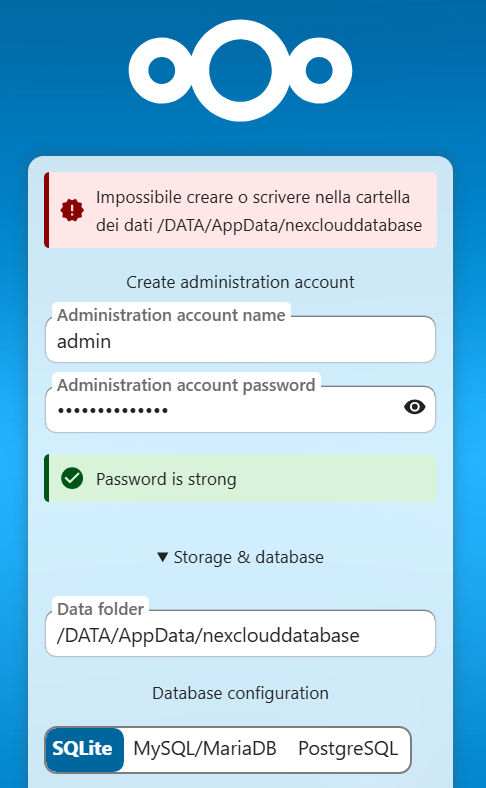
The Nextcloud welcome page accepts a path inside its container, not an arbitrary ZimaOS host path. Typing /DATA/... into that page fails when the container has no matching mount. Configure the mapping at ZimaOS Apps → Nextcloud → Settings → Volumes first.
Map a dedicated RAID folder on the host to the container's intended Nextcloud data directory, commonly /var/www/html/data for the image discussed. Then leave the welcome page's container path at that internal value. Docker redirects writes through the mount to persistent storage.
Verify ownership and free space before adding users. Create a test file, confirm it appears on the mapped host storage, restart the container, and open it again. Do not move an already populated data directory by editing only config.php; database and filesystem state must remain matched.
Use a database and backup plan that match the service lifetime
For an experiment or minimal personal instance, SQLite reduces setup work. For regular desktop synchronization by several users and additional Nextcloud apps, follow upstream guidance and configure MariaDB or PostgreSQL from the start. A database warning is not proof of imminent corruption, but it is a capacity and concurrency boundary worth respecting.
Persist both the user-data directory and the database state. A copy of uploaded files alone is not a complete Nextcloud backup because shares, users, versions, app state, and file metadata live in the database. Test restoration to a separate location before trusting the service with the only copy.
Monitor storage growth and background jobs after enabling phone uploads or apps. If SQLite is already in use, do not swap database files manually. Follow the supported Nextcloud database-conversion workflow after creating a verified backup.
Connect clients without creating a sync-engine conflict
Use the official Nextcloud desktop or mobile client against the final HTTPS hostname. When a reverse proxy terminates TLS, configure the actual proxy address under trusted_proxies and use overwrite parameters only when header detection requires them. Do not copy 127.0.0.1 unless the proxy truly connects from localhost.
The thread reports that pointing Nextcloud synchronization at an active OneDrive folder seriously disrupted OneDrive on that workstation. Two sync engines can rename, lock, deduplicate, or delete within the same tree. Do not overlap their live folders as a migration method.
For migration, pause one client, copy data into a staging folder, verify counts and hashes, then upload or move it under one authoritative sync engine. Test conflict files, renames, offline edits, and a reboot on one account before enrolling the other household users.

FAQ
Is SQLite guaranteed to corrupt a small Nextcloud instance?
No, but Nextcloud officially discourages it for client file syncing. The safer long-term choice is a supported server database plus tested backups.
Why cannot the welcome page use my /DATA folder?
The page runs inside the container. Mount the host folder to the container data path first, then enter or retain the internal path.
Can Nextcloud synchronize the same folder as OneDrive?
Do not run both engines on one live folder. The thread includes a user-confirmed failure; use a staged one-way migration instead.
The complete decision path and follow-up corrections are in the home cloud sync community thread.


