
The App Store Installation Completed, but Downloads Did Not Start
The Downtify container was installed from the official ZimaOS App Store, yet attempting to download even one song produced an endless loading wheel. That distinction matters: reinstalling the same package does not address a configuration or runtime failure that occurs after the interface has opened.
The author also noticed that the upstream project referred to account information in a configuration file. The thread never identified a confirmed ZimaOS App Store field, volume path, or environment-variable set for supplying that information.
Use one repeatable input while testing and observe whether a job enters the queue. Do not enter account credentials into an improvised file path or paste secrets into public screenshots while the package's supported configuration path remains unclear.
Privileges Worked for One User but Not for the Topic Author
Another user reported success after opening the three-dot menu on the Downtify tile, selecting Settings, and enabling the option they called Permissions. The author clarified that the interface labels the switch “Privileges.”
The same author enabled it and saw no change. That makes Privileges a useful reversible control, not a universal fix. Change only that setting, retry the same input, and then undo it if behavior is unchanged instead of leaving broad access enabled without a demonstrated need.
If enabling Privileges creates a job, restart the app and repeat the original test to confirm persistence. If the spinner remains, the source explicitly shows that this branch did not resolve every installation.
The Browser Error Was a Clue, Not a Proven Root Cause
A later participant associated a fresh installation with a Strict-Origin-When-Cross-Origin browser message. The screenshot documents what the browser exposed, but the topic does not include a controlled comparison, configuration change, or successful retest that proves cross-origin policy caused the failure.
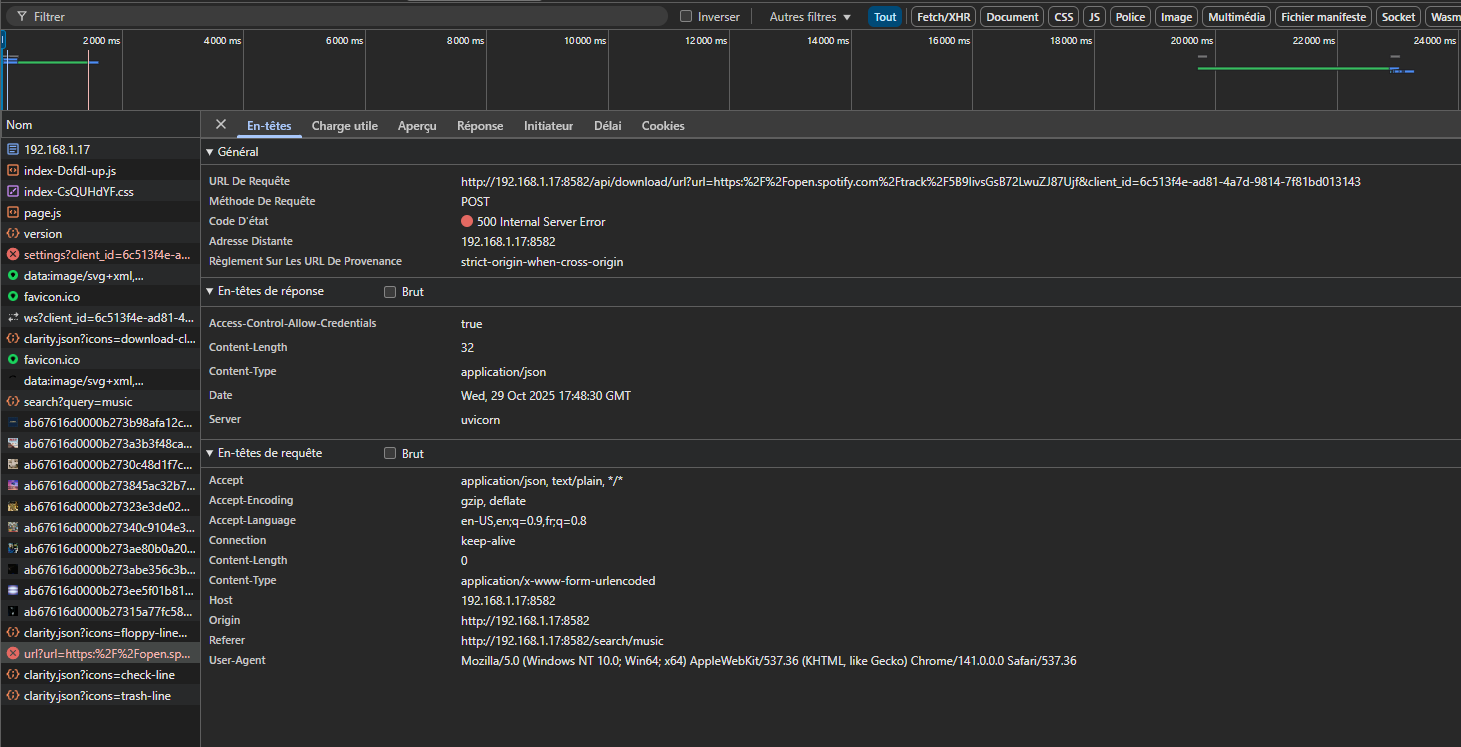
Record the exact request error, Downtify image version, ZimaOS version, input type, and whether the queue stays empty. Those details are more useful for support than naming a browser header without showing the failing request.
Because no reply connects that message to a confirmed repair, do not disable browser security controls or deploy an unverified proxy workaround based on this thread alone.
Stop at the Unresolved Boundary and Escalate with Evidence
The 2025 topic does not end with the original author confirming a working configuration. It therefore cannot support a definitive environment-variable recipe or a claim that Privileges always fixes Downtify.
A useful escalation package includes a short screen recording, the same test input, app logs, container image version, and the browser's failed request details with tokens and credentials removed. The ZimaOS team specifically requested screen recordings when the App Store package did not behave as expected.
Retest after a documented package update using the identical input. Recovery means that a job appears and progresses after an app restart; a spinner alone is not evidence that the account or browser configuration is correct.
FAQ
Should I enable Privileges for Downtify on ZimaOS?
It is a reversible test mentioned in the topic. It helped one participant but did not help the author, so keep it only when a controlled retest shows that it is required.
Which Downtify environment variables fixed the issue?
The thread does not provide or validate any environment-variable set. Adding guessed credentials or secrets would go beyond its evidence.
Did Strict-Origin-When-Cross-Origin cause the spinner?
A user suspected a connection, but no successful before-and-after test confirmed it.


