
How SjslTech Unboxes and Prepares the ZimaBlade 7700 Mini Server


Special thanks to SjslTech for documenting his first look at the ZimaBlade 7700 in My New Favourite Gadget Is Here! Unboxing the ZimaBlade 7700. He also makes the relationship behind the video clear: the device was provided free of charge for a future project, no money changed hands, this unboxing was not sponsored, and the opinions are his own.
That disclosure is important because SjslTech is visibly enthusiastic about the device before the box is open. His interest is not based on benchmark results yet. It comes from a rare hardware combination: a very small x86 server with replaceable memory, onboard storage, two native SATA connections, and an exposed PCIe slot.
Most inexpensive computers in this size and price range are either ARM development boards that require platform-specific software or sealed mini PCs with limited expansion. The ZimaBlade takes a more open approach. It is compact enough to compare with a handheld console, but its interfaces are arranged for storage, networking, virtualization, and DIY server projects.
Watch SjslTech’s complete unboxing: The video covers the cyberpunk packaging, included accessories, size comparison, x86 hardware, SATA and PCIe expansion, power requirements, and the complete installation of a 16GB DDR3L SO-DIMM.
Source note: This article reorganizes the specifications, assembly process, pricing observations, and opinions shown in SjslTech’s video. Product packages, regional prices, available models, included accessories, software compatibility, and power requirements may change after publication. Check the current product page before selecting a board, bundle, memory module, or power adapter.
The practical conclusion is that ZimaBlade 7700 is not a finished consumer NAS disguised as a small box. It is a compact starting platform for someone who wants to choose the memory, storage, operating system, and expansion path—and who is comfortable doing a small amount of assembly before the first boot.

The front of the ZimaBlade 7700 box introduces the transparent, cyberpunk-inspired server design before the hardware is revealed.
Why the ZimaBlade 7700 Immediately Appeals to SjslTech
SjslTech frequently tests inexpensive handhelds, compact computers, and unusual hardware. ZimaBlade fits that pattern because it is affordable enough to experiment with while exposing interfaces that are normally hidden inside a larger PC.
The attraction is not one specification in isolation. It is the combination of:
- Standard x86 software compatibility
- A user-accessible DDR3L SO-DIMM slot
- 32GB of onboard eMMC storage
- Two full-size SATA connections
- An exposed PCIe expansion interface
- A compact transparent enclosure
- Low-power operation suitable for always-on services
A cheap sealed mini PC may provide similar basic computing performance, but it often makes storage and PCIe expansion difficult or impossible. A conventional single-board computer may expose more maker-oriented pins, but ARM compatibility can narrow the choice of operating systems, containers, and precompiled applications.
ZimaBlade occupies the space between those categories. It is closer to a small x86 server motherboard than a closed appliance, yet it arrives in an enclosure that can sit on a desk without looking like a bare development board.
The Box Design Establishes the Cyberpunk Identity
SjslTech spends time on the packaging because it is designed as part of the product experience. The dark artwork, circuit-board graphics, symbols, and manifesto-style text frame the server as a tool for reclaiming control of personal computing rather than simply another low-cost PC.
The side of the box carries the phrase “Reclaim Your Cloud,” connecting the design to the self-hosting idea behind ZimaBlade. Instead of making a hosted cloud account the default home for files and applications, an owner can use local hardware as the foundation for storage, media, backup, or private services.
The message is deliberately dramatic, but the practical meaning is straightforward: the hardware is open enough for the owner to decide what it runs and how it grows.
What SjslTech Finds Inside the Box
Removing the lid reveals a welcome card before the server itself. The reverse side contains a QR code, while the multilingual user manual explains the initial setup and identifies the available ports.

A welcome card and multilingual setup guide sit above the ZimaBlade hardware inside the box.
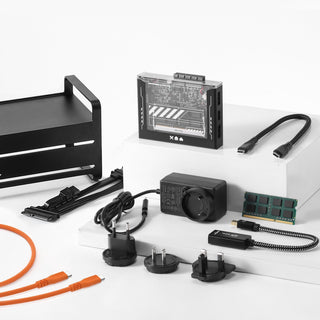
Below the main device, SjslTech finds the included connections and accessories for his package:
- A SATA data and power cable for connecting a full-size drive
- A USB-to-USB-C cable
- Two decorative stickers
- The documentation and welcome card
Package contents depend on whether the buyer chooses Board Only, the Starter Bundle, or a NAS kit. SjslTech is using a Starter Bundle that also provides a compatible 16GB DDR3L memory module and a 12V USB-C power adapter. A Board Only buyer needs to supply those essential components separately.

ZimaBlade Is Smaller Than the R36S Handheld
Once removed from the packaging, ZimaBlade is small enough for SjslTech to compare it directly with an R36S handheld. The server occupies less space in most dimensions, even though it provides desktop-class x86 architecture, replaceable memory, SATA storage connections, Ethernet, display output, USB, and PCIe expansion.

The transparent enclosure leaves the x86 board, SO-DIMM area, SATA interfaces, and PCIe expansion path visible.
The size comparison helps set the right expectation. This is not a small server because it hides expansion inside a thick chassis. It remains small because drives and many upgrades connect externally. That is useful on an open workbench, but a permanent NAS build still needs a deliberate plan for mounting drives, supporting PCIe cards, and routing cables.
SjslTech has already used similarly compact hardware in game-streaming projects. His earlier guide to streaming PC games to an R36S with ZimaBoard 2 shows how a handheld can become a client while x86 server hardware manages supporting services and network access.
Why x86 Compatibility Matters More Than the Form Factor
SjslTech identifies x86 compatibility as one of the strongest reasons to choose ZimaBlade over a typical ARM board. The difference does not mean ARM hardware is inherently unsuitable for servers. It means software selection can require more attention.
With x86 hardware, users can choose from a broad range of familiar operating environments. Depending on workload and compatibility, ZimaBlade can be used with:
- ZimaOS for browser-managed storage and Docker applications
- Proxmox VE for virtual machines and containers
- Ubuntu Server, Debian, or another compatible Linux distribution
- OpenWrt or pfSense for selected networking experiments
- Lightweight Windows installations for testing and compact desktop projects
The 32GB eMMC can provide a starting location for a lightweight operating system, but it should not automatically become the destination for every application and dataset. Containers, media indexes, virtual-machine disks, and user files can consume space quickly. SATA or PCIe-attached storage is the more deliberate path for persistent workloads.
ZimaBlade 3760 and 7700 Serve Different Workloads
SjslTech notes that ZimaBlade is offered in two processor variants while the surrounding platform remains broadly similar. The correct choice depends less on the physical size and more on how much simultaneous work the server must handle.
| Model | Best Starting Point | Workload Expectation |
|---|---|---|
| ZimaBlade 3760 | Entry-level file services, ad blocking, Home Assistant, lightweight Docker apps, and learning projects | Best when the server has a focused role and only a few modest services |
| ZimaBlade 7700 | Multitasking, media services, more Docker applications, and small DIY NAS builds | More headroom when several services or storage tasks need to operate together |
Both models use DDR3L SO-DIMM memory and support up to a single 16GB module. Because the memory is replaceable rather than soldered, a Board Only buyer can reuse a compatible module from an older laptop or select a new one for the intended workload.
Native SATA Changes What a Budget Mini Server Can Become
Two full-size SATA ports are a central part of SjslTech’s enthusiasm. Many small computers depend on USB adapters for every external drive. Native SATA makes it possible to connect HDDs or SSDs directly and build a more purposeful storage layout.
Possible arrangements include:
- One SSD for applications and one HDD for files
- Two matched drives for a mirrored storage pool
- One working drive and one separate local backup destination
- A media drive paired with storage for downloads, metadata, or databases
Two connected drives do not automatically create redundancy, and RAID is not a complete backup. The owner still needs to choose the storage layout, monitor drive health, and keep an independent recovery copy of important data.
The PCIe Slot Is the Rare Feature at This Price
SjslTech’s price comparison focuses on the exposed PCIe slot. Inexpensive mini PCs are frequently sealed plastic systems with a fixed set of interfaces. ZimaBlade instead leaves a direct expansion path accessible from the side.
Depending on electrical, driver, power, and physical compatibility, the slot can support projects involving:
- Additional Ethernet interfaces
- Wireless networking cards
- NVMe or other storage adapters
- Additional SATA controllers
- Specialized accelerators and experimental expansion cards
An exposed slot is an opportunity, not a guarantee that every desktop card will work. Larger cards may need separate power and mechanical support. Before purchasing an expansion device, users should confirm interface width, driver availability, power requirements, and operating-system compatibility.
Installing the 16GB DDR3L SO-DIMM
The unboxing becomes a short assembly guide when SjslTech installs the 16GB memory module included with his Starter Bundle.
- Carefully release the black plastic side pieces without bending the clips.
- Remove the two small Phillips-head screws beneath the side cover.
- Lift and slide the transparent top away from the PCIe side.
- Align the notch in the DDR3L SO-DIMM with the memory slot.
- Insert the module at an angle and press it down until the retaining clips lock.
- Slide the top cover back over the PCIe side and align the screw holes.
- Reinstall the screws and clip the black side pieces back into position.
The process is simple, but the enclosure clips and screws are small. A correctly sized magnetic screwdriver reduces the chance of losing a screw, and the board should be disconnected from power while memory is being installed.
The 12V USB-C Requirement Deserves Attention
ZimaBlade receives power through a USB-C connector, but the connector shape does not mean every phone charger is suitable. The board requires a compatible adapter that provides the specified 12V output.
Before using an existing USB-C power supply, check the printed output modes and confirm that the cable and adapter match the server’s requirements. A charger intended only for basic phone charging may not supply the necessary voltage. Storage-heavy builds can also create higher startup demand, particularly when mechanical hard drives begin spinning.
The safest beginner path is a bundle that includes the intended power adapter. Board Only is better for someone who already owns verified compatible memory and power hardware.
Board Only or Starter Bundle?
| Package | Choose It When | What to Check |
|---|---|---|
| Board Only | You already own a compatible DDR3L SO-DIMM and verified 12V USB-C power adapter | Memory type and capacity, adapter output, cables, and drive power |
| Starter Bundle | You want the essential memory and power components selected for the board | Which storage drives and mounting solution the project still needs |
| Dual-Bay NAS Kit | You are planning a more complete two-drive storage build | Drive capacity, redundancy, backup destination, and physical placement |
SjslTech mentions the low entry price available at the time of recording, but regional pricing, taxes, shipping, and promotions change. The better comparison is total project cost: board, memory, power, storage, drive mounting, display adapter, and any PCIe expansion required for the intended use.
What Should SjslTech Build With It Next?
This video intentionally stops after the unboxing and memory installation. It does not test application performance, storage throughput, virtualization capacity, media transcoding, or long-term thermal behavior. Those questions belong to the projects that follow.
The hardware creates several realistic next steps:
- A compact two-drive NAS for files and backups
- A Docker host for lightweight self-hosted applications
- A Plex or Jellyfin server focused on direct play
- A Home Assistant or network-service node
- A Proxmox learning server with carefully sized guests
- A retro-gaming or compact desktop experiment
SjslTech’s previous article on turning ZimaBoard 2 into a Windows 11 desktop shows the kind of unconventional x86 project that may also inspire future ZimaBlade testing.
SjslTech’s Unboxing Explains Why ZimaBlade Is Made for Experiments
The ZimaBlade 7700 earns SjslTech’s attention before it runs a single benchmark because its value is visible in the physical design. The memory can be installed by the owner, the SATA ports are exposed, the PCIe interface is accessible, and the transparent enclosure makes the platform feel more like a project than an appliance.
Those same qualities define its limitations. The buyer must choose compatible memory and power when purchasing Board Only, provide storage for meaningful workloads, support external drives and cards, and decide which operating system best fits the project.
For someone who wants a sealed NAS with no assembly, that may be unnecessary work. For someone like SjslTech—who enjoys testing inexpensive hardware and discovering how far it can be pushed—that openness is the main attraction.
Watch SjslTech’s complete ZimaBlade 7700 unboxing for the original packaging tour, size comparison, hardware overview, and memory installation. If you are planning a ZimaBlade NAS, Docker host, retro-gaming build, or another compact server experiment, join the ZimaSpace community to ask questions and share what you build.

Recommended products
Zima Campaign Hub
More to Read

Self-Hosting Day 2026: Why September 25 Belongs to the Self-Hosting Community
Discover what Self-Hosting Day 2026 is, why September 25 matters, what people self-host, and how to share your own server story.

Cybersecurity Awareness Month 2026: How Secure Is Your Digital Life at Home?
Use Cybersecurity Awareness Month 2026 to audit five layers of your digital home: identity, devices, network, data, and recovery.

How SjslTech Builds an R36S Cloud Gaming Server With ZimaOS
SjslTech compares three ways to host an R36S game library over SMB: a Windows PC, ZimaOS running on ZimaBlade, and another R36S handheld. The...


