


Features
- A compact x86 server for real self-hosting.
Built for personal cloud, homelab projects, and everyday DIY setups. - Low-power and made to stay on.
Quiet, efficient, and ready for always-on services at home. - Native SATA and PCIe, built for expansion.
Add storage and extend your setup with more flexibility as your needs grow. - Great for Docker, backups, and private services.
Run the apps and tools that matter to you, on hardware you control. - Open, customizable, and easy to build around.
ZimaBlade gives you the freedom to shape your own server your own way.
Before You Start
Q: Which model should I choose?
A: Go with 3760 for lightweight self-hosting, personal cloud, and everyday home server projects. Pick 7700 if you want more room for multitasking, expanded services, and a stronger homelab setup.
Q: What else do I need?
A: ZimaBlade is a flexible DIY server board, so RAM and power adapter are sold separately. Add DDR3L RAM up to 16GB and a 12V USB-C power adapter to complete your build.
Q: Can I get a more complete setup?
A: Yes. You can select a bundle on this page, or choose the ZimaBlade DeskBuild NAS Kit for a more complete NAS-style build.
Q: Who is ZimaBlade for?
A: ZimaBlade is made for users who want a compact, low-power x86 server for self-hosting, personal cloud, Docker apps, and hands-on projects.
Shipping & Delivery
- Orders are usually arranged within 72 hours after payment (holidays excluded)
- Delivery to most countries takes around 8–10 business days
- Questions about the product or shipment? Contact shop@icewhale.org or reach us via the online chatbox
Ways to Pay


Warranty & Support
- 2 years for deliveries within the EU
- 1 year for all other regions


Local Server, Media Streaming, Retro Gaming, DIY Nas
ZimaBlade is designed with a rich set of interfaces to empower creators with flexibility and expandability.

DIY Your Nas
Simplify NAS setup and usage. Supports users in creating personalized storage solutions.

Create Your Own Local Server
With ZimaBlade, effortlessly build a personalized local server without relying on third-party services. Whether it’s file management, data backup, or website hosting, ZimaBlade provides robust support for all your needs.
Relive the Classics with Retro Gaming
Easily set up a retro gaming console with ZimaBlade, supporting a variety of classic game emulators to let you enjoy the nostalgia of retro gaming. Compatible with various game controllers and accessories.


FAQ
What sets ZimaBlade apart from ZimaBoard? Are there differences beyond I/O?
ZimaBlade is designed to be a more compact and budget-friendly option for home labs and personal cloud setups. It focuses on accessibility while offering essential features for DIY projects. On the other hand, ZimaBoard is built for more advanced use cases, with a larger form factor, enhanced performance, and expanded interface options. Both cater to different needs within the Zima ecosystem, developed based on community feedback and user needs over the past two years.
Does ZimaBlade Come with a Power Supply?
No, ZimaBlade doesn’t come with a power adapter, but we offer bundles that include all the components you need, including the power adapter. You can easily select a bundle based on your requirements. We also provide power adapter for ZimaBlade separately, you can purchase directly.
Does ZimaBlade support NVMe storage or Wi-Fi?
ZimaBlade does not come with built-in support for NVMe storage or Wi-Fi to maintain its compact design. However, you can expand its functionality by adding external Wi-Fi dongles or using storage options via the SATA and USB interfaces.
Can ZimaBlade be used to create a home server?
Yes, ZimaBlade is specifically designed to function as a personal cloud server or home lab. It is equipped with x86 architecture, making it ideal for running services like file sharing, media playback, and even encryption. With its built-in CasaOS, it's perfect for users looking for a lightweight, flexible home server setup.
How much RAM does ZimaBlade support?
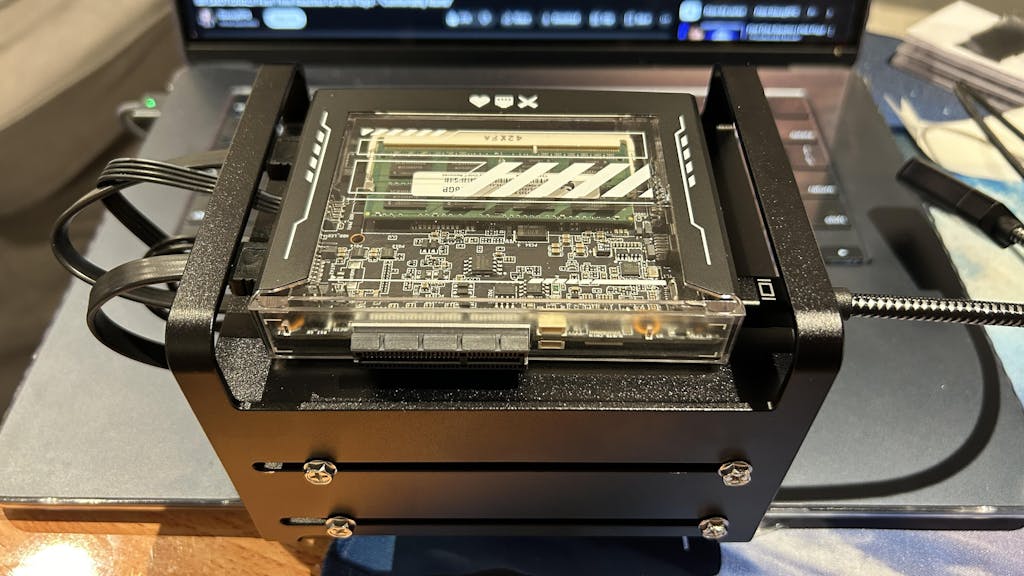
ZimaBlade does not come with pre-installed RAM. It supports up to 16GB of low-voltage (1.35V) DDR3L RAM through a single SODIMM slot.
I heard that the ZimaBlade 7700 now comes with an upgraded CPU. What's new?
Yes! Starting from late May 2025, all ZimaBlade 7700 units are shipping with an upgraded Intel® E3950 processor, replacing the previous N3450.
The new CPU has a higher base frequency, which effectively improves the responsiveness of lightweight tasks such as file operations or background services in daily use scenarios.
If you're ordering a ZimaBlade 7700 now, you're getting the upgraded version by default—no need to select anything extra.
Customer Reviews
Using the ZimaBlade to replace an OpenStack server running a few services in VMs, with a small beast to run the same services in containers. And it runs all I need beautifully. Great little solution.
The ZimaBoard and ZimaBlade are excellent devices that deliver impressive performance and flexibility for home servers and media setups. With seamless support from the vibrant IceWhale Discord community, any technical hurdles are swiftly addressed, making it a perfect choice for both beginners and advanced users. The combination of powerful hardware, customizable OS options like ZimaOS, and a highly responsive support team makes Zima products stand out in the market. Whether you're building a media server, running Docker containers, or setting up a NAS, ZimaBoard and Blade are reliable, versatile, and backed by an outstanding community.
I was a complete new guy to the world of homelabbing and "servers". I ran into a YouTube video or two after playing with raspberry pies about the zima board and zima blade so i gave the 7700 a try to build a NAS. Well now ive got a full blown proxmox server running truenas among other things. This blade is legit for small or large builds. I wish there were more sata ports. But again, if you are looking for some fun, this is it.
ZimaBlade - Single Board Server for Cyber Native
It is very useful and make a very powerful mini server which is uses many purpose like University and college students, engineering students, electronic and electronics students, B.tech engineering students and also M.tech and M.Sc students also use this mini Ness server like zima blade 7700 server thank you, thank you so much thank for making this server, so much again zima space and icewhale team.
Reviews in Other Languages
Manque juste que ZimaOS m'autorise à faire une pool de clés USB si j'en ai envie, même avec un gros avertissement comme sur TrueNAS Scale.
Il mio utilizzo è come home-server per fare backup delle mie macchine, e come download center. Trovo un po' dispersiva la gestione dei dischi e quella delle app che non sempre seguono le configurazioni dei programmi da pc. Ne ho trovata una (jdownloader) che non vuole proprio saperne di funzionare. Poi l'app "file browser", risulta inutile per me, in quanto l'app "files" di serie funziona ottimamente. Per i resto ottima la velocità e l'aggiornamento
È un prodotto molto bello ma direi che è solo per persone con ottime conoscenze di programmazione. Es: non c' è un' impostazione per attivare l'SSH né da remoto, né da locale.
Il progetto è ottimo e la qualità rispetto al prezzo è ottima durante i ribassi.
Your cart is currently empty.
Start Shopping-

 ZimaCube 2 Personal Cloud NAS (In Stock) From $799.00 USD /
 -

 ZimaBoard 2 - Hyper Performance Single Board Home Server From $279.00 USD /
 -

 ZimaBlade - Single Board Server for Cyber Native From $69.00 USD /


